

Super Backup & Restore
Download for Android This app is available for Android only.- Category:Tools
- Rating: 4.8
- Language:English
- Updated:2025-07-19
Screenshots
Introduction
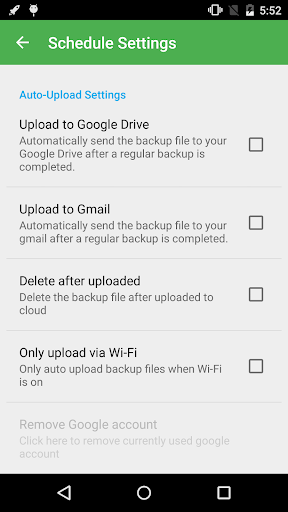
Super Backup & Restore is a backup and restore tool that lets you make a copy of various types of important data from your Android device and to restore them if necessary. Unlike some other mobile apps in its category, it lets you backup more than just your contacts. Super Backup lets you save your contacts, SMS messages, applications, bookmarks and calendar entries to an external SD card or to the cloud thanks to Google Drive or Gmail. There are many reasons why backing up the data on your Android phone is important. If your phone is lost or stolen, having a copy of all your data lets you get going as soon as you get a new device, without having to manually enter or copy data from several different sources. It can also be very handy if the data on your phone's internal storage becomes corrupted and you need to completely wipe your phone to fix the issue.
About:
Super Backup & Restore is a tool that lets you make backup copies of virtually every element of your Android device, so you will never again lose a single piece of data from your mobile phone.
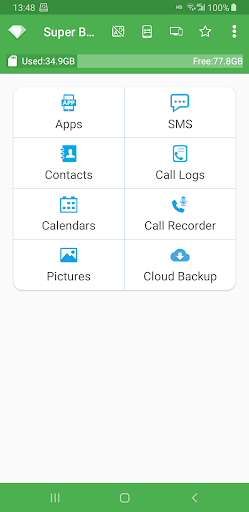
As the name suggests, Super Backup & Restore allows you to backup your contacts and text messages, but it also does much more. You can also backup your call history or even your calendar with all the dates marked on it.
Besides this, you can make backups of all your applications, and save the APK file to your Android memory or to an SD card.
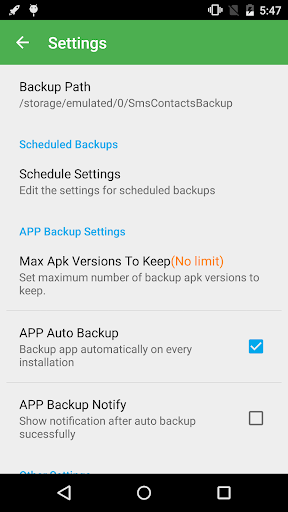
A very interesting feature of Super Backup & Restore is that which allows you to schedule your backups, so that you will always have your important files backed up, without having to think about it.
Features:
Back up everything
As mentioned above, the need to save data is indispensable for any Android user, especially those who store a lot of things on their devices. With Super Backup & Restore, users can back up important data with just a few simple steps and can easily access them anywhere.
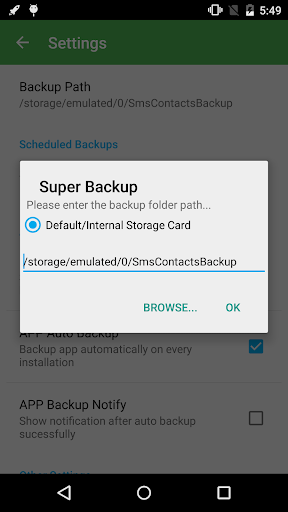
For devices with built-in memory, the default backup area can be on an internal or external memory card. Besides, users can also fully decide the backup area according to their wishes to make everything more convenient. For example, choose to back up files in device storage or move files to a cloud storage service whenever you want.
Data recovery
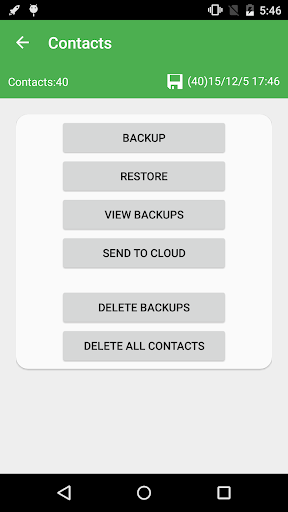
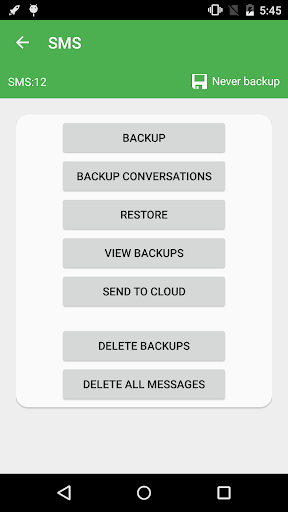
It can be seen that backup always comes with the data recovery process to give users data consistency. This app can bulk recover in-app data from SD cards, recover SMS messages, contacts, call logs, and more. The data recovery process in this application is also optimized thanks to the powerful built-in algorithms. So users will not have to wait too long to find personal data that seems to have disappeared.
Use certain permissions
To make the data backup and restore process easier, users need to provide access to the device for Super Backup & Restore. Of course, the application will not access the entire device, but only need to grant permissions in some appropriate data. Typically read text messages, read contacts, read browsing history, retrieve call logs, read audio records, etc.
All of the above access rights requests will not directly affect the user’s information. Accordingly, Super Backup & Restore will be responsible for ensuring everything is optimally secured. And this application is only used for the purpose of supporting data backup and restoration.
Simple interface with many features
Super Backup & Restore has a simple interface that comes with a lot of powerful features. Thanks to that, users can use any feature by clicking on it easily. If you are a new user, please check out some of the app’s features right below:
Backup: This feature allows users to read all the messages on the phone and back them up to XML format.Restore: The Restore button on the screen reads XML files and creates new SMS messages.View: Click the View button to view the messages in the backup file.Search: Search for important data in the backup file.Delete Backups: Used to delete old backup files that are not needed to save memory space.Delete Message: Delete all messages on the device with a single tap.
Conclusion:
Using the steps provided, you can easily create a backup of all apps on your phone by transferring them to the SD card. Furthermore, you can freely share files with your friends, most simply and conveniently possible, which is especially useful given that this application will provide a very high level of protection for your data. Not only that, but it also provides users with a language selection to choose from while using the application. This allows users to easily comprehend all of the content provided by the application in their native language. This application supports many worldwide translations, including Korean, Russian, Italian, and other languages. You can inform those in your immediate vicinity about the unique benefits you’ve discovered in this location.
More Information
- Size:20.20MB
- Version:2.4.03
- Requirements:Android
- Votes:171
Related topics
-
Welcome to our App Store! Explore a handpicked collection of top apps for productivity, entertainment, and more. Find easy-to-use tools, popular games, and innovative utilities-all chosen for quality. Download your new favorites easily and discover new ways to simplify your digital life today!
-
![TutuApp]()
TutuApp
-
![BlackMarket APK]()
BlackMarket APK
-
![Oppo App Market]()
Oppo App Market
-
![W7ghost]()
W7ghost
-
![AAStore]()
AAStore
-
![APK Cort]()
APK Cort
-
![HappyMod]()
HappyMod
-
![MPL]()
MPL
-
-
Utility apps are indispensable in our lives, making our daily routines more convenient. To help you find these apps more easily, this site has created a collection. This collection brings together a series of practical tools covering various aspects of life, work, and education, meeting all your needs. What are you waiting for? Try these apps now and make your life easier!
-
![NES.emu]()
NES.emu
-
![Screen Mirroring]()
Screen Mirroring
-
![MEye]()
MEye
-
![MiXplorer Silver File Manager]()
MiXplorer Silver File Manager
-
![HideX]()
HideX
-
![Parrot Downloader]()
Parrot Downloader
-
![RemakeFace]()
RemakeFace
-
![Avast Antivirus]()
Avast Antivirus
-
-
Transform your mobile device into a powerhouse of efficiency with these handpicked essential tools. Whether you need professional-grade photo editing, seamless file organization, smart task management, or real-time weather updates, our curated selection of premium apps delivers unbeatable performance. Streamline your daily routine, automate repetitive tasks, and boost your productivity with intuitive interfaces and powerful features. Designed for both professionals and casual users, these editor-approved applications will revolutionize how you work and play. Don't settle for an ordinary phone - upgrade your digital experience today and unlock your device's full potential!
-
![NES.emu]()
NES.emu
-
![Screen Mirroring]()
Screen Mirroring
-
![MEye]()
MEye
-
![MiXplorer Silver File Manager]()
MiXplorer Silver File Manager
-
![HideX]()
HideX
-
![Parrot Downloader]()
Parrot Downloader
-
![RemakeFace]()
RemakeFace
-
![Alarmy]()
Alarmy
-

















Latest Updated



Popular Apps








Popular News
More+-
![Tomie Wants to Get Married Full Walkthrough, All Choices and Ending Guide]()
Tomie Wants to Get Married Full Walkthrough, All Choices and Ending Guide
2026-05-22
-
![Karryn’s Prison Gameplay Walkthrough & Strategy Guide]()
Karryn’s Prison Gameplay Walkthrough & Strategy Guide
2025-10-28
-
![Life in Santa County Game Guide & Complete Walkthrough]()
Life in Santa County Game Guide & Complete Walkthrough
2025-10-28
-
![Dreams of Desire Complete Walkthrough and Game Guide]()
Dreams of Desire Complete Walkthrough and Game Guide
2025-10-28
-
![Era Hunter Gameplay Guide & Full Walkthrough]()
Era Hunter Gameplay Guide & Full Walkthrough
2025-10-28




