

NES.emu
Download for Android This app is available for Android only.- Category:Tools
- Rating: 4.8
- Language:English
- Updated:2026-08-26
Screenshots
Introduction
NES.emu is an emulator tool that supports parsing ZIP and other file formats, quickly decompressing game packages, and emulating a disk system. If the games require a BIOS boot option, this software can help you achieve that. It's currently available on Android devices and offers low audio/video latency, recreating authentic NES games. It also features touch and light gun input/output, allowing direct on-screen operation via touch and light gun. It supports Bluetooth or USB gamepad controls. It's a very powerful tool with button mapping capabilities and a simple interface, allowing users to quickly familiarize themselves with its functions.
Features
NES and Famicom file support
NES.emu (NES Emulator supports common NES ROM formats such as .nes and .unf, so users with existing game files can load them directly in the app. It also opens compressed ZIP, RAR, and 7Z files, which helps keep a game library organized without extracting every file first. As a result, you can manage more files from one folder and spend less time moving data around.
Famicom Disk System support
NES.emu (NES Emulator includes Famicom Disk System emulation through .fds files. If a game needs a BIOS file, you can select it from the app options before running the disk file. This makes the app useful for users who keep Famicom Disk System titles as part of a preservation focused collection.
Low audio and video delay
NES.emu (NES Emulator focuses on low audio and video latency for classic NES gameplay on many Android devices. This matters because older action games often depend on fast button response and stable timing. While performance can vary by device and settings, the app is designed to keep input and screen response close enough for normal play.
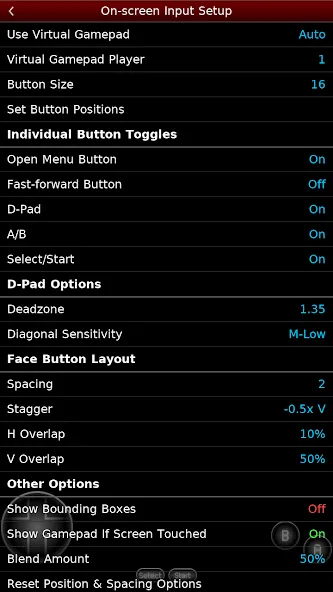
Touch controls and Zapper input
You can use configurable on screen controls when playing without a separate controller. The layout can be adjusted for mobile play, which helps when different games need different button positions. For supported games, touch based Zapper and Gun input is also available, so you can interact with those titles directly on the screen.
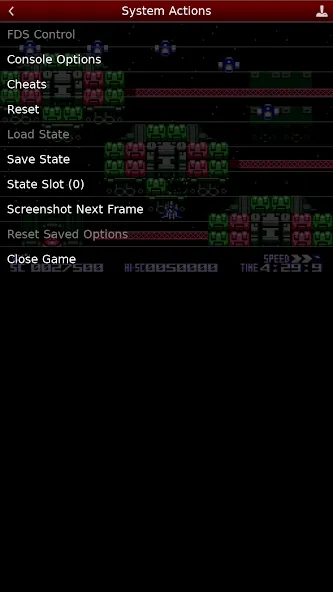
Controller and cheat file options
NES.emu (NES Emulator supports Bluetooth and USB gamepads, keyboards, and HID controllers, including Xbox and PS4 controllers. This gives users a more console like control setup when touch buttons are not comfortable. In addition, the app can use FCEU compatible .cht cheat files and includes editing options for users who want to adjust cheat entries for their own gameplay.
How to Use
Open NES.emu (NES Emulator and use the file browser to find the folder where your NES or Famicom files are stored.
Select a supported file, such as .nes, .unf, .fds, ZIP, RAR, or 7Z, then let the emulator load the game.
If you use Famicom Disk System files, go to the options and choose the required BIOS file before starting the related game.
Adjust the on screen controls if you play by touch, or connect a Bluetooth or USB controller and map the buttons as needed.
If you use cheat files, place FCEU compatible .cht files with your game files, then open the cheat options to review or edit entries.
User comments
The only NES.emu you'll need and love! I switched over to this after John NES stopped being updated and crapped the bed. Now I'm gonna do the same with the Gameboy and SNES ones! This is hands down the best emulator experience I've had. Controller mapping and utilization is a dream, love the rewind feature you can map as opposed to a button on the screen. No issues with setting up folders or running anything. Absolute joy to use and worth the fiver!
Absolutely amazing. I got those little joy-con things you can put on the sides of your phone to use, but I didn't have any games to use it with, then I got this app. It may cost money, but trust me and ALL the positive reviews, it's worth it! (I recommend a controller, but it's good for mobile, too)!
Really well put together and runs extremely well. I actually ran a test rom on it and it passed the vast majority of tests. The only ones it failed were for stuff like niche edge cases and accurate frame timing (compared to original hardware) so if you're not speedruning and just playing one of your old favorites, it's absolutely perfect.
Summarize
In conclusion, NES.emu Free represents a perfect blend of nostalgia and modern convenience for playing beloved NES titles. It provides robust support for an expansive gaming library, ensuring that new generations can appreciate the gems of the past without any barriers. The emulator's dedication to authenticity and accessibility make it a standout choice for enthusiasts and casual gamers alike.
More Information
- Size:2.75MB
- Version:1.5.73
- Requirements:Android
- Votes:303
- Package Name:com.explusalpha.NesEmu
- Signature:c4379fd0f6de1f7ab808af958ee79f90
Related Versions


Related topics
-
Welcome to our collection of game customization tools! These apps help you personalize your gameplay. You can access premium content, enjoy more in-game resources, or opt for an ad-free experience. Apps like Game Guardian and Lucky Patcher allow you to adjust game parameters. Just a heads-up, it's good to be mindful of the game's original terms of service. Feel free to explore and elevate your play, but always use them responsibly.
-
![NES.emu]()
NES.emu
-
![Kerala Bus Mod Livery]()
Kerala Bus Mod Livery
-
![UU Game Booster]()
UU Game Booster
-
![Citra Emulator]()
Citra Emulator
-
![Mods AddOns for Minecraft PE]()
Mods AddOns for Minecraft PE
-
![Headshot GFX Tool]()
Headshot GFX Tool
-
![MOD Bus Simulator Indonesia]()
MOD Bus Simulator Indonesia
-
![RTX Shaders for MCPE]()
RTX Shaders for MCPE
-
-
Meet Game BOX — your all-in-one game hub! Explore action, RPG, strategy, and more. Find games quickly, download fast, and play seamlessly on mobile. Simple, safe, and packed with top-rated titles. Perfect for gamers everywhere.
-
![NES.emu]()
NES.emu
-
![Kerala Bus Mod Livery]()
Kerala Bus Mod Livery
-
![Gacha Neon]()
Gacha Neon
-
![Gdps Editor]()
Gdps Editor
-
![Citra Emulator]()
Citra Emulator
-
![Headshot GFX Tool]()
Headshot GFX Tool
-
![Ppsspp Game Files]()
Ppsspp Game Files
-
![Zolaxis Patcher Mobile]()
Zolaxis Patcher Mobile
-
-
Utility apps are indispensable in our lives, making our daily routines more convenient. To help you find these apps more easily, this site has created a collection. This collection brings together a series of practical tools covering various aspects of life, work, and education, meeting all your needs. What are you waiting for? Try these apps now and make your life easier!
-
![NES.emu]()
NES.emu
-
![Screen Mirroring]()
Screen Mirroring
-
![MEye]()
MEye
-
![MiXplorer Silver File Manager]()
MiXplorer Silver File Manager
-
![HideX]()
HideX
-
![Parrot Downloader]()
Parrot Downloader
-
![RemakeFace]()
RemakeFace
-
![Avast Antivirus]()
Avast Antivirus
-
















Latest Updated



Popular Apps








Popular News
More+-
![Tomie Wants to Get Married Full Walkthrough, All Choices and Ending Guide]()
Tomie Wants to Get Married Full Walkthrough, All Choices and Ending Guide
2026-05-22
-
![Karryn’s Prison Gameplay Walkthrough & Strategy Guide]()
Karryn’s Prison Gameplay Walkthrough & Strategy Guide
2025-10-28
-
![Life in Santa County Game Guide & Complete Walkthrough]()
Life in Santa County Game Guide & Complete Walkthrough
2025-10-28
-
![Dreams of Desire Complete Walkthrough and Game Guide]()
Dreams of Desire Complete Walkthrough and Game Guide
2025-10-28
-
![Era Hunter Gameplay Guide & Full Walkthrough]()
Era Hunter Gameplay Guide & Full Walkthrough
2025-10-28




