

Slime Chunk Finder apk
Download for Android This app is available for Android only.- Category:Tools
- Rating: 4.5
- Language:English
- Updated:2025-09-09
Screenshots
Introduction
Slime Chunk Finder is a fantastic Minecraftia tool that helps you quickly find slimes in the game. Using the same algorithm as Minecraftia, it eliminates the need for players to wander around aimlessly searching for hours in vain. Download Slime Chunk Finder and discover this new slime detector!
Brief Introduction:
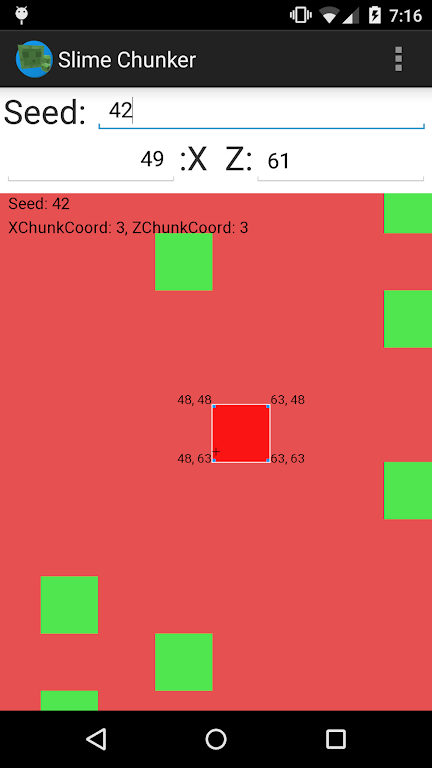
Tired of tirelessly searching for slimes in the vast world of Minecraftia? Frustrated by your lack of luck in finding this valuable resource? Well, it's time to take control of your game with the Slime Chunk Finder app! Using the same algorithm as Minecraft, this app determines which chunks are perfect for slimes to spawn in. Simply load up your Minecraft world, obtain your seed, enter it into the app, and watch as it shows you a visual representation of your world with green squares indicating slime-friendly chunks. Whether you're building a slime farm or just want a pet slime, this app has got you covered. No more hours wasted, no more disappointment - it's time for success!
Features of Slime Chunk Finder:
Slime Chunk Finder: This app helps you locate slime chunks in your Minecraft world, saving you hours of fruitless searching.
Utilizes Minecraft Algorithm: The app uses the same algorithm as Minecraft to identify viable chunks for slime spawning, ensuring accuracy.
Works on Various Platforms: Whether you play Minecraft on Xbox, Playstation, or PC, this app is compatible with most versions.
Easy to Use: Simply input your Minecraft world's seed number and your coordinates, and the app will display a visual representation of slime-friendly chunks.
Zoom Functionality: Zoom in and out with two fingers to explore and analyze the chunks in detail, making it easy to find the perfect spot for slime farming.
Step-by-Step Instructions: The app provides clear instructions on how to use it effectively, guiding you through the process of locating slimes and creating your own slime farm.
What it does:
Simply, it shows you where to find Slimes in the game 'Minecraft' (http://minecraft.net/).
How it works:
It uses the same algorithm as Minecraft to determine which chunks are viable for slimes to spawn in. Then it just displays that information in a meaningful way.
This should work for Xbox, Playstation and most PC versions.
How to use it:
Firstly,load up your Minecraft world.
Next, press 'T' on your keyboard, and type in '/seed' (don't include the quotation marks). If done correctly, and you've enabled cheats in your world, it should spit out a big long number. Yay!
Now ,open up the app, and type the big long number (your seed) into the top text field (next to 'Seed:', funnily enough).
Watch the magic happen, as the display shifts and morphs, until it eventually settles showing a green and red representation of your world.
One last step. In your Minecraft world, press 'F3' on your keyboard. And look for two numbers: Your X coordinate, and your Z coordinate. Enter these two numbers into the respective X and Z number fields. (Just round them to the nearest whole number)
And BAM.
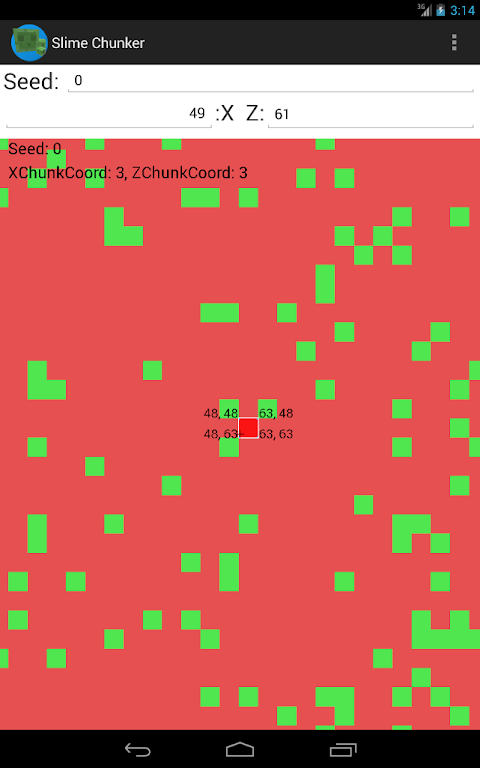
The view is currently centred on your position in Minecraft.
Zoom in and out with two fingers to view more and less of the world.
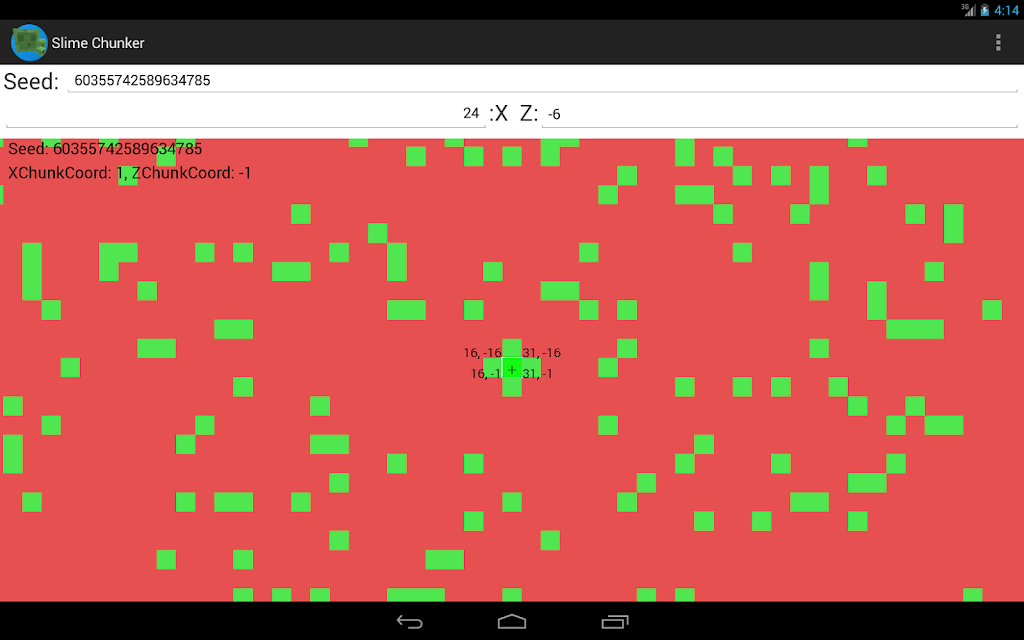
Green squares represent chunks where Slimes can spawn.
Red squares represent chunks where Slimes can't spawn (unless if it's a swamp Biome)
If you're building a slime farm, just look for a big cluster of green squares nearby.
If you just want to find a slime to make it your pet, then just find your closest green chunk.
When centred on the chunk you wish to use. Zoom in.
The blue squares/blocks in the corners have their coordinates labelled.
In your actual Minecraft game, use the labelled corners to map out the size of the chunk. Then dig down to level 40 (as Slimes only spawn below level 40, when your Y coordinate is less than 40) and dig out a big room within the confines of the square you marked out.
Move away, wait a few moments, and check back to see if Slimes have spawned.
Eventually they should. And hoorah! If they have, congratulations.
If not, double check your seed, ensure you're below level 40. Ensure you're within the green square, and that there is enough room for them to spawn.
 Conclusion:
Say goodbye to frustrating hours of searching for slimes in Minecraft with the Slime Chunk Finder app. This user-friendly and accurate tool uses Minecraft's algorithm to pinpoint slime-friendly chunks in your world. Whether you're a beginner or an experienced player, this app will make your gaming experience more enjoyable. With its easy-to-use interface, zoom functionality, and step-by-step instructions, finding slimes and creating a slime farm has never been easier. Don't waste any more time, download the Slime Chunk Finder app now and take control of your Minecraft adventure!
More Information
- Size:0.10MB
- Version:1.3.1
- Requirements:Android
- Votes:79
Related topics
-
Utility apps are indispensable in our lives, making our daily routines more convenient. To help you find these apps more easily, this site has created a collection. This collection brings together a series of practical tools covering various aspects of life, work, and education, meeting all your needs. What are you waiting for? Try these apps now and make your life easier!
-
![NES.emu]()
NES.emu
-
![Screen Mirroring]()
Screen Mirroring
-
![MEye]()
MEye
-
![MiXplorer Silver File Manager]()
MiXplorer Silver File Manager
-
![HideX]()
HideX
-
![Parrot Downloader]()
Parrot Downloader
-
![RemakeFace]()
RemakeFace
-
![Avast Antivirus]()
Avast Antivirus
-
-
Transform your mobile device into a powerhouse of efficiency with these handpicked essential tools. Whether you need professional-grade photo editing, seamless file organization, smart task management, or real-time weather updates, our curated selection of premium apps delivers unbeatable performance. Streamline your daily routine, automate repetitive tasks, and boost your productivity with intuitive interfaces and powerful features. Designed for both professionals and casual users, these editor-approved applications will revolutionize how you work and play. Don't settle for an ordinary phone - upgrade your digital experience today and unlock your device's full potential!
-
![NES.emu]()
NES.emu
-
![Screen Mirroring]()
Screen Mirroring
-
![MEye]()
MEye
-
![MiXplorer Silver File Manager]()
MiXplorer Silver File Manager
-
![HideX]()
HideX
-
![Parrot Downloader]()
Parrot Downloader
-
![RemakeFace]()
RemakeFace
-
![Alarmy]()
Alarmy
-
-
With the development of mobile hardware and software, many practical tool software have emerged, covering a wide range of aspects and becoming a good helper for everyone in work and life. Today, the editor provides you with a list of useful tool software downloads. These tools are not particularly complex types, and after reading them, everyone can quickly learn how to use them. Proper use can bring great convenience to life and work.
-
![Screen Mirroring]()
Screen Mirroring
-
![MEye]()
MEye
-
![MiXplorer Silver File Manager]()
MiXplorer Silver File Manager
-
![HideX]()
HideX
-
![Parrot Downloader]()
Parrot Downloader
-
![RemakeFace]()
RemakeFace
-
![Alarmy]()
Alarmy
-
![Multi Parallel]()
Multi Parallel
-










Latest Updated


Popular Apps








Popular News
More+-
![Tomie Wants to Get Married Full Walkthrough, All Choices and Ending Guide]()
Tomie Wants to Get Married Full Walkthrough, All Choices and Ending Guide
2026-05-22
-
![Karryn’s Prison Gameplay Walkthrough & Strategy Guide]()
Karryn’s Prison Gameplay Walkthrough & Strategy Guide
2025-10-28
-
![Life in Santa County Game Guide & Complete Walkthrough]()
Life in Santa County Game Guide & Complete Walkthrough
2025-10-28
-
![Dreams of Desire Complete Walkthrough and Game Guide]()
Dreams of Desire Complete Walkthrough and Game Guide
2025-10-28
-
![Era Hunter Gameplay Guide & Full Walkthrough]()
Era Hunter Gameplay Guide & Full Walkthrough
2025-10-28




