

Splitwise
Download for Android This app is available for Android only.- Category:Finance
- Rating: 4.7
- Language:English
- Updated:2026-07-13
Screenshots
Introduction
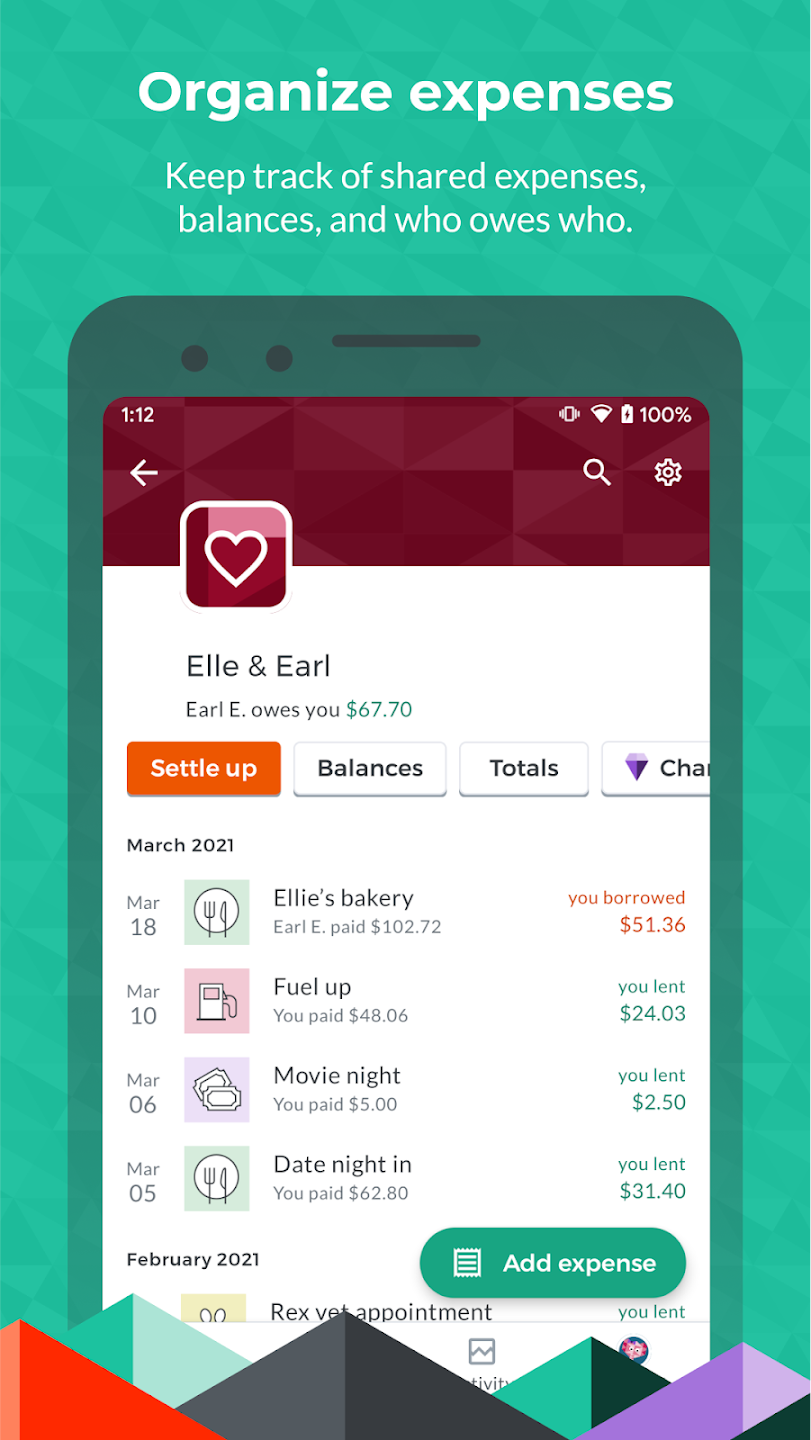
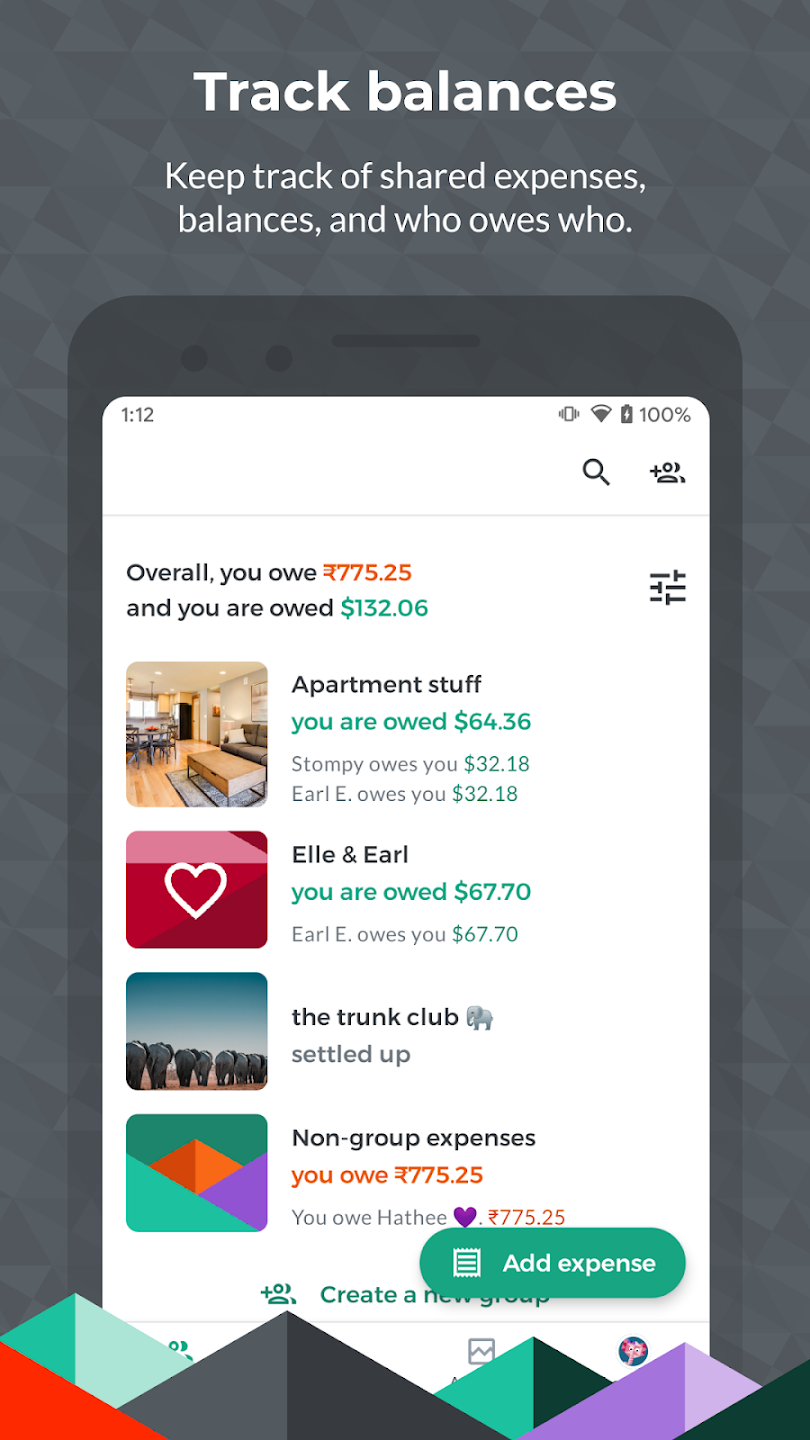
Splitwise is a user-friendly financial services software that allows users to manage their expenses and bills. The software tracks and backs up all user expenditures in real time, and users can view monthly or even yearly bills at any time, meeting various user needs. It offers diverse timers to help users calculate rent, travel expenses, and scan receipts, helping them accurately calculate their payments in different scenarios. The software also boasts a dedicated online support team, ensuring users can get timely responses to any questions, providing peace of mind when using the app.
Features of Splitwise:
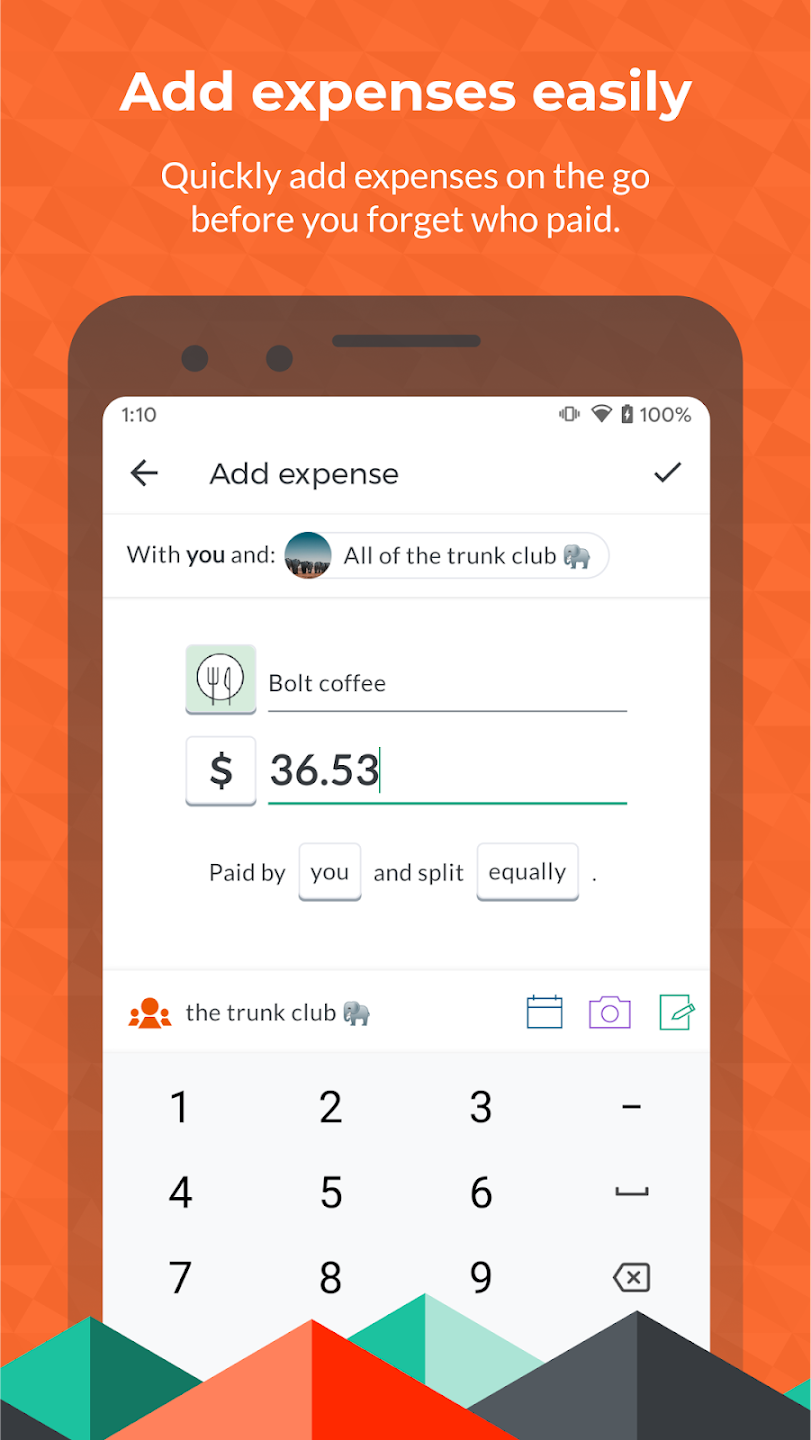
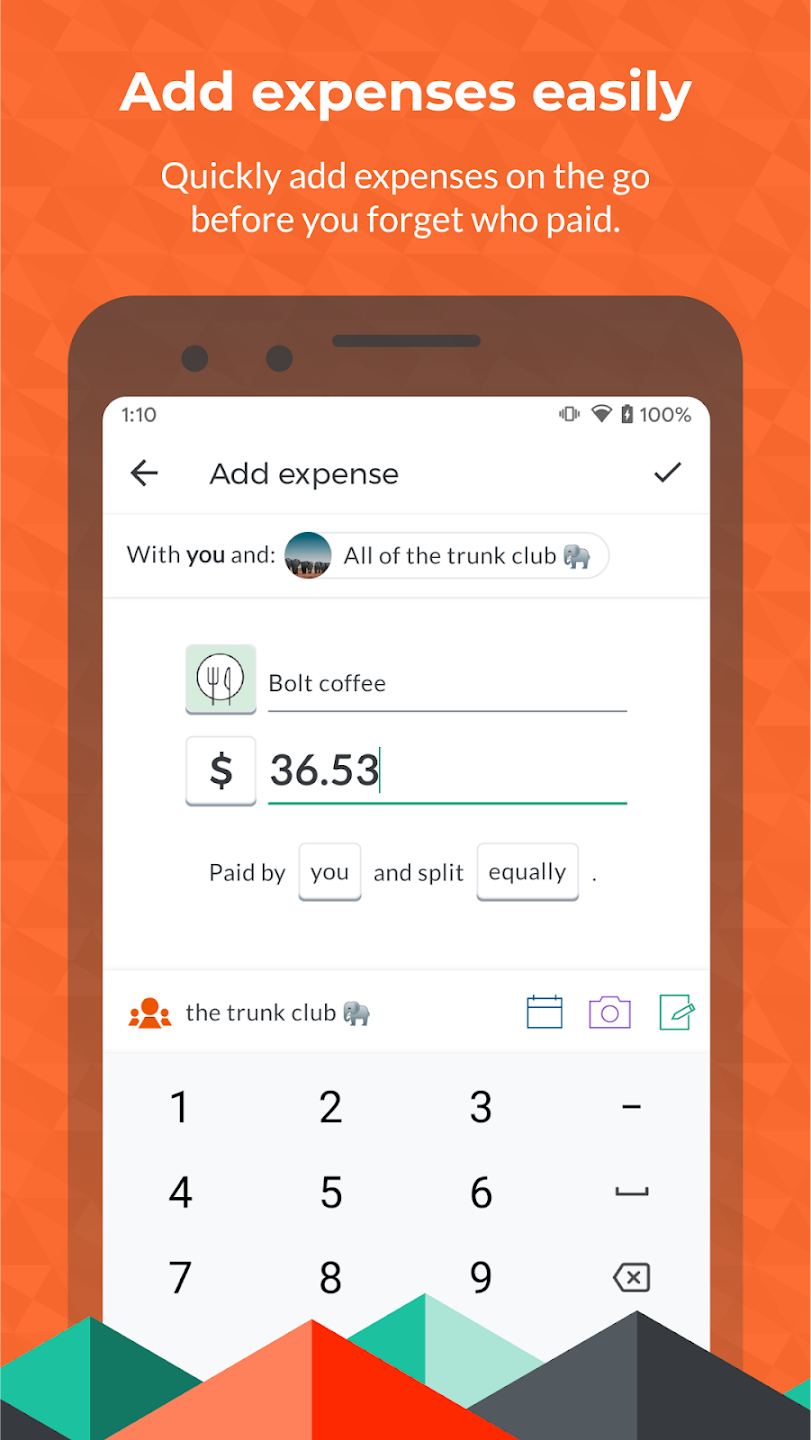
Imagine you’ve just had dinner with friends. Instead of the awkward “who owes what” conversation, you simply open the app, add the total bill amount, and select who paid. The app does all the math for you, dividing the total amongst your group. What’s really cool is that it supports multiple currencies, perfect for international trips. And the best part? You can send reminders to your friends if they ‘forget’ to settle up.
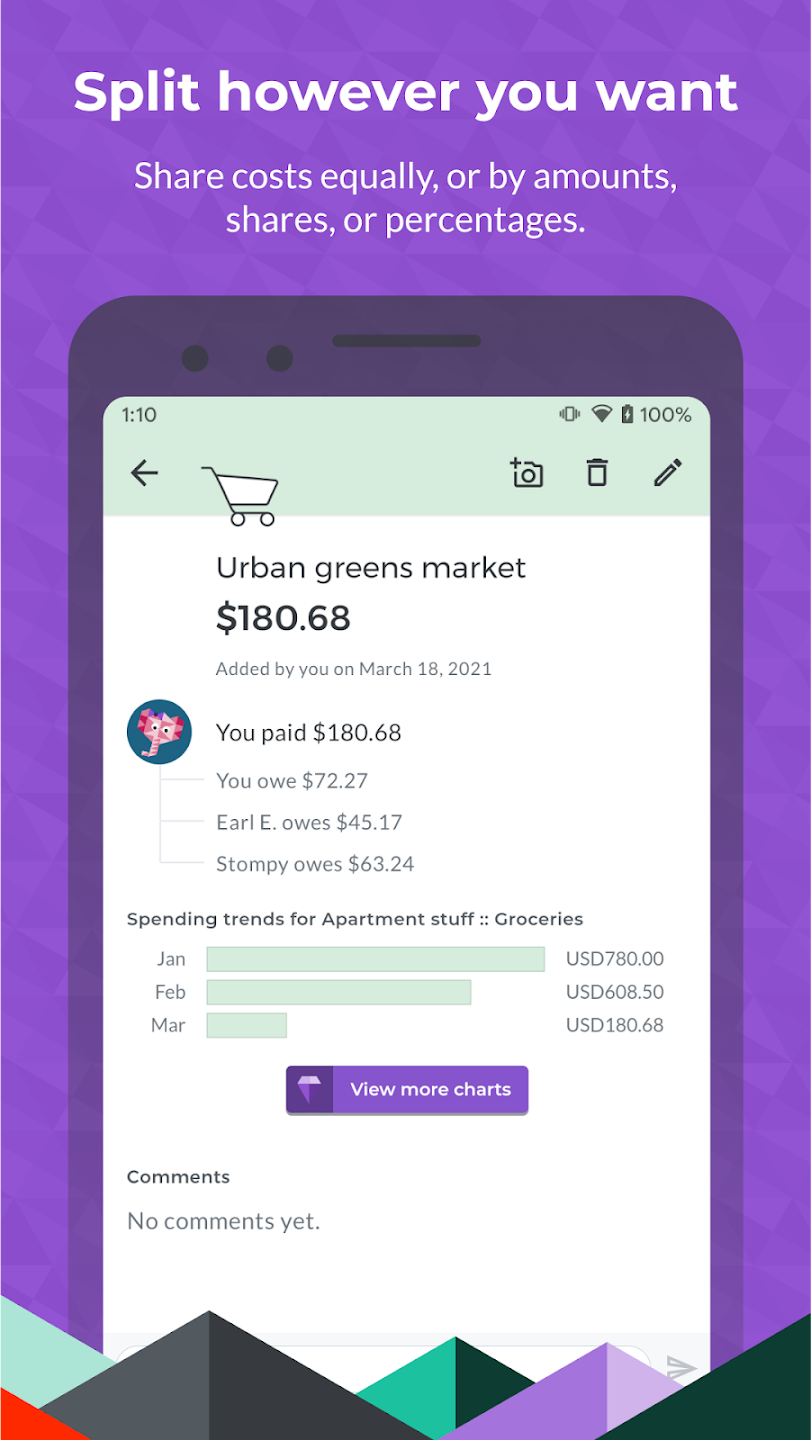
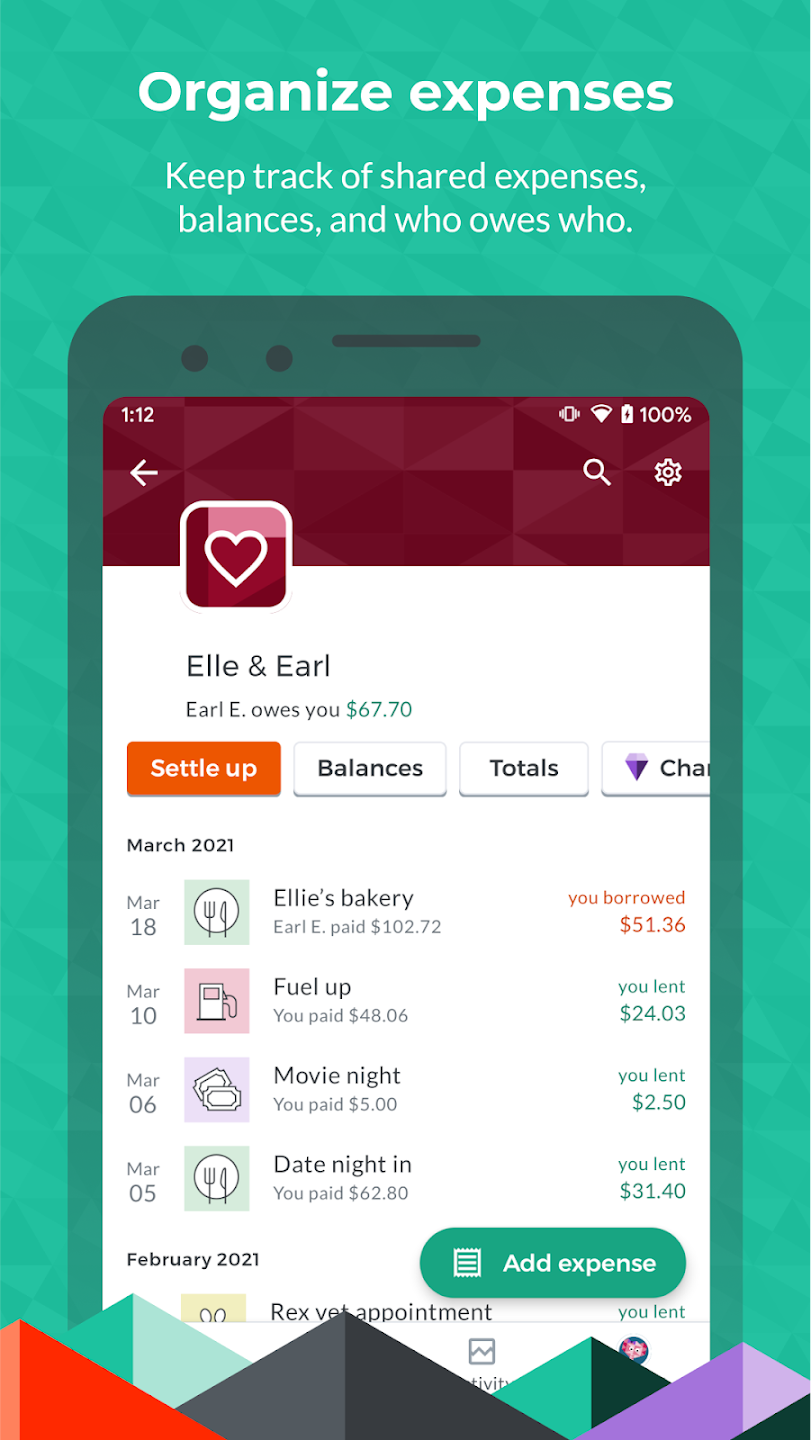
Splitwise also lets you categorize expenses, which is super handy. Whether it’s groceries, rent, or utilities, you can keep track of exactly where your money is going. It also provides a neat balance sheet for each group, so you can see who owes what at a glance. Trust me, it’s a game-changer for group finances.
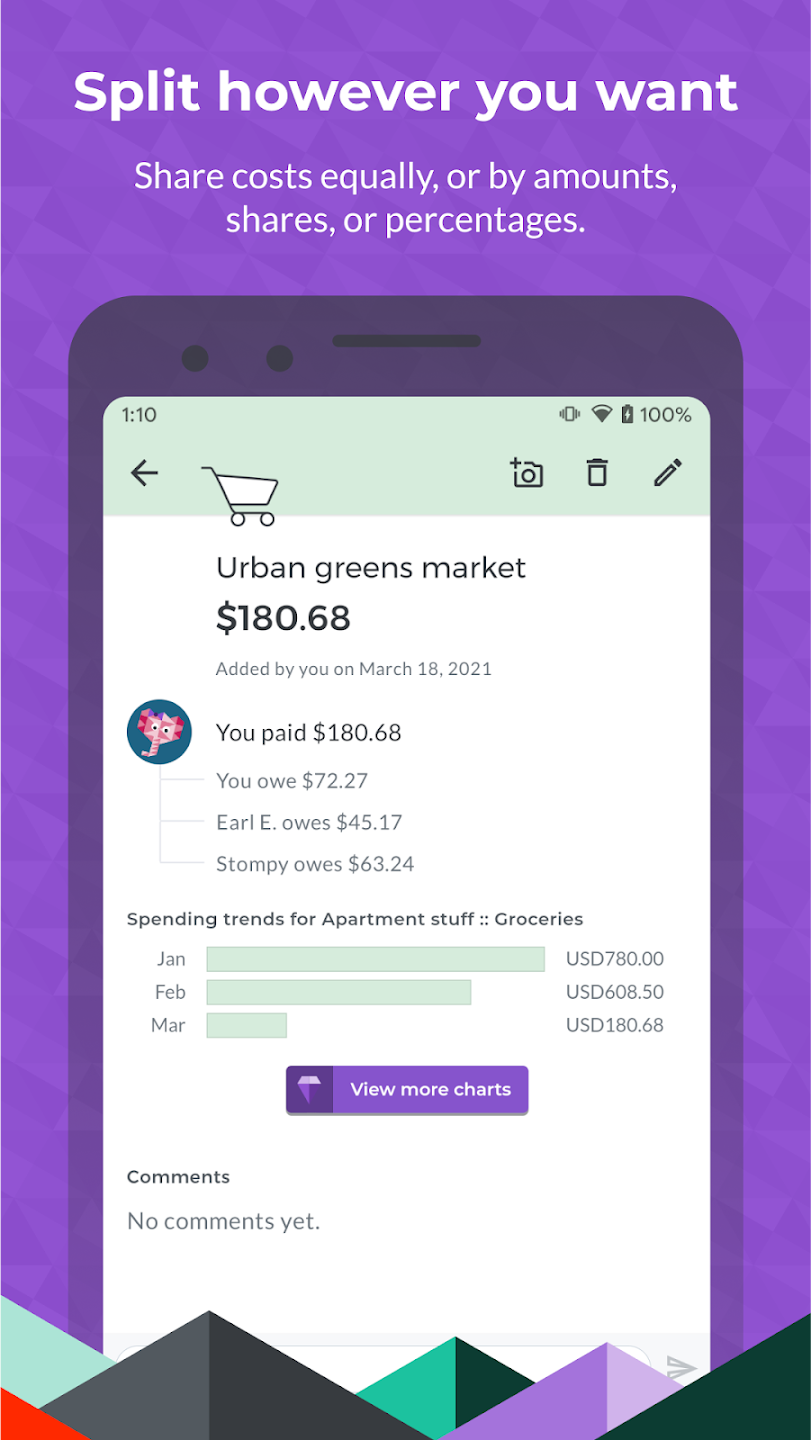
One of the features I love is the ability to split bills unequally. Let’s say someone ordered an extra dish or drinks, you can adjust the amounts accordingly. This ensures that everyone pays their fair share, and no one feels shortchanged. Plus, with the option to attach photos of receipts, you can always double-check the details of any transaction.
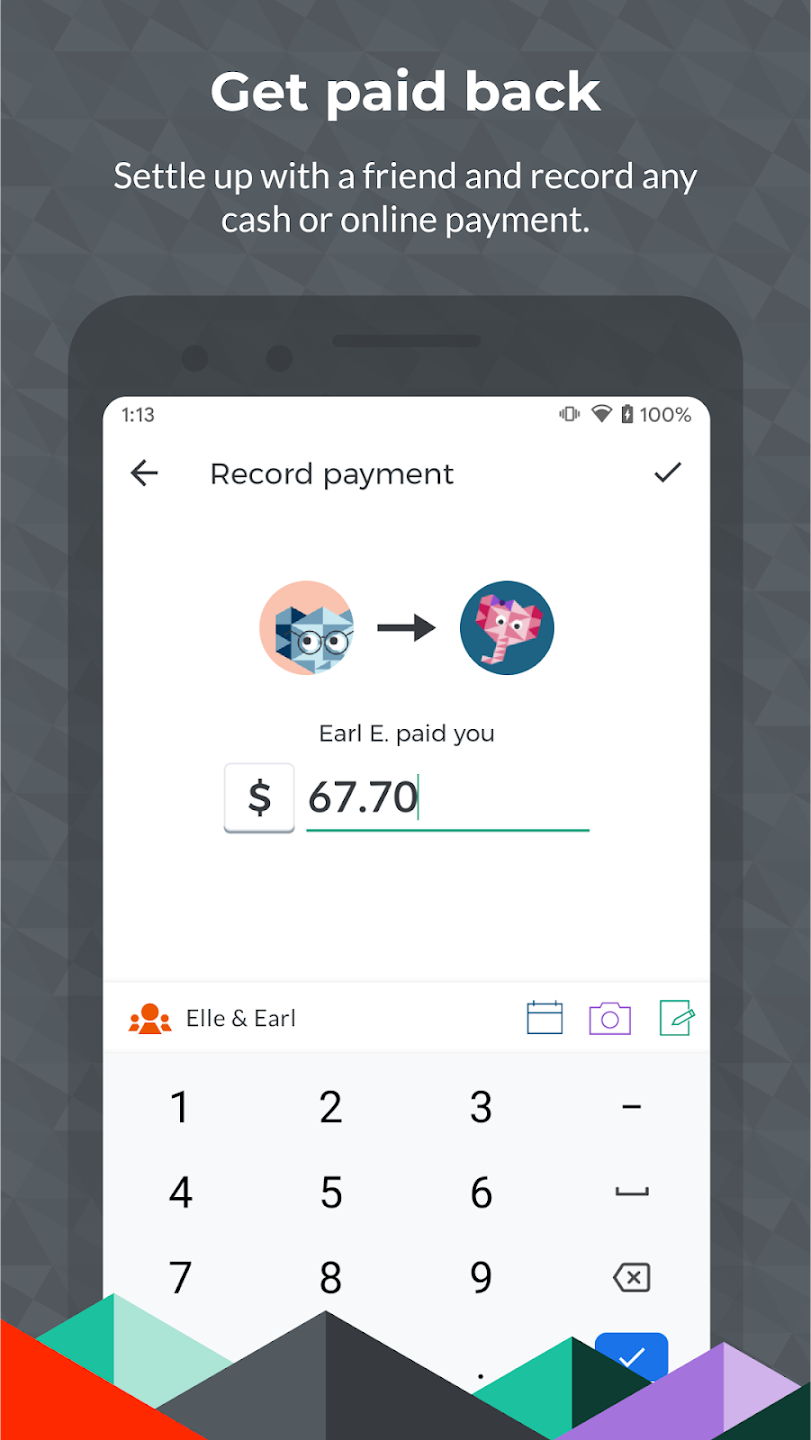
Another nifty feature is the integration with PayPal and Venmo, which allows you to settle up directly through the app. No more excuses for not paying up, right?
Functions of Splitwise:
Scan your receipts: This feature will automatically upload complicated expenses to Splitwise by scanning the receipt with your phone's camera.
Split the rent calculator: This tool is great for roommates whose rooms and amenities are different from one another. Splitwise's rent calculator will ask you to input your total rent and then describe each person's living accommodations. Splitwise factors in the number of windows in a room, size, closet space, and more to split the rent fairly among roommates.
Travel calculator: If you're going on a road trip or splitting a beach house, Splitwise can divvy up the costs. Input the total cost, how many people attended, and how long they stayed for a fair price estimate for each person.
Noise calculator: If you're keeping your neighbors up at night with late night noise (like parties or guitar practice), use this tool to figure out how much you should contribute in rent as an apology.
Guest calculator: If a friend is crashing for a couple of nights on your couch, calculate what percentage of the rent they should contribute. This is best used for longer-term couch-stays, rather than a one or two-night visit.
User Reviews of Splitwise:
Splitwise was a great way for us to share expenses for our group of six. Sometimes we just needed to share with a couple of people and other times with the whole group. The foreign currency conversion was especially helpful. We also appreciated the option to make the payments outside the app so we could make small payments in cash or transfer by other means.
Anytime I go on a trip with friends, I make them use this app, because it's so much simpler than worrying about splitting every single bill every single meal. It removes a level of complexity and annoyance from group trips, group meals, anything that involves spending money as a group, and means you can just focus on having a good time.
I’ve been using this app for about 7 years, and it’s been a lifesaver for managing group expenses. Whether it’s splitting costs with friends or keeping track of purchases my siblings make on my Amazon account (and paying me back later in a lump sum), it keeps everything organized and transparent. It takes the stress out of who owes what and makes settling up simple. Highly recommend for anyone who deals with shared expenses regularly.
I've been using Splitwise to keep track of our travel expenses for our trips which often include multiple destinations. I find it very user friendly, allowing entry of expenses in local currencies or USD and then conversion to USD when settling up. The limit of 4 entries/day in the free version can be frustrating but the cost of the pro-version is not exorbitant for the convenience.
FAQs of Splitwise:
How do I change the currency of an expense?
When adding a new bill (or payment), just click on the currency symbol in the "amount" field. You'll be presented with a list of all the different currencies that Splitwise supports.If you'd like to use a currency not currently on the list, just contact support and we'd be happy to add it for you.
Can I set a default currency?
Yes! In the "account info" section of your user settings page, you'll see an option to set a default currency. To get there on the website, log in to splitwise.com, click on your name on the top right of the screen, and then click "My account". This currency will be selected by default when adding new bills.Changing the default will not change the currency of your existing bills. You can change the currency of any individual bill by opening the "Edit bill" screen, then clicking or tapping on the currency symbol, which should bring up a list of all currency options. Alternately, if you would like to switch the currency on all your existing bills at once, you can do so under "Advanced features" on the account settings page of our website.
Can Splitwise do currency conversion between multiple currencies?
In general, Splitwise keeps your balance in each currency separate (e.g. "You owe $12.45 and you are owed £8.72"). However, Splitwise Pro includes the ability to do currency conversion. In one tap, you can convert all your transactions with a given friend or group using the current market exchange rate.To do so, navigate to friendship or group you'd like to convert. If you have any transactions with your friend/group that are not already in your default currency, you should see a button to convert all transactions to your default currency. This will update all past expenses to use the new currency.Please note that if you add additional expenses in the future, those expenses will not be automatically converted – you'll need to come back and click the "Convert" button again, and then those items will be converted at the current exchange rate.
How do I use Splitwise?
Splitwise is an app for splitting expenses with your friends. It lets you and your friends add various bills and keep track of who owes who, and then it helps you to settle up with each other. Here's a quick overview of how it works.First, sign up for an account!Next, create a group. Groups are an easy way to split expenses with a particular group of people on an ongoing basis. For example, you might create a group for your apartment, or a group for a ski trip. As part of creating a group, you'll be asked to provide contact information for the other members of the group. This allows all of those people to view the group on Splitwise, and to add expenses of their own. Splitwise also lets you add "non-group expenses" for items that don't deserve an entire group, like going to dinner with a few random friends.Once you've created your group, you and your friends can all start adding expenses! Go to your group, then hit the "Add bill" button. You'll be asked for various details about your expense, like the total cost, who paid, and how much each person should owe. You can include a picture or additional notes, or even change the date (for example, if you're adding an expense from last week). As soon as you hit "Save", Splitwise will update everyone's balances to keep track of how much each person owes.Later, after you've added a bunch of expenses, you'll probably want to settle up with your friends. Just hit the "Settle up" button to pay back your friend. You can record a cash payment (e.g. you just handed your friend some cash, and now you want to update Splitwise to reflect that), or if you're in a supported country, you can send your friend a PayPal or Venmo payment directly through the Splitwise app. Electronic money transfers will be delivered to the recipient's email address.Those are the basics, and should be enough to get you started. If you have more questions, check out the rest of our helpdesk articles!
Why do I have to add friends in order to use Splitwise? Can I add a friend without an email address or phone number?
Splitwise was built specifically to keep track of IOUs with other people. All bills on Splitwise are split – you can't add an expense unless you're sharing it with someone else (someone who you owe, or who owes you). Splitwise is only useful if you have friends to split expenses with.In addition, we think it's extremely important that everyone involved in a bill can log on and see that bill. Splitwise is a communication tool to help everyone stay on the same page. We believe that keeping a shared record of what has occurred is the best way to avoid stress and keep things fair, which is our mission. Everyone should have a right to see what's going on, fix problems, and add their own expenses – otherwise, it's very easy for people keeping separate records to start disagreeing on how much they owe each other.
Final words:
Splitwise is a handy mobile package and impressive aid during gatherings, travels, or rent dues. Through this platform, you will hardly forget to collect your friend or colleague’s share of the expenses. The hassle of calculating and dividing the full cost can now be alleviated as well. Its free-of-charge capabilities are robust and sufficient enough but if you wish to enjoy more features, you can make some in-app purchases.
More Information
- Size:109.7MB
- Version:26.6.3
- Requirements:Android
- Votes:158

Related topics
-
Money may not be everything, but it is undeniably crucial in life. This well-known saying resonates deeply with many, often striking a chord because of its painful truth. The reality is, in order to achieve our dreams and aspirations, financial stability often becomes a necessity. Whether it's pursuing a passion, starting a business, or simply living comfortably, money plays a pivotal role in making these goals attainable. So, what's the solution? The only path forward is to dedicate ourselves to hard work and earn the money needed to fulfill our dreams. Through perseverance, determination, and effort, we can overcome financial obstacles and pave the way toward a brighter future.
-
![BFast BFree - Earn BTC]()
BFast BFree - Earn BTC
-
![Stockbit - Investasi Saham]()
Stockbit - Investasi Saham
-
![mPokket]()
mPokket
-
![Google Pay for Business]()
Google Pay for Business
-
![Exness Trade]()
Exness Trade
-
![Google Pay]()
Google Pay
-
![Airtel Thanks]()
Airtel Thanks
-
![Banco do Brasil]()
Banco do Brasil
-
-
Digital currency exchanges, commonly referred to as cryptocurrency exchanges, are online platforms that enable users to buy, sell, and trade digital assets. These exchanges support transactions between different cryptocurrencies (e.g., Bitcoin for Ethereum) as well as conversions between cryptocurrencies and traditional fiat currencies like the US Dollar (USD), Euro (EUR), or Chinese Yuan (CNY). Beyond facilitating trades, these platforms play a crucial role in bridging the gap between conventional financial systems and the emerging decentralized digital economy. They provide essential services such as liquidity, price discovery, and secure transaction processing, making them a cornerstone of the modern crypto ecosystem.
-
![BFast BFree - Earn BTC]()
BFast BFree - Earn BTC
-
![Stockbit - Investasi Saham]()
Stockbit - Investasi Saham
-
![Google Pay for Business]()
Google Pay for Business
-
![Exness Trade]()
Exness Trade
-
![Google Pay]()
Google Pay
-
![PAYEER]()
PAYEER
-
![Splitwise]()
Splitwise
-
![FinArt]()
FinArt
-
-
Designed for modern traders and investors, our all-in-one cryptocurrency platform combines cutting-edge technology with user-friendly functionality. Featuring secure wallet integration, institutional-grade trading tools, and AI-powered market analytics, our solution supports seamless buying, selling, and exchanging across hundreds of digital assets. Real-time price tracking, customizable alerts, and expert insights help users optimize their strategies while managing risk effectively. Whether you're a beginner exploring crypto or a seasoned trader executing complex positions, our cross-platform suite delivers the performance, security, and intelligence needed to succeed in today's dynamic markets.
-
![Google Pay for Business]()
Google Pay for Business
-
![Exness Trade]()
Exness Trade
-
![PAYEER]()
PAYEER
-
![Splitwise]()
Splitwise
-
![55five]()
55five
-
![LT Wallet]()
LT Wallet
-
![Binomo]()
Binomo
-
![Mitra]()
Mitra
-













Latest Updated


Popular Apps




Popular News
More+-
![Tomie Wants to Get Married Full Walkthrough, All Choices and Ending Guide]()
Tomie Wants to Get Married Full Walkthrough, All Choices and Ending Guide
2026-05-22
-
![Karryn’s Prison Gameplay Walkthrough & Strategy Guide]()
Karryn’s Prison Gameplay Walkthrough & Strategy Guide
2025-10-28
-
![Life in Santa County Game Guide & Complete Walkthrough]()
Life in Santa County Game Guide & Complete Walkthrough
2025-10-28
-
![Dreams of Desire Complete Walkthrough and Game Guide]()
Dreams of Desire Complete Walkthrough and Game Guide
2025-10-28
-
![Era Hunter Gameplay Guide & Full Walkthrough]()
Era Hunter Gameplay Guide & Full Walkthrough
2025-10-28




