

ShotCut AI
Download for Android This app is available for Android only.- Category:Media & Video
- Rating: 4.8
- Language:English
- Updated:2026-07-16
Screenshots
Introduction
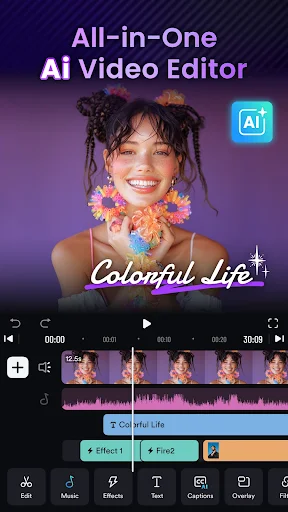
AI Video Editor: ShotCut AI This is a free video editing software, easy to use and suitable for beginners. It features an intuitive interface and advanced AI capabilities, making operation simpler. It includes many advanced editing functions such as adding music, slow motion, and stop-motion animation to your videos, making them more professional and high-quality. You can create slideshows, movies, short films, and vlogs with this software. Whether you're a beginner or a professional video editor, this software is perfect for you.
Features
AI Video Editor Tool
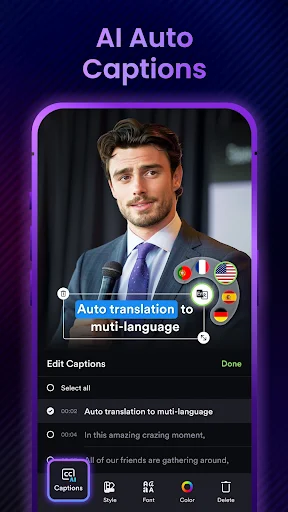
AI Captions
Free trial for transcribing your videos to text is now live! Experience our latest ai technology, smarter sentence segmentation, precise word segmentations, and full support across all major languages!
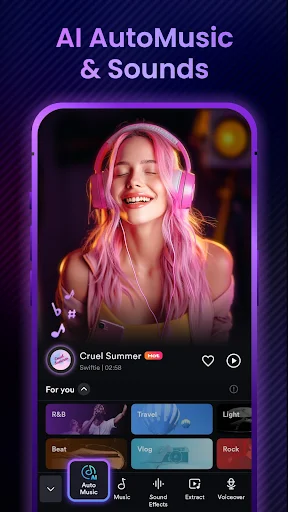
AI Automusic
Post your videos to shotcut and enrich them with auto-generated music. We'll match a music set suitable for your video's style.
Ai Text Generation
Simply upload your video, specify the platform, and our Ai crafts powerful titles, hashtags, and descriptions for maximum engagement.
Basic Video Editing
Video reverser
Reverse/rewind vid and play video backwards in seconds.
Video cropper
Crop your video for free. Easily crop your video to any aspect ratios.
Video cutter & splitter
Cut and split larger video into clips.
Video merger & combiner
A free merge tool to combine video clips together.
Video converter
Convert video to HD quality or MP3 audio. Export video without watermark.
Video eraser
Video editor no watermark. Remove watermark from video.
Video sound/audio editor
Extract audio from video and edit audio track of your video.
Highlights
Free video editor, maker, and creator
A free video maker to generate slideshows, movies, vlogs for TikTok, YouTube, and Instagram platforms.
Movie maker & editor
Make a movie for free with a standard 24 fps frame rate. Edit films or movies like a pro.
Slideshow maker
Free photo video slideshow maker with music and voice over. Picture video maker: convert live photo to video.
Free collage maker
Make video collage for free, layout video and photo collage as you want.
Slow motion video editor
Make slow and fast motion video from normal frame rate footage.
Video speed editor
Adjust video velocity with fast & slow motion fx. Speed up or slow down video without losing video quality.
Reels maker & editor
Instagram reel maker, Instagram editor, free reel maker, instagram video editor
YouTube editor
The best editing app for YouTube. Easily create vlogs and music videos.
TikTok editor
Edit videos for TikTok without CapCut video editor and Effect House.
Instagram post maker
Create Instagram posts with a plethora of reel templates.
Advantages and disadvantages
Pros
ShotCut AI utilizes artificial intelligence to streamline video editing tasks, making it easier and faster to create professional-looking videos.
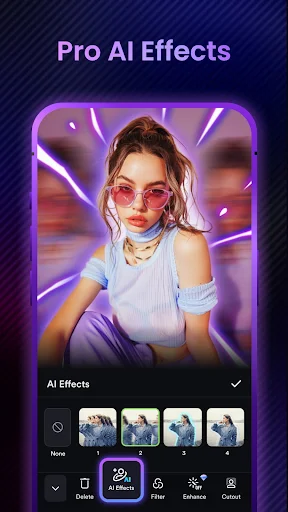
The software offers a wide range of editing features and tools, allowing users to enhance their videos with effects, transitions, and filters.
It supports a variety of file formats, making it versatile for editing different types of videos.
ShotCut AI has a user-friendly interface that makes it accessible to beginners while still offering advanced editing capabilities for more experienced users.
The software is free to use, which is a major advantage for individuals and businesses on a budget.
Cons
The AI capabilities may not always produce the desired results, leading to potential manual adjustments being necessary.
Being a free software, ShotCut AI may lack some of the more advanced features and functionalities found in paid video editing software.
There may be limitations in terms of technical support and updates compared to paid editing software options.
User comments
I am a Beginner in editing and I think that is best app for me, I have not used it so well but they give us tutorial for how to edit properly they appreciate us for editing by giving us pop up notification and I am so happy for that. It's also free but you can take the premium also. I appreciate this app for being in #1 in all editing apps. Thankyou thanks for reading my review
tbh, it has sooo many ads but the outcome of any video/photo would be so so good and I have already made so many videos and photos with the help of Capcut and it has so vintage filters and effects if your are an millennial then you would definitely loved it
SERIOUSLY- ShotCut AI Video Editor App. is Good But You have to Be Real Good Best Please Start Beta Testing Program Updates Regularly improve FREE features Provide-( Free Long Videos Hindi Auto Captions Facility )-HONESTLY please.
Conclusion
ShotCut presents a beginner-friendly platform that features a wide range of modern effects and filters that fit social media’s fast-changing trends. However, the limitations in customization and the frustration of locked features behind ads and paywalls can deter some users. Overall, it’s a decent option for someone who wants a quick and easy editor, but it doesn’t really stand out much in the vast realm of editing apps.
More Information
- Size:191MB
- Version:1.69.6
- Requirements:Android
- Votes:562


Related topics
-
Transform your smartphone into a powerful editing studio with the best video editing apps for Android! Whether you're a content creator, social media enthusiast, or just looking to polish personal videos, these apps offer professional-grade tools right at your fingertips. Enjoy intuitive interfaces, advanced features like multi-track editing and filters, and seamless exporting options - all optimized for mobile devices. Download now and start creating stunning videos anytime, anywhere!
-
![Funimate]()
Funimate
-
![Dream Face]()
Dream Face
-
![VN - Video Editor & Maker]()
VN - Video Editor & Maker
-
![Faceplay Face Swap Video]()
Faceplay Face Swap Video
-
![NodeVideo]()
NodeVideo
-
![Edits Video Editor]()
Edits Video Editor
-
![Storybeat]()
Storybeat
-
![All Video Downloader]()
All Video Downloader
-
-
Video Editor is a powerful software tool designed for crafting, refining, and enhancing video content. It enables users to transform raw footage into compelling visual narratives or effective communication platforms. As digital media continues to evolve, video editing has grown in significance - no longer just a professional necessity but also an accessible skill for everyday creators. Modern editing tools now offer intuitive interfaces, AI-powered features, and cross-platform compatibility, making high-quality video production achievable for both experts and casual users alike.
-
![Vidmix]()
Vidmix
-
![Funimate]()
Funimate
-
![Vivavideo]()
Vivavideo
-
![Faceplay Face Swap Video]()
Faceplay Face Swap Video
-
![NodeVideo]()
NodeVideo
-
![Edits Video Editor]()
Edits Video Editor
-
![Storybeat]()
Storybeat
-
![MVideo]()
MVideo
-











Latest Updated








Popular Apps





Popular News
More+-
![Tomie Wants to Get Married Full Walkthrough, All Choices and Ending Guide]()
Tomie Wants to Get Married Full Walkthrough, All Choices and Ending Guide
2026-05-22
-
![Karryn’s Prison Gameplay Walkthrough & Strategy Guide]()
Karryn’s Prison Gameplay Walkthrough & Strategy Guide
2025-10-28
-
![Life in Santa County Game Guide & Complete Walkthrough]()
Life in Santa County Game Guide & Complete Walkthrough
2025-10-28
-
![Dreams of Desire Complete Walkthrough and Game Guide]()
Dreams of Desire Complete Walkthrough and Game Guide
2025-10-28
-
![Era Hunter Gameplay Guide & Full Walkthrough]()
Era Hunter Gameplay Guide & Full Walkthrough
2025-10-28




