

Vpn Hosts
Download for Android This app is available for Android only.- Category:Tools
- Rating: 4.7
- Language:English
- Updated:2026-08-27
Screenshots
Introduction
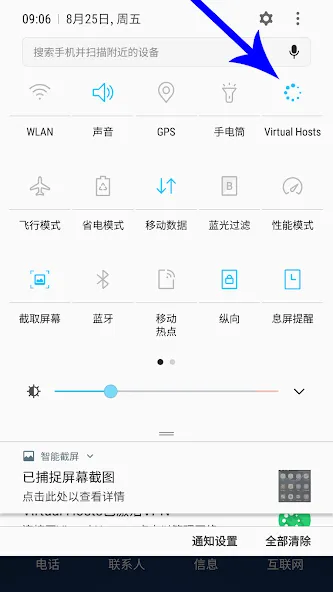
VPN Hosts is a network tool for Android systems. It has a log-free policy, meaning it doesn't actively record or collect user browsing history, IP addresses, or activity. It also uses Android's APN service for strong encryption, creating encrypted tunnels to protect user network activities. When connecting to public Wi-Fi, it prevents hacker attacks. It also allows for data monetization, ensuring your data isn't sold or redirected. The interface is simple; a single click of the one-click connection button lets you monitor your connection status. It makes the VPN completely transparent and clean, with no sales features. It also allows for custom DNS servers.
Features
Strict No-Logs Policy — We do NOT log, collect, or share your browsing data, IP addresses, or activity
Strong Encryption via Android VpnService — Creates a secure, encrypted tunnel to safeguard all your internet traffic
Public Wi-Fi Protection — Shields you from hackers, data interception, and snooping on unsecured networks
No Data Monetization — Your traffic is never sold, redirected, modified, or used for ads — 100% transparent
One-Tap Connection — Instant connect with Android system consent dialog + persistent notification for full control
Optimized Speed & Stability — Lightning-fast performance for browsing, streaming, gaming, and daily use without slowdowns
No Subscriptions or Hidden Fees — Clean, honest VPN with no unnecessary features or upsells
Function
Support for custom DNS servers
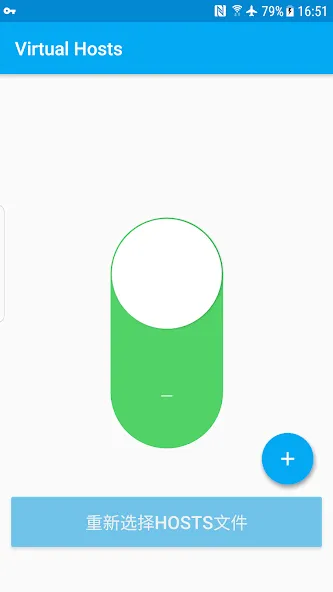
Support for downloading Hosts files from the network. You can explore this feature as follows:
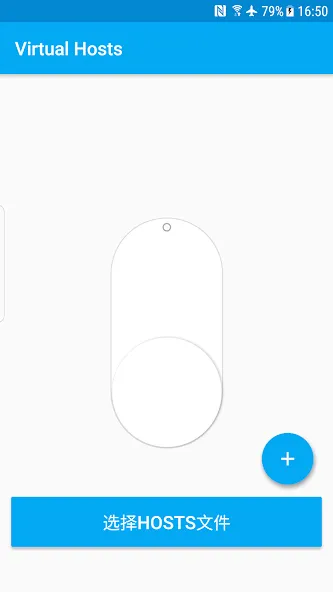
1. Long press the "Select Hosts file" button.
2. Enter your website address and click the "Download" button.
3. Click the radio button for "From the network," then click the "Confirm" button.
4. Click the largest "Start" button to test it.
5. Enjoy!
Permissions
View Network Connections
Allows the application to view network connection information, such as which networks are available and whether they are connected.
View Wi-Fi Connections
Allows the application to view Wi-Fi network information, such as whether Wi-Fi is enabled and the name of the connected Wi-Fi device.
android.permission.BIND_VPN_SERVICE
Change Network Connections
Allows the application to change the network connection status.
Establish and Disconnect Wi-Fi Connections
Allows the application to connect to or disconnect from Wi-Fi access points and to change the device settings of the Wi-Fi network.
Perform Foreground Services
Allows the application to use foreground services.
Has Full Network Access
Allows the application to establish network communication endpoints and use custom network communication protocols. Browsers and other applications provide methods for transferring data to the Internet, so this permission is not required to transfer data to the Internet.
Read Contents in Shared Storage
Allow this application to read content in shared storage.
Execute on Startup
Allow this application to launch automatically immediately after the system completes the boot process. This will increase the phone's boot time and slow down the overall phone performance because the system is constantly running the application.
Prevent Phone from Sleeping
Allow this application to prevent the phone from entering sleep mode.
Modify or Delete Contents in Your Shared Storage
Allow this application to write content in shared storage.
Summarize
Vpn Hosts app is a tool that helps developers to customize the host file, which is a list of hostnames that your device can use to find and bind to your server. The app allows you to do domain name resolution and can also be used to do ad blocking.
More Information
- Size:0.87MB
- Version:1.6.0
- Requirements:Android
- Votes:573
- Package Name:com.github.xfalcon.vhosts
- Signature:489c0672d5ebd032633c2629dc2c4498
Related topics
-
With more and more of our lives happening online, smartphones have become an essential component of our daily routines. Whether you’re shopping, banking, or socializing – everything can be tracked online, even on Androids. This information can then be used by third-parties profiting off your data or your ISP to slow down your internet speed. An easy way to increase online privacy and security of your Android smartphone is to start using a VPN. At Cybernews, we have over 5 years of experience testing VPN services, so we know what makes a great VPN app. To make your search for a reliable VPN easier, together with our research team, I tested both free and paid Android VPN apps, and summarized the results of our research below.
-
![VPN Secure]()
VPN Secure
-
![Vpn Hosts]()
Vpn Hosts
-
![Ninja VPN]()
Ninja VPN
-
![Supervpn]()
Supervpn
-
![ProtonVPN]()
ProtonVPN
-
![Kiwi Vpn Connection Ip Changer]()
Kiwi Vpn Connection Ip Changer
-
![Lucky Vip Proxy]()
Lucky Vip Proxy
-
![VPN.lat]()
VPN.lat
-
-
Enjoy unrestricted internet access anywhere in the world with these top-rated free VPNs for Android. Securely browse in private, bypass geo-blocks, and unlock censored websites in just a few taps. These powerful apps encrypt your connection, mask your IP address, and protect your data-especially on risky public Wi-Fi. Whether you're streaming global content, accessing restricted platforms, or simply safeguarding your privacy, these trusted VPNs deliver fast, reliable performance. Discover the most popular free VPN downloads and experience true online freedom today-no limits, no compromises!
-
![VPN Secure]()
VPN Secure
-
![Vpn Hosts]()
Vpn Hosts
-
![Supervpn]()
Supervpn
-
![ProtonVPN]()
ProtonVPN
-
![Kiwi Vpn Connection Ip Changer]()
Kiwi Vpn Connection Ip Changer
-
![Lucky Vip Proxy]()
Lucky Vip Proxy
-
![VPN.lat]()
VPN.lat
-
![UPX]()
UPX
-
-
In 2024, privacy and security on mobile devices are more important than ever, and a reliable VPN can help protect your data while browsing. The best free VPNs for Android offer a solid balance of speed, security, and user-friendly features without costing a dime. These VPNs allow you to browse anonymously, bypass geo-restrictions, and safeguard your personal information on public Wi-Fi networks. While free options may have certain limitations, such as data caps or fewer server locations, they still provide essential privacy protection. With strong encryption, zero-logging policies, and a simple setup, these free VPNs ensure your online activities remain private and secure while using your Android device.
-
![VPN Secure]()
VPN Secure
-
![Vpn Hosts]()
Vpn Hosts
-
![Ninja VPN]()
Ninja VPN
-
![Supervpn]()
Supervpn
-
![ProtonVPN]()
ProtonVPN
-
![Kiwi Vpn Connection Ip Changer]()
Kiwi Vpn Connection Ip Changer
-
![Lucky Vip Proxy]()
Lucky Vip Proxy
-
![VPN.lat]()
VPN.lat
-





Latest Updated







Popular Apps








Popular News
More+-
![Tomie Wants to Get Married Full Walkthrough, All Choices and Ending Guide]()
Tomie Wants to Get Married Full Walkthrough, All Choices and Ending Guide
2026-05-22
-
![Karryn’s Prison Gameplay Walkthrough & Strategy Guide]()
Karryn’s Prison Gameplay Walkthrough & Strategy Guide
2025-10-28
-
![Life in Santa County Game Guide & Complete Walkthrough]()
Life in Santa County Game Guide & Complete Walkthrough
2025-10-28
-
![Dreams of Desire Complete Walkthrough and Game Guide]()
Dreams of Desire Complete Walkthrough and Game Guide
2025-10-28
-
![Era Hunter Gameplay Guide & Full Walkthrough]()
Era Hunter Gameplay Guide & Full Walkthrough
2025-10-28




