

Navitel
Download for Android This app is available for Android only.- Category:Nav
- Rating: 4.6
- Language:English
- Updated:2026-09-12
Screenshots
Introduction
Navitel is an offline navigation app featuring detailed maps for over 60 countries. Users simply enter a destination, and the app calculates multiple routes based on nearby traffic conditions and the chosen mode of travel, allowing for easy switching between options. During navigation, the app provides real-time updates on traffic congestion ahead and automatically alerts users to speed limits and traffic cameras; it also offers a variety of voice options. Additionally, the app includes extensive customization features, enabling users to tailor the interface layout and map display to suit their specific needs.
Features of Navitel:
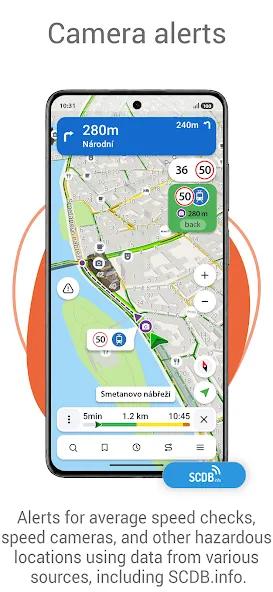
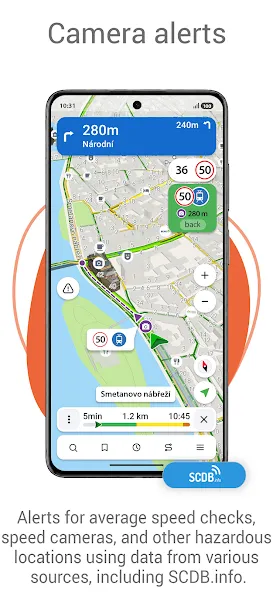
SpeedCam warnings:information about radars, speed cameras and road restrictions.
3D Maps: three-dimensional maps with support for textures and display of building heights.
3D Road interchanges: display of multi-level road interchanges in 3D mode.
Lane Assist: route calculations taking multilane traffic into account and visual prompts while following the route.
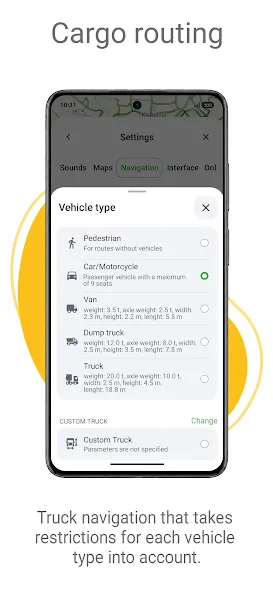
Cargo graph: building routes considering road signs for cars from 3.5 to 40+ tons.
Unlimited number of waypoints when building a route. Convenient route planning with an unlimited number of waypoints.
Customizable user interface. Ability to adapt the program interface and map display mode for your own needs.
Strengths of Navitel:
This way, we will always have access to the directions, even in the most remote places. It also gives us a lot of useful tools:
Specific routes for cars, motorcycles, bicycles, vans, trucks and even pedestrians.
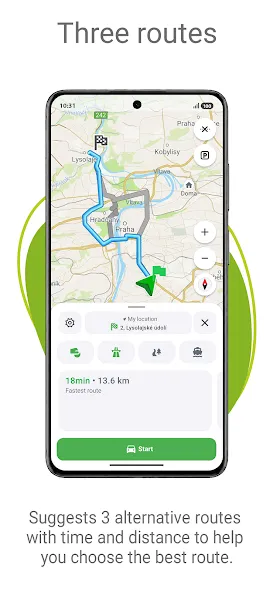
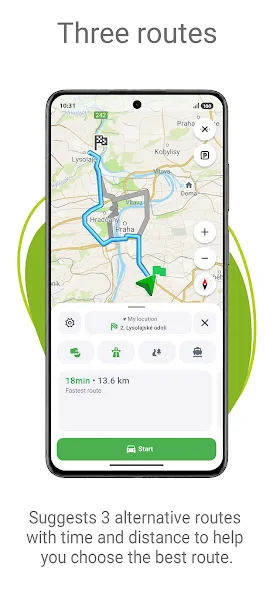
Up to three alternative routes with time and distance indications.
Position tracking with friends and joint route planning.
Weather forecasts anywhere in the world for the next three days.
Information on fuel prices, film schedules and other useful information.
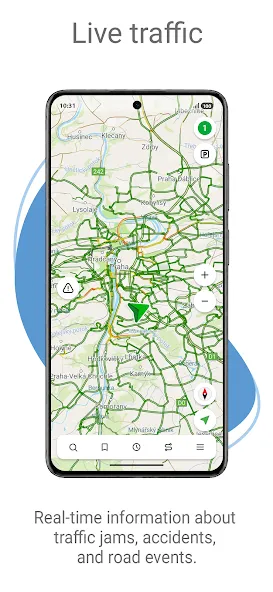
Data and notifications about traffic accidents, speed cameras, road works and other events added by users.
Simple interface available in a lot of languages.
User Reviews of Navitel:
I tried trial version. It looks great. But found some errors in the given Indian map . If there is an option to report such errors, it can be easily corrected in the future updates. Indian map is great. Options of markers and head up display is great. I felt nearby hotels, accommodation fuel stations, hospitals and ATMs should be able to select from the main menu itself. At present it is showing in the trip stopover menu only.
The map & navigator work well, full of alerts. Trial version is impressive. It should better to buy the map purchase, paid version is better. This app is realy impressive.
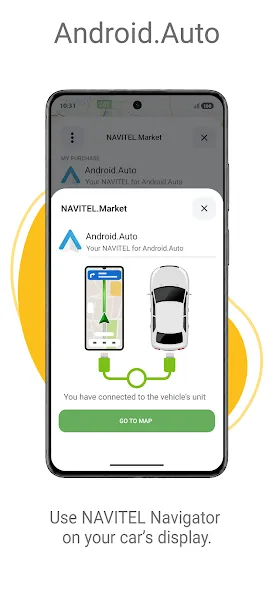
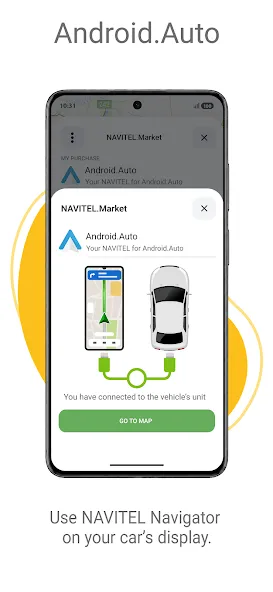
Please we need Navitel navigator in Android auto and carplay,Navitel is the world most precise accurate navigator. Are you working on integrating Navitel to Android auto and Carplay.Also you should change the Compass to Cardinal compass in Navitel interface.
Hi, I am a Navitel user in Vietnam. Does it have Widget which allows me to see the map , notifications, Speed cam from Home Screen.
Searching is sometimes hard in cases where countries have two languages. For example in Kosovo you have Cyrillic and latin. Countries like Kosovo and Greece get updated quite slowly (6 months since highways were opened and still not included). Searching on the map can be annoying due to the tendency to refocus on your location within 10 seconds. The good: Speed is displayed clearly, though could be a bit bigger. Lane changeing is not always clear, but 99% of the time it is sufficient. Voice guidance is clear. Colors day/night good. Am using it Offline.
FAQs of Navitel:
How can I install the “Navitel” program to a PND, which is supplied with other navigation software?
The program version for portable navigation devices (PNDs) is supplied only together with the device, and is not available without it. Please contact the authorized service center of the device manufacturer to find out if it is possible to install “Navitel”.
Where can I see the serial number, assigned to the device by the program, the program license key number and the version of the installed program?
To view this information, start the “Navitel” program. Select Menu in the bottom left corner of the main screen, then select My Navitel > Download maps > Navitel. The screen will open showing the version of the program, the serial number of the device and the program license key number. If the Download maps submenu is not represented in the program, select My Navitel > All products > Navitel.
Where can I purchase the “Navitel” program and maps?
It is possible to purchase additional maps and map packages, as well as the full version of the “Navitel” program after expiration of its trial version, through the program menu. The function is available for 5.5 and later versions of the program, installed in Android, iOS, Windows Mobile or Windows Phone devices. Internet connection is required. For more details see /support/instructions/buy-a-map.You can purchase the program and maps for a smartphone or a tablet, as well as additional maps for a PND supplied with “Navitel”, at the “How to buy” section of the website.You can also select to view the list of Internet stores, and of shops in Russia and abroad, which sell the program and maps, at the “How to buy” section of the website. Methods of payment are to be specified by the representatives of these companies.
Final Verdict:
A GPS is a stable in this hyperconnected world. If you always find yourself lost in a new location, look no further than Navitel. Precise and reliable, the app provides detailed maps of locations and helps you save on roaming data costs — especially if you're traveling overseas.
More Information
- Size:61.22MB
- Version:12.6.1552
- Requirements:Android 2.3.3+
- Votes:378
- Package Name:com.navitel
- Signature:ba6b90a7c73752f4723e732f2714b49d
Related topics
-
When you are traveling or experiencing a new place or activity, no one wants to stare at their phone or tablet the whole time. However, you want the memories of your trips and travel to last forever, and you want to share those memories with friends and loved ones back home. The best travel logs combine both worlds with stunning features and interfaces to document your memories, photos and videos of the places that you visit and simple, easy-to-use design. These some trip logging apps let you easily capture the memories, so you can get back to enjoying it in the moment.
-
![Navitel]()
Navitel
-
![Locus Map Pro]()
Locus Map Pro
-
![NAVIGON North America]()
NAVIGON North America
-
![Mock Locations]()
Mock Locations
-
![Google Earth]()
Google Earth
-
![Heimdall]()
Heimdall
-
![HappyEasyTrip]()
HappyEasyTrip
-
![Uber]()
Uber
-
-
These must-have travel apps bring global adventures to your phone, making trip planning effortless and budget-friendly. Compare flights and hotels in seconds, access offline maps and expert city guides, or master key phrases in foreign languages. Read authentic tips from locals to uncover hidden gems before you arrive. Whether you're dreaming up future journeys or navigating current travels, these tools transform wanderlust into reality. With exclusive free premium features, your digital passport to discovery is ready - download now and let your next unforgettable journey begin!
-
![GPS Fake Location Toolkit]()
GPS Fake Location Toolkit
-
![Navitel]()
Navitel
-
![Locus Map Pro]()
Locus Map Pro
-
![NAVIGON North America]()
NAVIGON North America
-
![GPS Emulator]()
GPS Emulator
-
![Google Maps Go]()
Google Maps Go
-
![Google Earth]()
Google Earth
-
![Fly GPS]()
Fly GPS
-
-
Nowadays, with the popularity of smartphones, navigation software has become an essential tool for people's travel. Among numerous Android mobile navigation software, some are highly regarded for providing users with convenient navigation services. These software not only have accurate positioning functions, but also can update road condition information in real time, providing users with the best driving route. At the same time, they also offer multiple travel options such as walking, public transportation, self driving, etc., and can intelligently plan routes based on user needs. In addition, these navigation software also have voice navigation function, making it convenient for users to obtain navigation guidance at any time while driving. In short, Android mobile navigation software can provide users with comprehensive route planning services, making travel more convenient and safe.
-
![GPS Fake Location Toolkit]()
GPS Fake Location Toolkit
-
![Navitel]()
Navitel
-
![Locus Map Pro]()
Locus Map Pro
-
![NAVIGON North America]()
NAVIGON North America
-
![GPS Emulator]()
GPS Emulator
-
![Mock Locations]()
Mock Locations
-
![Google Maps Go]()
Google Maps Go
-
![Google Earth]()
Google Earth
-







Latest Updated


Popular Apps







Popular News
More+-
![Tomie Wants to Get Married Full Walkthrough, All Choices and Ending Guide]()
Tomie Wants to Get Married Full Walkthrough, All Choices and Ending Guide
2026-05-22
-
![Karryn’s Prison Gameplay Walkthrough & Strategy Guide]()
Karryn’s Prison Gameplay Walkthrough & Strategy Guide
2025-10-28
-
![Life in Santa County Game Guide & Complete Walkthrough]()
Life in Santa County Game Guide & Complete Walkthrough
2025-10-28
-
![Dreams of Desire Complete Walkthrough and Game Guide]()
Dreams of Desire Complete Walkthrough and Game Guide
2025-10-28
-
![Era Hunter Gameplay Guide & Full Walkthrough]()
Era Hunter Gameplay Guide & Full Walkthrough
2025-10-28




