

MAX Player
Download for Android This app is available for Android only.- Category:Media & Video
- Rating: 4.9
- Language:English
- Updated:2026-09-18
Screenshots
Introduction
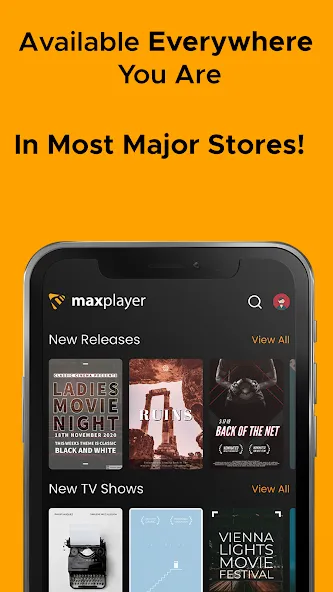
MAX Player is a powerful video player app. It supports all major video formats and delivers stunning high-definition playback, offering users an immersive viewing experience. With MAX Player, you can enjoy your favorite movies, music, and videos in breathtaking Full HD quality. The app also features a smart floating window and various playback modes, allowing you to easily multitask while watching. Packed with features like background playback, an equalizer, and video downloading, it comprehensively meets all your playback needs.
Highlights:
Clean interface optimized for big screens
Supports IPTV, VOD, TV Series & Catch-up
Favorite channels and search functionality
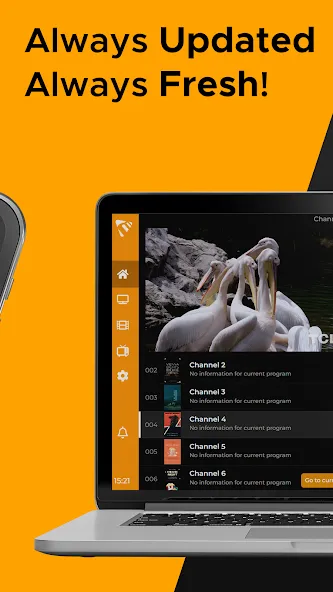
Scheduled EPG (TV Guide) updates
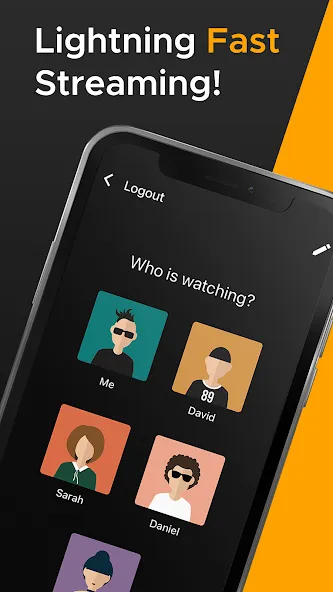
1 account supports up to 5 devices and 5 sub-users
Parental control and multi-language support
Works with M3U, Xtream Codes API & more
Features:
Live TV, VOD, Series, and Catch-up
Max Player organizes your IPTV playlist into clear sections for Live TV, VOD, series, and catch up. Scheduled EPG updates provide current program information so you see what is on now and what comes next. This structure makes it easier to move between channels and on demand titles without switching apps.
TV optimized interface with Favorites and search
Max Player presents a clean layout that works well with remotes and touchscreens. You can mark channels or titles as Favorites for quick access. Additionally, fast search helps you find a channel or show by name without scrolling through long lists.
Cross device coverage
Max Player runs on Android TV, phones, and tablets, as well as Fire TV, Google TV, Apple TV, and Windows desktop. It also supports Samsung Tizen and LG webOS smart TVs. This broad coverage lets you keep the same viewing setup across living room TVs and personal devices.
Flexible account sharing and sub users
One account supports up to five devices and five sub users. You can create separate profiles so preferences and Favorites stay private for each viewer. For example, use the same account on a living room TV, a bedroom TV, a phone, a tablet, and a Windows PC while assigning profiles to different family members.
Playlist integration and compliance
Max Player supports M3U playlists and Xtream Codes API, so you can add content from your own provider. The app does not include streams or subscriptions, and it does not host any media. Users are responsible for adding valid credentials and following provider terms and regional laws.
Tips for Users:
Customize Your Viewing Experience: Utilize the video player's features such as equalizer, video cropping, and advanced decoder to personalize your viewing experience.
Multiplay Back Options: Take advantage of the auto rotation, aspect ratio, and screen lock features while watching videos to optimize your viewing experience.
Background Play Feature: Enjoy listening to music while watching videos with the background play feature, allowing you to multitask seamlessly on your device.
Changelog:
Localization Support
Layout changes
Autorotation and more...
Conclusion:
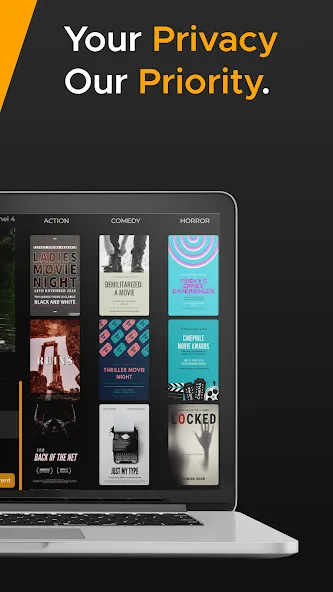
Download the MX Player APK and discover one of the best options available in the field of video players for Android. This app provides many features to help you watch your movies in the most comfortable way possible, but you can also enjoy an easy-to-use, comfortable, and very accessible interface. Thanks to the child lock, you can also let the little ones watch a movie without them being able to leave the app or cause any problems.
More Information
- Size:50.42MB
- Version:1.1.195
- Requirements:Android 4.3+
- Votes:94
- Package Name:tv.maxplayer.android
- Signature:811fbf2aad8d7450d98243feec64f245
Related Versions
-
 Download
Version:1.4Size:4.3MB
Related topics
-
Media player with multimedia capabilities is one of the important features in today’s smartphones. Most of the video content is consumed on smart devices and viewers continue their tasks like sending emails, surfing apps keeping the video playback on through Picture-in-Picture mode. Playing audio/video on an Android app has become a basic function with android video players becoming more and more customizable. Some of the best video players for Android offer multi format support, easy customizations, hardware acceleration, subtitle support and much more. In this blog, we have compared the best video player for Android based on speed, battery consumption, streaming capabilities, resource usage and more.
-
![MAX Player]()
MAX Player
-
![NOVA Video Player]()
NOVA Video Player
-
![Archos Video Player]()
Archos Video Player
-
![Gore Scrolling]()
Gore Scrolling
-
![DramaBox Lite - Mini Drama TV]()
DramaBox Lite - Mini Drama TV
-
![GoodShort]()
GoodShort
-
![Poweramp Full Version Unlocker]()
Poweramp Full Version Unlocker
-
![Chromecast built-in]()
Chromecast built-in
-
-
A truly outstanding movie is not just about an engaging plot-it also requires seamless transitions between scenes. When these transitions are natural and fluid, they help the audience stay immersed in the story without feeling disconnected. The same principle applies to video games. Games that ensure smooth, uninterrupted gameplay, whether through well-designed animations, intuitive controls, or seamless scene changes, create a more immersive and enjoyable experience for players. A game that flows effortlessly from one moment to the next demonstrates a level of craftsmanship that deserves recognition and admiration.
-
![MAX Player]()
MAX Player
-
![SnapTik]()
SnapTik
-
![Cmoar VR Cinema]()
Cmoar VR Cinema
-
![Archos Video Player]()
Archos Video Player
-
![Gore Scrolling]()
Gore Scrolling
-
![Pinster Advanced Downloader]()
Pinster Advanced Downloader
-
![Dream Face]()
Dream Face
-
![Vivavideo]()
Vivavideo
-
-
Video Player is a software application or hardware device designed to decode and display digital video content. Modern video players are highly versatile, capable of handling both locally stored files and real-time streaming media from online platforms. Over time, technological advancements have transformed video players from basic format-specific tools into sophisticated systems supporting a wide range of codecs, resolutions, and playback features. Today’s players offer enhanced functionality such as subtitle synchronization, playback customization, and adaptive streaming, ensuring a seamless and user-friendly viewing experience across various devices.
-
![MAX Player]()
MAX Player
-
![NOVA Video Player]()
NOVA Video Player
-
![Bioskop Online]()
Bioskop Online
-
![Feneo Movies]()
Feneo Movies
-
![Pinster Advanced Downloader]()
Pinster Advanced Downloader
-
![All Video Downloader]()
All Video Downloader
-
![Tubular]()
Tubular
-
![YouTube Pink]()
YouTube Pink
-














Latest Updated





Popular Apps



Popular News
More+-
![Tomie Wants to Get Married Full Walkthrough, All Choices and Ending Guide]()
Tomie Wants to Get Married Full Walkthrough, All Choices and Ending Guide
2026-05-22
-
![Karryn’s Prison Gameplay Walkthrough & Strategy Guide]()
Karryn’s Prison Gameplay Walkthrough & Strategy Guide
2025-10-28
-
![Life in Santa County Game Guide & Complete Walkthrough]()
Life in Santa County Game Guide & Complete Walkthrough
2025-10-28
-
![Dreams of Desire Complete Walkthrough and Game Guide]()
Dreams of Desire Complete Walkthrough and Game Guide
2025-10-28
-
![Era Hunter Gameplay Guide & Full Walkthrough]()
Era Hunter Gameplay Guide & Full Walkthrough
2025-10-28




