

Magma
Download for Android This app is available for Android only.- Category:Media & Video
- Rating:
- Language:English
- Updated:2026-11-13
Screenshots
Introduction
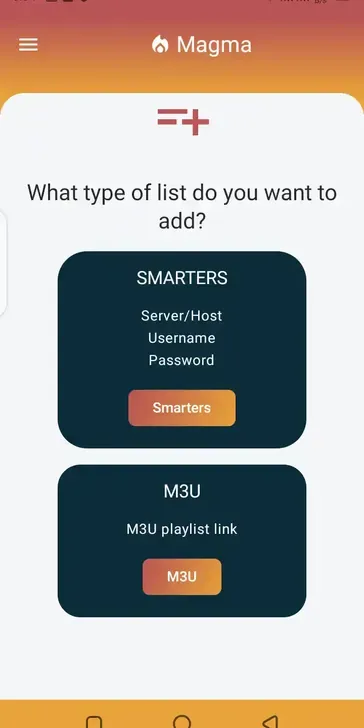
Magma is a multimedia application for Android that allows users to play a wide range of video and audio files. It supports various video codecs, enabling users to open videos from diverse sources while preserving maximum visual clarity. The app also handles multiple audio formats, including FLAC. Furthermore, it allows users to access and view legacy video files—such as older digital formats—without the need for external converters. With seamless, uninterrupted playback, Magma delivers an excellent user experience and is compatible with a broad range of devices.
Features
Support for Multiple Video Codecs
Magma supports a variety of modern, mainstream video formats, including H.264 (AVC), H.265 (HEVC), and VP9. You can open compressed videos from various sources while maintaining high visual fidelity. This broad compatibility helps prevent playback failures that might otherwise occur due to differences in the devices or editing software used to create the files.
Flexible Audio Options
Magma supports MP3 for everyday listening, as well as AAC, which offers superior sound quality at lower bitrates. It also handles FLAC (lossless) and WMA formats, making it easy to enjoy music collections built up over the years. With this single player, you can access your entire library of albums.
Legacy Format Support
Magma supports MPEG-2 and MPEG-4 video files, including those in DivX and Xvid formats. You can play older web videos or files from the DVD era alongside your more recent downloads—no need to hunt for additional apps to access your long-archived content.
Play Without Conversion
Designed for maximum compatibility, Magma ensures that files open immediately. There is no need to run file converters or rename file extensions; you can simply play your media directly. This eliminates time-consuming steps when reviewing video clips or checking old backups.
Smooth, Uninterrupted Playback
Magma minimizes playback errors and interruptions, ensuring a clear, high-quality audiovisual experience. You can switch between different file types while using the same consistent controls and interface. This consistency ensures a smooth user experience, even when managing a mixed-media library.
Highlights
Codec compatibility
High-quality integrated player
Modern, intuitive interface
Compatibility with a wide range of devices
Rapid playlist updates
Organization by category and favorites
External playback options
Usage
Install Magma and launch the app.
If prompted, grant storage access permissions so the application can read your media folders.
Browse your internal storage or SD card to locate the videos or music you wish to access.
Tap a file to begin playback. Magma plays file formats directly, with no conversion required.
Use the on-screen controls to pause, fast-forward, or rewind, then return to your folders to select other files.
Conclusion
Magma is ideal for users who keep a mix of content—such as ripped DVDs, web videos, and high-quality audio files—in a single media library. It focuses on reliable playback, allowing you to open files directly and start watching or listening immediately.
More Information
- Size:33.83MB
- Version:1.0.9
- Requirements:Android
- Package Name:com.magmaplayer
- Signature:56edf03bc3504afc5aadf6026ec939e1
Related topics
-
A truly outstanding movie is not just about an engaging plot-it also requires seamless transitions between scenes. When these transitions are natural and fluid, they help the audience stay immersed in the story without feeling disconnected. The same principle applies to video games. Games that ensure smooth, uninterrupted gameplay, whether through well-designed animations, intuitive controls, or seamless scene changes, create a more immersive and enjoyable experience for players. A game that flows effortlessly from one moment to the next demonstrates a level of craftsmanship that deserves recognition and admiration.
-
![Magma]()
Magma
-
![f2movies]()
f2movies
-
![Playvid]()
Playvid
-
![Watch Wrestling]()
Watch Wrestling
-
![FDown net]()
FDown net
-
![MonPlayer]()
MonPlayer
-
![9xBuddy]()
9xBuddy
-
![Quick Player]()
Quick Player
-
-
Video Editor is a powerful software tool designed for crafting, refining, and enhancing video content. It enables users to transform raw footage into compelling visual narratives or effective communication platforms. As digital media continues to evolve, video editing has grown in significance - no longer just a professional necessity but also an accessible skill for everyday creators. Modern editing tools now offer intuitive interfaces, AI-powered features, and cross-platform compatibility, making high-quality video production achievable for both experts and casual users alike.
-
![Magma]()
Magma
-
![Capcut]()
Capcut
-
![DU Screen Recorder]()
DU Screen Recorder
-
![Snack Video]()
Snack Video
-
![P6SLite]()
P6SLite
-
![MV Master]()
MV Master
-
![Video Editor VideoShow]()
Video Editor VideoShow
-
![MindSync Mod]()
MindSync Mod
-
-
Video Player is a software application or hardware device designed to decode and display digital video content. Modern video players are highly versatile, capable of handling both locally stored files and real-time streaming media from online platforms. Over time, technological advancements have transformed video players from basic format-specific tools into sophisticated systems supporting a wide range of codecs, resolutions, and playback features. Today’s players offer enhanced functionality such as subtitle synchronization, playback customization, and adaptive streaming, ensuring a seamless and user-friendly viewing experience across various devices.
-
![Magma]()
Magma
-
![Playvid]()
Playvid
-
![FDown net]()
FDown net
-
![MultiMovies]()
MultiMovies
-
![Y2Mate]()
Y2Mate
-
![YouTube Kids]()
YouTube Kids
-
![ProHub Video Downloader]()
ProHub Video Downloader
-
![Tube Mp3 Mp4 Video Downloader]()
Tube Mp3 Mp4 Video Downloader
-

















Latest Updated








Popular Apps








Popular News
More+-
![Tomie Wants to Get Married Full Walkthrough, All Choices and Ending Guide]()
Tomie Wants to Get Married Full Walkthrough, All Choices and Ending Guide
2026-05-22
-
![Karryn’s Prison Gameplay Walkthrough & Strategy Guide]()
Karryn’s Prison Gameplay Walkthrough & Strategy Guide
2025-10-28
-
![Life in Santa County Game Guide & Complete Walkthrough]()
Life in Santa County Game Guide & Complete Walkthrough
2025-10-28
-
![Dreams of Desire Complete Walkthrough and Game Guide]()
Dreams of Desire Complete Walkthrough and Game Guide
2025-10-28
-
![Era Hunter Gameplay Guide & Full Walkthrough]()
Era Hunter Gameplay Guide & Full Walkthrough
2025-10-28




