

Bridgefy
Download for Android This app is available for Android only.- Category:Social
- Rating:
- Language:English
- Updated:2026-11-16
Screenshots
Introduction
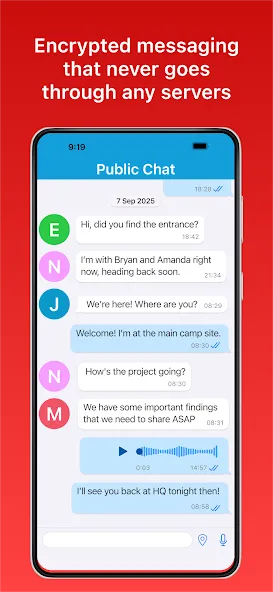
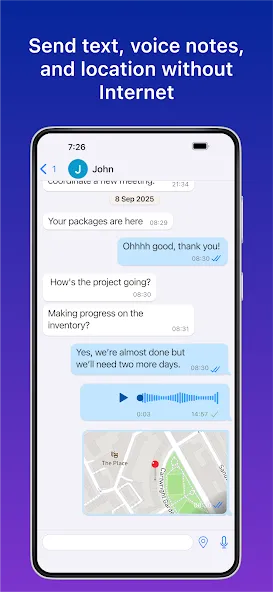
Bridgefy is a powerful offline communication tool. The app offers powerful communication features, allowing users to send messages to people nearby and connect with friends, family, and even strangers even without Wi-Fi or mobile network signal. With Bridgefy, users don't need to rely on a network signal; they can simply connect via Bluetooth to chat with friends within 100 meters. Leveraging advanced encryption technology, the app ensures that all your interactions—from sharing personal information to private conversations—are transmitted via a secure, encrypted mesh network, keeping your communications safe and worry-free.
Features:
Bluetooth Messaging:
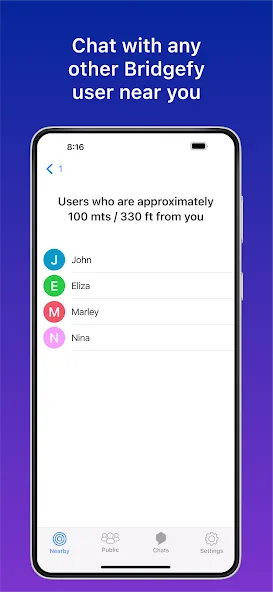
Forget about needing a signal—just use Bluetooth to chat with people who are within about 330 feet of you. Easy to set up, and you don’t even need to exchange contact info.
Broadcast to Groups:
Want to send out an update or chat with everyone nearby? Tap into the Broadcast tab to connect with all Bridgefy users within range. Keep in mind—broadcasts are visible to anyone using the app nearby.
Private, Encrypted Messages:
Whether you’re sharing personal notes or planning something in a crowd, your messages travel through encrypted, secure mesh networks for peace of mind.
No Contact List Needed:
Bridgefy automatically finds others who are using the app around you. Just open it up and see who’s there—no need to add contacts manually.
Quick Start-Up:
After your very first sign-in (where you’ll need a quick Internet connection), you’ll only need Bluetooth going forward. Grant location permissions, open the app, and you’re ready to start chatting.
Great for Emergencies & Events:
Traveling, natural disasters, rural areas—this app’s got your back when other ways of communicating fall short. Perfect for times when you’re somewhere that’s off the grid.
Pros & Cons:
Pros
3 ways to communicate offline
Only needs Bluetooth
Has a wide reach
Clean-looking interface
Cons
Offline messages won’t send or show sometimes
Can only send to Bridgefy users
FAQs:
Why is my friend not receiving my messages?
To make sure someone else can receive your Bridgefy messages, check that the following are true:That person is within 330 feet* of youYou both have the latest version of the Bridgefy appYou both have Bluetooth turned on. You both already opened Bridgefy while having access to the Internet at least once. There isn’t anything between you providing significant interference, such as large buildings *This is an approximate based on testing and Bluetooth specifications. Distance can vary depending on physical conditions, hardware devices, and other potential external factors.
Is the Bridgefy App safe to use?
Yes! We use the Signal Protocol, which is industry-leading encryption that allows you to share Bridgefy messages safely and privately. Please keep in mind that messages sent in the Broadcast section of the Bridgefy App, can be seen by all other Bridgefy users around you.
Why do you ask for access to my location services? (Android only)
Android users will see a prompt pop up when they’re first using the Bridgefy app, which asks for access to location permissions. This does not mean that we’re going to be tracking or using your location, it just means that the Android operating system requires it from us app developers that need to use the Bluetooth antenna on your phone.
Conclusion:
Bridgefy offers a simple operation that will allow you to locate people who are close to you in order to exchange information with them. Thanks to the fact that there is no need for an Internet connection after the first use, the app ensures that you are always in touch with family members or acquaintances in extreme situations.
More Information
- Size:106.91MB
- Version:4.4.94 RELEASE
- Requirements:Android 7.0+
- Package Name:me.bridgefy.main
- Signature:7606942ce8f435ca3ef533b2f827a4dc
Related topics
-
Let's make one thing clear: unfortunately, there's no one best texting app. Unless you absolutely require one or two specific features or are a real stickler for security, the best text message app will be the one that the people you want to text also use. Depending on where you are in the world, that can be iMessage, WhatsApp, Viber, Telegram, LINE, or even SMS. But if, for whatever reason, you do have a choice of which messaging app you can use—or you can convince your friends and family to make the switch—these are the six best texting apps to choose from. (Though, if I could rule the world using benevolent AIs, I'd make everyone use Signal.)
-
![Bridgefy]()
Bridgefy
-
![Eyecon Caller ID]()
Eyecon Caller ID
-
![Proton Mail]()
Proton Mail
-
![imo]()
imo
-
![W Direct]()
W Direct
-
![Black WhatsApp]()
Black WhatsApp
-
![2ndLine]()
2ndLine
-
![Ucell]()
Ucell
-
-
Nowadays, social networking apps are constantly emerging, and one of the most popular ones is the fully free chat app. This type of software not only provides high-quality calling and information transmission functions, but also has rich and diverse features and personalized settings. Whether it's text chat, voice call, video chat, or fun elements such as emojis and stickers, they can all be found in these software. The advantage of a completely free chat software is that users do not need to pay additional fees for call time or information volume. In addition, they also widely support multiple operating systems, which can meet the needs of different users. Whether communicating with family, friends, colleagues, or strangers, a fully free chat app is a convenient and efficient choice. It should be noted that when downloading any software, the source should be reliable to protect personal information security. Choose a fully free chat software that suits you, making communication more convenient and enjoyable.
-
![Bridgefy]()
Bridgefy
-
![JioJoin]()
JioJoin
-
![Dialpad]()
Dialpad
-
![Zoom Workplace]()
Zoom Workplace
-
![Call App:Unlimited Call & Text]()
Call App:Unlimited Call & Text
-
![Icall Phone Dialer]()
Icall Phone Dialer
-
![W Direct]()
W Direct
-
![2ndLine]()
2ndLine
-










Latest Updated






Popular Apps








Popular News
More+-
![Tomie Wants to Get Married Full Walkthrough, All Choices and Ending Guide]()
Tomie Wants to Get Married Full Walkthrough, All Choices and Ending Guide
2026-05-22
-
![Karryn’s Prison Gameplay Walkthrough & Strategy Guide]()
Karryn’s Prison Gameplay Walkthrough & Strategy Guide
2025-10-28
-
![Life in Santa County Game Guide & Complete Walkthrough]()
Life in Santa County Game Guide & Complete Walkthrough
2025-10-28
-
![Dreams of Desire Complete Walkthrough and Game Guide]()
Dreams of Desire Complete Walkthrough and Game Guide
2025-10-28
-
![Era Hunter Gameplay Guide & Full Walkthrough]()
Era Hunter Gameplay Guide & Full Walkthrough
2025-10-28




