

Jvdroid
Download for Android This app is available for Android only.- Category:Tools
- Rating:
- Language:English
- Updated:2026-11-17
Screenshots
Introduction
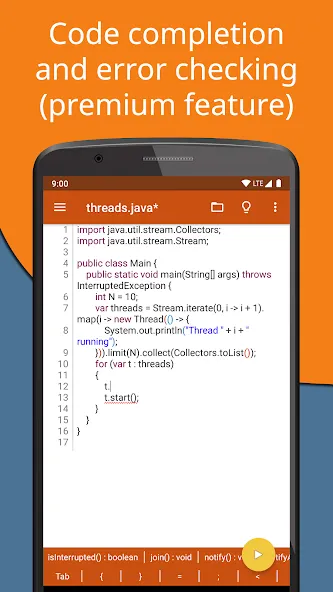
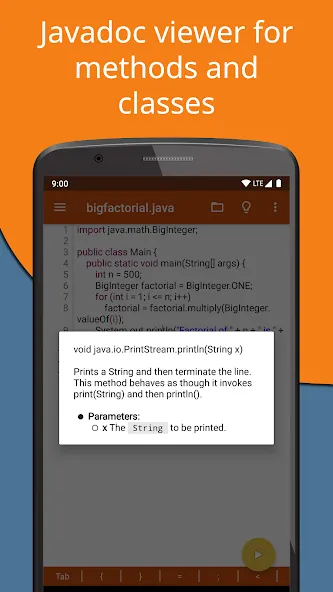
Jvdroid is a streamlined Java integrated development environment tool. It integrates a dedicated code editor, a terminal, and a lightweight file manager, enabling users to write, run, and test Android applications and Java console programs directly on their mobile devices. With Jvdroid, you can edit code, test small-scale projects, or perform quick fixes anytime, anywhere. The app also provides context-aware auto-completion and real-time error checking, highlighting problems as you type code to reduce the time needed to troubleshoot syntax errors.
Highlights:
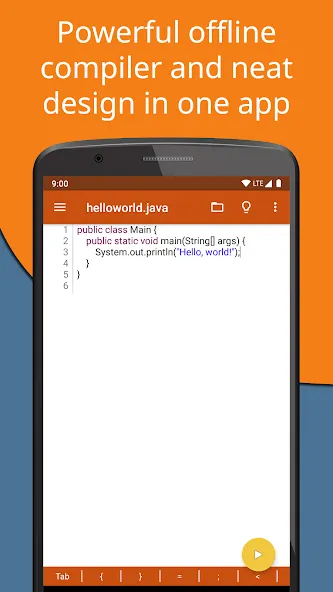
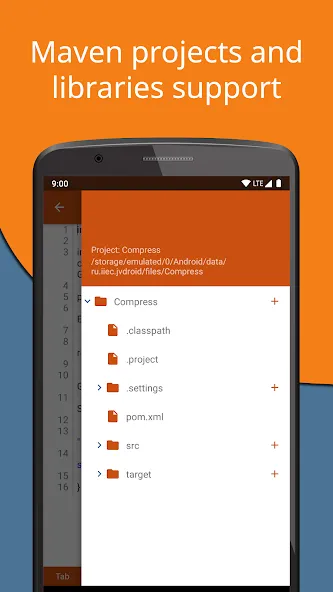
Jvdroid offers support for Maven projects and libraries, as well as compatibility with any JAR library. Plus, it can compile and run Java code from a file, similar to what you can do on a web browser. The editor allows you to create and format code, featuring a built-in formatter that makes things easier.
You can also extend the keyboard to include all symbols you may need in programming. One-click sharing to Pastebin is allowed, as well. However, a significant amount of free storage space is required for the app to run smoothly. Code prediction is also unavailable in this free version.
Compiling, creating, and editing Java code is made easy and accessible by Jvdroid. It houses the most basic necessities for Java programming, allowing users to manage code on the go. The required storage space for it to work well is quite hefty, however.
Features:
One-tap upload of snippets to Pastebin for quick sharing with others.
Optional keyboard extension that adds commonly used programming symbols for faster typing.
Ability to compile and execute Java code directly from files stored on the device.
Compatibility with standard JAR libraries so you can include external dependencies.
Support for Maven-style projects and associated libraries when a project structure is needed.
Built-in code formatter inside the editor to help keep code tidy and readable.
Requires a substantial amount of free storage space to operate smoothly.
The free edition does not include predictive code completion.
Legal information:
Busybox and OpenJDK in Jvdroid APK are licensed under GPL. Please email us for the source code.
This application is considered to be legally distributed only when downloaded from the Play Store.
Samples available in the application are free for educational usage, with the exception that they or their derivative works cannot be used in any competing products without permission.
For any clarifications regarding the restriction mentioned above, please contact us via email.
Oracle and Java are registered trademarks of Oracle and/or its affiliates.
Android is a trademark of Google Inc.
Pros & Cons:
Pros
Supports Java development environment for Android
Integrated Development Environment (IDE) with code editor, compiler, and debugger
Offers features like code completion, syntax highlighting, and error checking
Includes easy navigation tools and project management capabilities
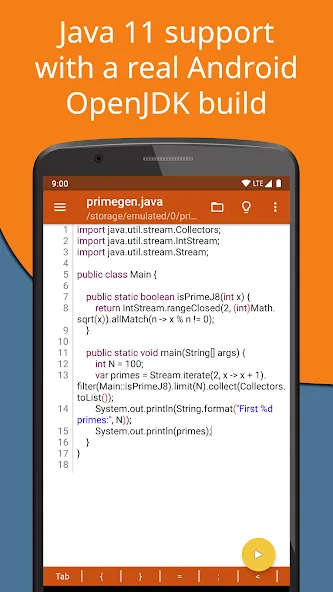
Provides support for multiple versions of Java
Cons
Some users may experience bugs or glitches while using the software
Could have limited plugin support compared to other popular IDEs
Final Words:
Assistance and community support can be sought from the dedicated support forum, which promises a commitment to helping users solve any arising issues. Jvdroid stands not only as a mobile development powerhouse but also as an emblem of innovation and efficiency in the app creation ecosystem, tailored to enhance the productivity and reach of developers worldwide.
More Information
- Size:91.47MB
- Version:2.8
- Requirements:Android 5.0+
- Package Name:ru.iiec.jvdroid
- Signature:b4f3365ba31a719f903634f3805a11a9
Related topics
-
Explore a handpicked selection of top mobile coding apps that transform your smartphone into a versatile programming hub. Whether you're a beginner diving into Python, Java, or JavaScript or a seasoned developer coding on the move, our platform offers offline-compatible tools, interactive lessons, and real-time compilers for smooth, on-the-go development. Discover apps like Termux (a Linux terminal emulator), AIDE (Android app development), and Pydroid 3 (Python coding), all optimized for touchscreen interfaces and cross-platform use. Utilize built-in debugging tools, version control systems, and cloud synchronization, alongside step-by-step tutorials and an engaged developer community. Ideal for web development, app creation, and scripting, these SEO-optimized coding apps ensure effortless discovery with keyword-rich descriptions and user-friendly interfaces. Start coding today and take your programming skills to the next level - anytime, anywhere!
-
![Jvdroid]()
Jvdroid
-
![WebCode]()
WebCode
-
![Sololearn]()
Sololearn
-
![Mimo]()
Mimo
-
![Sketchware Projects]()
Sketchware Projects
-
![Coddy]()
Coddy
-
![Pydroid 3]()
Pydroid 3
-
![ArduinoDroid]()
ArduinoDroid
-







Latest Updated







Popular Apps








Popular News
More+-
![Tomie Wants to Get Married Full Walkthrough, All Choices and Ending Guide]()
Tomie Wants to Get Married Full Walkthrough, All Choices and Ending Guide
2026-05-22
-
![Karryn’s Prison Gameplay Walkthrough & Strategy Guide]()
Karryn’s Prison Gameplay Walkthrough & Strategy Guide
2025-10-28
-
![Life in Santa County Game Guide & Complete Walkthrough]()
Life in Santa County Game Guide & Complete Walkthrough
2025-10-28
-
![Dreams of Desire Complete Walkthrough and Game Guide]()
Dreams of Desire Complete Walkthrough and Game Guide
2025-10-28
-
![Era Hunter Gameplay Guide & Full Walkthrough]()
Era Hunter Gameplay Guide & Full Walkthrough
2025-10-28




