

G-Form Tools
Download for Android This app is available for Android only.- Category:Tools
- Rating:
- Language:English
- Updated:2026-11-17
Screenshots
Introduction
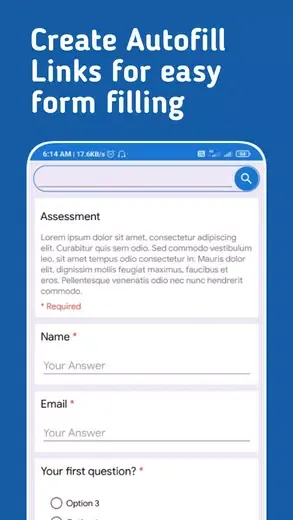
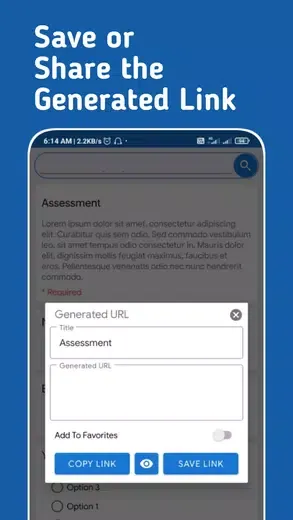
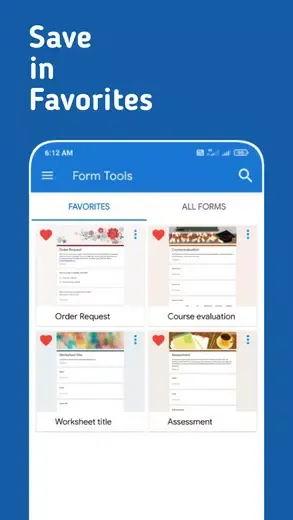
G-Form Tools is a third-party utility app designed for Android devices. This application offers powerful features and a user-friendly interface, enabling users to create and save Google Forms links with autofill functionality, making form filling easier and faster. With G-Form Tools, you can store an unlimited number of Google Form links, edit the auto-fill data, and quickly search through your saved forms. Please note that this app is intended solely for generating "auto-fill" links; it cannot be used to create or edit the Google Forms themselves.
Highlights:
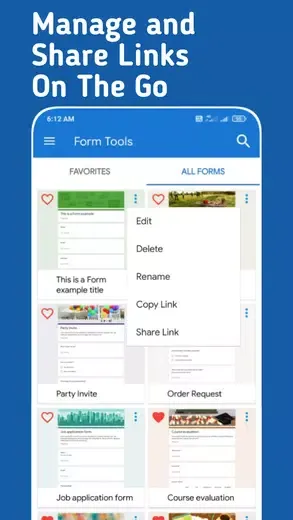
Unlimited Link Storage
Keep as many Google Form links as you need all in one place. No more rooting through emails or tabs to find that one form you use every day.
Create Autofilled Links
Make custom links that remember your usual answers. Set it up once and watch the app handle all that repeat info for you every time.
Edit Saved Autofill Data
Change your usual answers when things switch up. Just tap and update the autofill info for any saved link.
Features:
Quick Search for Forms
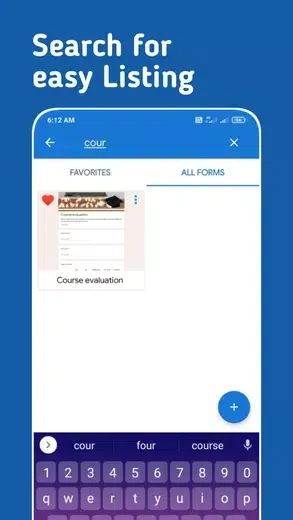
Got a bunch of forms? The built-in search helps you jump right to the one you need, fast.
Open in Your Favorite Browser
Launch any form in the browser you like best—choose your go-to web browser right in the settings.
Supports Sign-In-Required Forms
Need to handle Google Forms that make you sign in or upload files? No problem. The app’s got you covered even for those.
Great for Frequent Submissions
If you’re submitting the same Google Form with just a few tweaks over and over, this tool does the repetitive stuff for you.
Pros & Cons:
Pros
Creates and edits Google Forms from Android devices
Shares separate links with collaborators and respondents
Exports responses as CSV files and charts as images
Provides offline access to saved data
Cons
Text-response questions may be missing from summary views
Changelog:
Migrated to Flutter.
Added Dark/Light mode support.
Added Support for Multi-Page Forms.
Some UI Improvements.
Added Premium Option.
Final Words:
G-Form Tools is useful for people who need to submit data using the same Google Form link multiple times with some constant values. The app creates a link that autofills common questions, saving time by skipping the process of filling in the same information repeatedly. However, it is important to note that this app is not capable of creating new Google Forms or editing details and questions of a Google Form. It can only be used to create and share autofill links of existing Google Forms. Also, Google Forms with multiple sections can only be navigated up to one section.
More Information
- Size:44.37MB
- Version:2.0.6
- Requirements:Android
- Package Name:studio.awntech.gformtools
- Signature:f77ea505cb2fa2f85c289d3a70ae6b64
Related topics
-
Transform your mobile device into a powerhouse of efficiency with these handpicked essential tools. Whether you need professional-grade photo editing, seamless file organization, smart task management, or real-time weather updates, our curated selection of premium apps delivers unbeatable performance. Streamline your daily routine, automate repetitive tasks, and boost your productivity with intuitive interfaces and powerful features. Designed for both professionals and casual users, these editor-approved applications will revolutionize how you work and play. Don't settle for an ordinary phone - upgrade your digital experience today and unlock your device's full potential!
-
![G-Form Tools]()
G-Form Tools
-
![Govee Home]()
Govee Home
-
![TCGplayer]()
TCGplayer
-
![Android TV Home]()
Android TV Home
-
![Smart TV app]()
Smart TV app
-
![Android TV Launcher]()
Android TV Launcher
-
![File Cleaner–Booster&Cleanup]()
File Cleaner–Booster&Cleanup
-
![Skin Maker for Minecraft]()
Skin Maker for Minecraft
-
-
With the development of mobile hardware and software, many practical tool software have emerged, covering a wide range of aspects and becoming a good helper for everyone in work and life. Today, the editor provides you with a list of useful tool software downloads. These tools are not particularly complex types, and after reading them, everyone can quickly learn how to use them. Proper use can bring great convenience to life and work.
-
![G-Form Tools]()
G-Form Tools
-
![ITS App]()
ITS App
-
![Govee Home]()
Govee Home
-
![Offline Notepad]()
Offline Notepad
-
![FEB]()
FEB
-
![TCGplayer]()
TCGplayer
-
![Android TV Home]()
Android TV Home
-
![Smart TV app]()
Smart TV app
-









Latest Updated





Popular Apps








Popular News
More+-
![Tomie Wants to Get Married Full Walkthrough, All Choices and Ending Guide]()
Tomie Wants to Get Married Full Walkthrough, All Choices and Ending Guide
2026-05-22
-
![Karryn’s Prison Gameplay Walkthrough & Strategy Guide]()
Karryn’s Prison Gameplay Walkthrough & Strategy Guide
2025-10-28
-
![Life in Santa County Game Guide & Complete Walkthrough]()
Life in Santa County Game Guide & Complete Walkthrough
2025-10-28
-
![Dreams of Desire Complete Walkthrough and Game Guide]()
Dreams of Desire Complete Walkthrough and Game Guide
2025-10-28
-
![Era Hunter Gameplay Guide & Full Walkthrough]()
Era Hunter Gameplay Guide & Full Walkthrough
2025-10-28




