
File Cleaner–Booster&Cleanup
Download for Android This app is available for Android only.- Category:Tools
- Rating:
- Language:English
- Updated:2026-11-16
Screenshots
Introduction
File Cleaner–Booster&Cleanup is an excellent mobile management tool. This application integrates multiple functions such as file management, phone cleaning, device cooling, virus scanning, and battery optimization, allowing users to easily free up storage space and improve device performance. With File Cleaner–Booster&Cleanup, users can organize files by category, clear out junk files and caches, and efficiently locate and manage their data to enhance phone speed. In addition, it can stabilize CPU speed, extend battery life, protect your privacy with app lock, and support file sharing via Wi-Fi or hotspot.
Highlights:
Antivirus,virus remover
Big File Scan and clean
Photo Compress&Video Compress
Find out hidden images
Similar photo cleanup
Find out hidden videos
Blurry photo cleanup
Non-photo Cleanup,Screenshot Cleanup
Features:
Cleanup Report
Provide junk data summary for you
WhatsApp & TikTok & Facebook Scan
Scan junk files in social media app
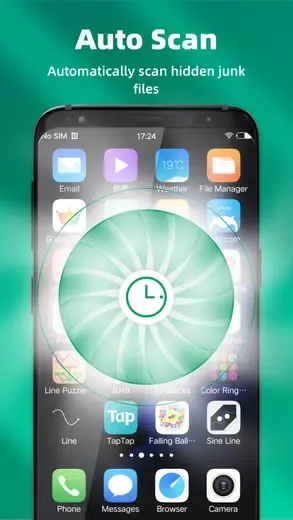
Deep Scan
Help to deep scan hidden files on your phone
File Manager
You can view or manage all files on your device, we also provide individual features for Large Files, Blurred Images, Download Files, Audio Files and Video Files.
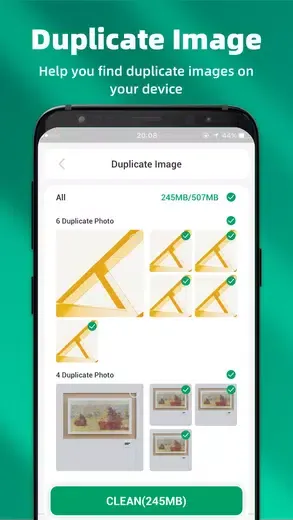
Duplicate Image
Help you find all similar images and pick the best quality images for you.
Large Files
Easy to find large files on your device
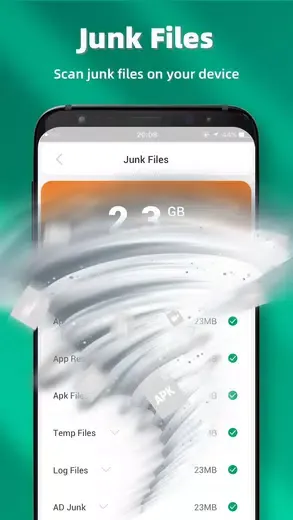
Junk Files
Help to scan junk files, residual files and cache files. (Don’t worry about it, we will not remove your personal files)
App Manager
Quick to find & uninstall unused apps

Tips and Tricks:
Efficient Junk Removal and Storage Optimization
With File Cleaner–Booster&Cleanup, you can quickly declutter your device by identifying and deleting large or unused files and unnecessary application caches. By doing so, it helps reclaim valuable storage space, allowing your phone to function more efficiently. Its duplicate file remover feature scans for redundant photos, videos, and documents stored on your Android device, enabling you to delete them effortlessly and enhance space utility.
App Management Made Easy
File Cleaner–Booster&Cleanup features an app manager that provides a comprehensive view of installed applications, allowing you to identify those that consume excessive space or remain unused for extended periods. It also supports the removal of large apps or outdated APK files, ensuring that your smartphone remains streamlined and optimized for daily use.
Real-Time Battery Monitoring
Another significant advantage of File Cleaner–Booster&Cleanup is its battery monitoring function, which offers real-time data on battery status, temperature, and health. This feature helps you keep track of your device's power usage and maintain its performance over time.
Benefits:
File Manager – Manage the most types of files on your device, and help to free up more space.
Effective Phone Booster & Junk Cleaner – Not enough memory space? Clean up your storage space and junk files to boost your phone with one tap!
Battery Saver – Your phone battery consumption is too fast? Detect and disable draining Apps now!
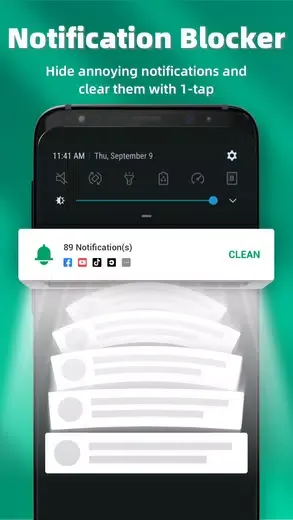
Notification cleaner – Block notifications and clear them in one box

Conclusion:
In addition, this optimization tool can also help you find hidden videos that take up a lot of space without being useful. Download the File Cleaner–Booster&Cleanup APK to keep your Android device organized and optimized. This tool is very useful, especially for anyone who stores countless images or videos on their smartphones or tablets.
More Information
- Size:20.34MB
- Version:4.1.1
- Requirements:Android 7.0+
- Package Name:file.space.clean.junk.boost
- Signature:c8d50170565e3a279b4078289ee65823
Related topics
-
Discover our File Management Apps hub! Here, you can explore essential tools like Google Drive for cloud storage, Dropbox for simple file sharing, and File Commander for managing files directly on your device. Easily organize and access your files across your phone, or tablet. Our platform is designed to help you quickly find reliable apps to streamline your digital file management.
-
![File Cleaner–Booster&Cleanup]()
File Cleaner–Booster&Cleanup
-
![KeepSafe]()
KeepSafe
-
![Video & Music Downloader]()
Video & Music Downloader
-
![Filelinked]()
Filelinked
-
![FrostWire Downloader & Player]()
FrostWire Downloader & Player
-
![Amazon Photos]()
Amazon Photos
-
![XShare- Transfer & Share files]()
XShare- Transfer & Share files
-
![UserUpload]()
UserUpload
-
-
Transform your mobile device into a powerhouse of efficiency with these handpicked essential tools. Whether you need professional-grade photo editing, seamless file organization, smart task management, or real-time weather updates, our curated selection of premium apps delivers unbeatable performance. Streamline your daily routine, automate repetitive tasks, and boost your productivity with intuitive interfaces and powerful features. Designed for both professionals and casual users, these editor-approved applications will revolutionize how you work and play. Don't settle for an ordinary phone - upgrade your digital experience today and unlock your device's full potential!
-
![File Cleaner–Booster&Cleanup]()
File Cleaner–Booster&Cleanup
-
![PPI Calc]()
PPI Calc
-
![Game Controller Tester]()
Game Controller Tester
-
![Free Adblocker Browser:Adblock]()
Free Adblocker Browser:Adblock
-
![RawBT]()
RawBT
-
![Floating Apps]()
Floating Apps
-
![Emojimix wasticker]()
Emojimix wasticker
-
![Private Photo Vault]()
Private Photo Vault
-











Latest Updated







Popular Apps








Popular News
More+-
![Tomie Wants to Get Married Full Walkthrough, All Choices and Ending Guide]()
Tomie Wants to Get Married Full Walkthrough, All Choices and Ending Guide
2026-05-22
-
![Karryn’s Prison Gameplay Walkthrough & Strategy Guide]()
Karryn’s Prison Gameplay Walkthrough & Strategy Guide
2025-10-28
-
![Life in Santa County Game Guide & Complete Walkthrough]()
Life in Santa County Game Guide & Complete Walkthrough
2025-10-28
-
![Dreams of Desire Complete Walkthrough and Game Guide]()
Dreams of Desire Complete Walkthrough and Game Guide
2025-10-28
-
![Era Hunter Gameplay Guide & Full Walkthrough]()
Era Hunter Gameplay Guide & Full Walkthrough
2025-10-28




