
Map Marker
Download for Android This app is available for Android only.- Category:Nav
- Rating:
- Language:English
- Updated:2026-11-18
Screenshots
Introduction
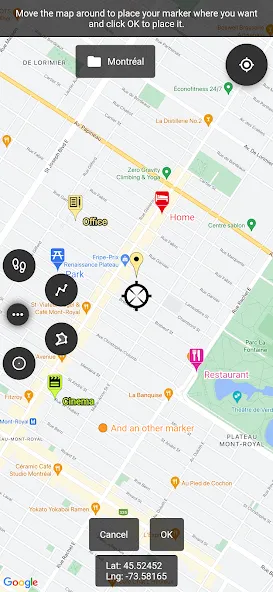
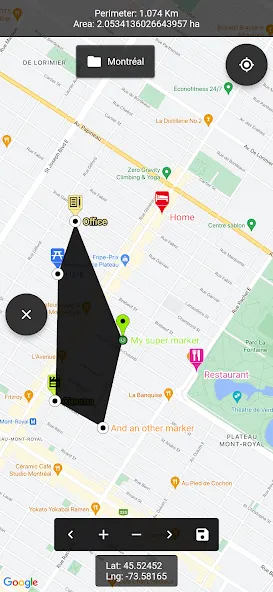
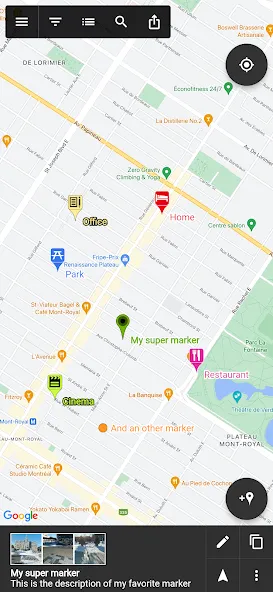
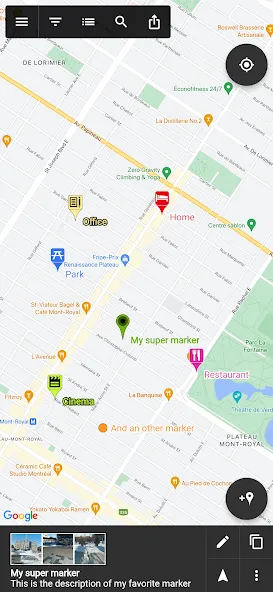
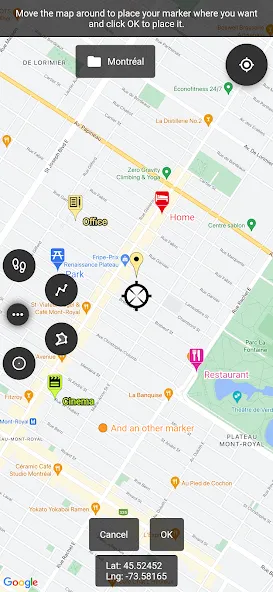
Map Marker is a highly powerful navigation application. It allows users to view nearby locations offline and supports the use of map resources from various providers, including Google Maps. Users can add custom markers to the map and organize them into folders. The app also features a built-in compass, making it easy to locate specific points. Additionally, the tool can measure the distance between two locations and allows users to define areas—such as polygons or circles—to calculate their perimeter and surface area. Users can also share or export their markers, with the exported files being compatible with other mapping applications.
Functions
Offline Maps: Import offline map files from external sources to view maps even when you are offline.
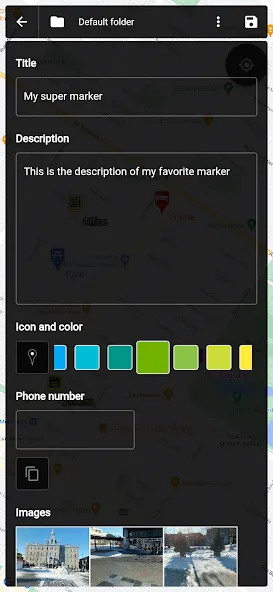
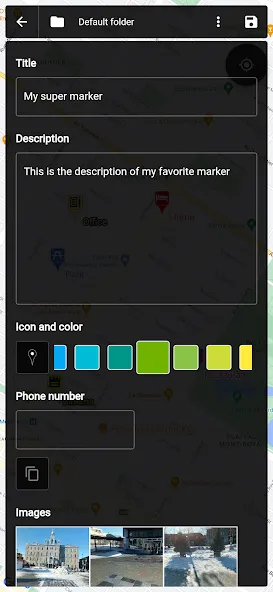
Customizable Markers: Assign a title, description, date, color, icon, and image to each marker, and easily adjust their positions on the map.
Organization: Group markers into different folders for better management.
Easy Browsing and Organization: Access and manage your markers efficiently via a searchable list.
Search: Find locations from various sources and create new markers directly from the search results.
Compatibility with Other Map Apps: Open the location of any marker in other mapping applications installed on your device.
Built-in Compass: Use the integrated compass to navigate toward your marked locations.
GPS Coordinate Copying: View and copy a marker’s GPS coordinates to your clipboard with a single click.
Address Display: View the address associated with a marker (if available).
Path Measurement: Create paths and easily measure the distance between points.
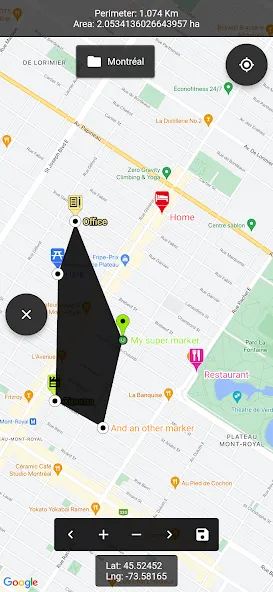
Polygon Area Measurement: Define polygonal areas and calculate their perimeter and surface area.
Circular Area Measurement: Define circular areas and calculate their perimeter and surface area.
Pros and Cons
Pros:
User-friendly interface.
Customizable marker icons and colors.
Support for adding multiple markers to the map.
Multiple map view options, including satellite, terrain, and street views. Offers the option to add information windows—containing text, images, and links—to markers.
Supports the export and import of marker data for backup and sharing purposes.
Cons:
The free version has limited features and includes advertisements.
Some users may find the pricing for the premium version too high.
FAQs
How do I import markers from KML, KMZ, or CSV files?
Tap the button on the left side of the main action bar to open the side drawer. Tap "Map Files" at the top to access the file options menu. Select "Import Markers," choose the file you wish to import, and—if the system does not automatically detect the format—select the appropriate import format. Wait for the import process to complete.
How do I open existing map files from the cloud?
Tap the button on the left side of the main action bar to open the side drawer. Select the "Open Cloud Map" option, then choose the cloud-based map you wish to open.
How do I export/share my markers?
Tap the "Share" button (the last button) on the main action bar. Select "All Markers and Folders," choose your preferred export format, wait for the export to finish, and then select whether to save or share the file.
Conclusion
Map Marker allows you to place markers on a map—whether online or offline—using Google Maps and other map resources, thereby enhancing your navigation experience.
More Information
- Size:32.85MB
- Version:3.21.1-861
- Requirements:Android
- Package Name:com.exlyo.mapmarker
- Signature:2d9248676b3804ccaa1e65406fcf885f
Related topics
-
These must-have travel apps bring global adventures to your phone, making trip planning effortless and budget-friendly. Compare flights and hotels in seconds, access offline maps and expert city guides, or master key phrases in foreign languages. Read authentic tips from locals to uncover hidden gems before you arrive. Whether you're dreaming up future journeys or navigating current travels, these tools transform wanderlust into reality. With exclusive free premium features, your digital passport to discovery is ready - download now and let your next unforgettable journey begin!
-
![Map Marker]()
Map Marker
-
![Fake GPS Go]()
Fake GPS Go
-
![Where is my Train]()
Where is my Train
-
![Agoda]()
Agoda
-
![Moovit]()
Moovit
-
![GPS Speedometer]()
GPS Speedometer
-
![Headunit Reloaded]()
Headunit Reloaded
-
![Grab Driver]()
Grab Driver
-
-
Nowadays, with the popularity of smartphones, navigation software has become an essential tool for people's travel. Among numerous Android mobile navigation software, some are highly regarded for providing users with convenient navigation services. These software not only have accurate positioning functions, but also can update road condition information in real time, providing users with the best driving route. At the same time, they also offer multiple travel options such as walking, public transportation, self driving, etc., and can intelligently plan routes based on user needs. In addition, these navigation software also have voice navigation function, making it convenient for users to obtain navigation guidance at any time while driving. In short, Android mobile navigation software can provide users with comprehensive route planning services, making travel more convenient and safe.
-
![Map Marker]()
Map Marker
-
![Fake GPS Go]()
Fake GPS Go
-
![Chalo]()
Chalo
-
![Moovit]()
Moovit
-
![GPS Speedometer]()
GPS Speedometer
-
![Wanderlog]()
Wanderlog
-
![Flightradar24 Flight Tracker]()
Flightradar24 Flight Tracker
-
![Headunit Reloaded]()
Headunit Reloaded
-
-
Accurate navigation software can not only help users quickly find their destination, but also assist customers in obtaining real-time traffic information and avoiding congested roads. So which navigation software is the most accurate? In order to help netizens better choose the most accurate navigation software, the editor has compiled a ranking list of navigation apps. Through these navigation apps, users can easily access practical information such as gas stations, restaurants, and parking around their destination, making it easier to plan their daily travel plans. At the same time, these navigation apps also provide accurate route planning and navigation services, allowing users to rely on them with confidence to complete accurate navigation.
-
![Map Marker]()
Map Marker
-
![Fake GPS Go]()
Fake GPS Go
-
![Chalo]()
Chalo
-
![BlaBlaCar]()
BlaBlaCar
-
![GPS Speedometer]()
GPS Speedometer
-
![Flightradar24 Flight Tracker]()
Flightradar24 Flight Tracker
-
![Headunit Reloaded]()
Headunit Reloaded
-
![HuntWise]()
HuntWise
-








Latest Updated
Popular Apps






Popular News
More+-
![Tomie Wants to Get Married Full Walkthrough, All Choices and Ending Guide]()
Tomie Wants to Get Married Full Walkthrough, All Choices and Ending Guide
2026-05-22
-
![Karryn’s Prison Gameplay Walkthrough & Strategy Guide]()
Karryn’s Prison Gameplay Walkthrough & Strategy Guide
2025-10-28
-
![Life in Santa County Game Guide & Complete Walkthrough]()
Life in Santa County Game Guide & Complete Walkthrough
2025-10-28
-
![Dreams of Desire Complete Walkthrough and Game Guide]()
Dreams of Desire Complete Walkthrough and Game Guide
2025-10-28
-
![Era Hunter Gameplay Guide & Full Walkthrough]()
Era Hunter Gameplay Guide & Full Walkthrough
2025-10-28




