

Solid Explorer File Manager
Download for Android This app is available for Android only.- Category:Productivity
- Rating: 4.4
- Language:English
- Updated:2024-12-25
Screenshots
Introduction
Solid Explorer File Manager is an easy-to-use file explorer to manage all the files on your device's memory or SD card in such a simple way that you'll never turn to another app to explore your Android. The interface is specially designed to be easy to use. Like other file managers, Solid Explorer File Manager incorporates a main shortcut to all its options from the folder /storage/emulated/0, from which you can explore all the subfolders on your Android. On the other hand, it has the advantage of locating and extracting all your multimedia files into sections for photos, music, videos, and apps, so you can have your most relevant files on hand.
Highlights:
Material Design!
Two independent panels serving as file browsers.
Rich customization options: icons sets, color schemes, themes.
Drag and Drop inside and between panels.
FTP, SFTP, WebDav, SMB/CIFS clients.
Ability to read and extract ZIP, 7ZIP, RAR and TAR archives, even encrypted.
Ability to create password protected ZIP and 7ZIP archives.
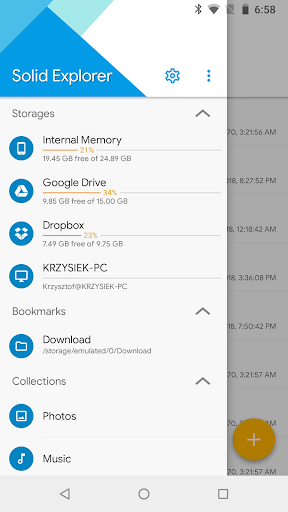
Cloud file manager: Dropbox, Box, OneDrive, Google Drive, Sugarsync, Copy, Mediafire, Owncloud, Yandex.
Root access makes Solid Explorer a fully functional root explorer.
Extensibility: more features in separate plugins available in Google Play.
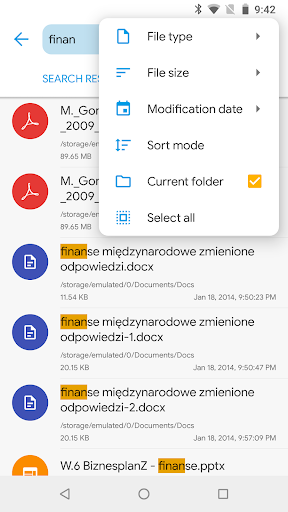
Indexed search finds your files in a couple of seconds.
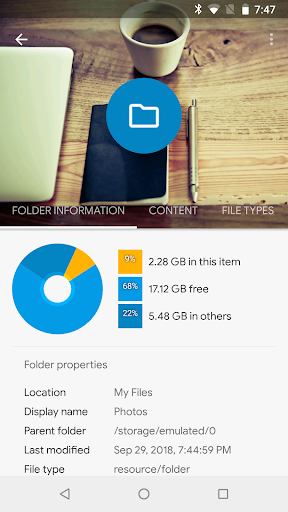
Detailed file information with storage usage statistics.
Batch rename: change names of multiple files at once using regular expressions and variables.
Useful tools: hiding unwanted folders, FTP Server (plugin), bookmarks, Chromecast support, media browser.
Features:
Organize and manage files easily
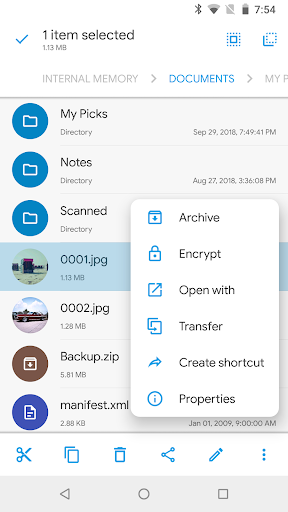
As mentioned, the main feature of Solid Explorer File Manager is to help users manage their files efficiently. The files can include images, text, sound, and a lot of other content. The processing operations in this application are also greatly simplified, suitable for users who do not have too much knowledge about technology.
Moreover, you can also use this application to create your own folders or move files into different folders for intuitive operation next time. At the same time, you can also perform operations such as adding, editing, and deleting any file. In addition, use the available search icon to shorten the search time for the files you want.
Analyze device memory
The device memory analysis feature available in Solid Explorer File Manager is used by many people at the moment. Although it does not possess specialized analysis algorithms, the results after analysis are enough to meet the needs of many users. Specifically, the application will display information about the percentage of space that each folder takes up as well as lists of the largest files. Hopefully, this feature will be upgraded in the future to give more optimal results.
Organize remote folders
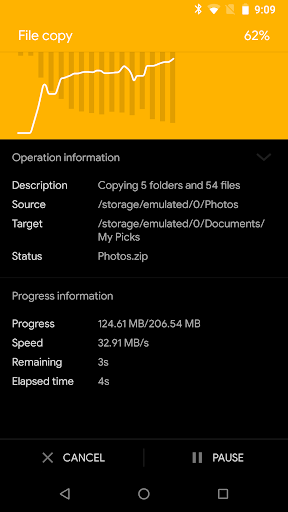
This is one of the features that make this application stand out from other competitors. Through Solid Explorer File Manager, users can easily organize remote folders through available network protocols. As a result, you can organize or organize your files anytime, anywhere without necessarily being in the same location. Besides, the operation is also set up very simply. You can do drag and drop from one file to another without any delay.
Advanced security
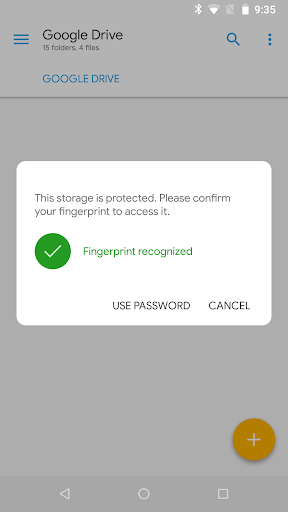
In the latest updates, Solid Explorer File Manager has integrated many different security protocols to ensure that users’ data is always safe. Now you can perform password protection of your files and folders. For some mobile devices with a built-in fingerprint sensor, it is recommended to use it to unlock files for added security and without taking too long to enter a password. In general, you can choose any security protocol you want in this game to ensure the safety of your data.
User-friendly, customizable interface
Solid Explorer File Manager owns a friendly and modern interface with minimalist design lines. Here, you can see the interface divided into two windows with different features. This is quite convenient, it allows users to manipulate and drag and drop between items more quickly. Besides, you can also customize the interface of the application according to your own preferences. Includes editing icons, colors, and themes. Thanks to that, you will not get bored when using this application for a long time.
Advantages:
The content provided is related to file storage and management of basic information about users with a single application. Ensure security and enjoy a safe time.
Discover the many changes in the updated versions released by the system. The long period of launching and recording reviews helps us improve the app’s performance effectively.
Add multiple new files to the same space without worrying about sorting or editing. Users are free to store and organize the information they want in multiple folders to manage them better.
Faced with security risks, we build a code system sure, giving users more peace of mind when storing files. Various types of passwords are applied to help you tailor your choice accordingly.
Other activities are recorded during the experience, such as managing all files stored in the cloud or network hard drives. Operations for moving files are accepted.
Conclusion:
In conclusion, the Solid Explorer File Manager stands out as a robust and feature-rich file management application. Its intuitive design, coupled with a vast array of features, makes it a top choice for users seeking a comprehensive file management solution. However, developers could further improve the app by addressing the FTP server issue and considering the addition of features suggested by users.
More Information
- Size:38.05MB
- Version:2.8.56
- Requirements:Android
- Votes:592
Related Versions
-
Download
Solid Explorer File Manager APK
Version:2.8.63Size:29.01MB
-
 Download
Version:3.1.3Size:32.8MB
-
 Download
Version:3.4.9Size:50.2MB
-
 Download
Version:3.5.12Size:29.3MB
-
 Download
Solid Explorer File Manager Mod
Version:v2.8.58Size:40MB
Related topics
-
Discover our File Management Apps hub! Here, you can explore essential tools like Google Drive for cloud storage, Dropbox for simple file sharing, and File Commander for managing files directly on your device. Easily organize and access your files across your phone, or tablet. Our platform is designed to help you quickly find reliable apps to streamline your digital file management.
-
![Espacio]()
Espacio
-
![Terabox]()
Terabox
-
![Easeus Mobisaver]()
Easeus Mobisaver
-
![MediaConverter]()
MediaConverter
-
![OPPO Clone Phone]()
OPPO Clone Phone
-
![Zender India]()
Zender India
-
![Send Anywhere]()
Send Anywhere
-
![Xender]()
Xender
-
-
Feeling that there aren’t enough hours in the day? That you’re fighting a losing battle with your agenda? That each time you look up from your desk another year has rolled by? Well don’t worry, you’re not alone, and in today’s hyperconnected world, people are busier than ever before. On Android, there are countless productivity apps to help take control of your time and make your work more efficient. From a simple plugin for Chrome to a full-fledged app, picking the right productivity apps on Android can mean the difference between having a clear to-do list at the end of the day or having it overflowing with missed deadlines and projects that are off schedule. Productivity apps aren’t just about work, though. Using a productivity app in your personal life can keep you on top of deadlines for vacations, home repairs, and other family responsibilities.
-
![Home Design 3D]()
Home Design 3D
-
![iScanner: PDF Scanner App Free]()
iScanner: PDF Scanner App Free
-
![QuickSell]()
QuickSell
-
![Microsoft Outlook Lite]()
Microsoft Outlook Lite
-
![Google Slides]()
Google Slides
-
![S Note]()
S Note
-
![Add-On: Wiko]()
Add-On: Wiko
-
![Inkpad Notepad]()
Inkpad Notepad
-
-
File Manager offers both graphical and command-line interfaces, allowing users to efficiently organize and control files and directories on their phone. With a file manager, users can perform a wide range of tasks, including creating, renaming, moving, copying, and deleting files and folders. Additionally, it enables users to view file properties, access content, and modify file permissions as needed. Advanced features may also include cloud storage integration, file compression, and secure encryption, enhancing file accessibility and management on mobile devices.
-
![Espacio]()
Espacio
-
![Terabox]()
Terabox
-
![Easeus Mobisaver]()
Easeus Mobisaver
-
![MediaConverter]()
MediaConverter
-
![Zender India]()
Zender India
-
![Send Anywhere]()
Send Anywhere
-
![Xender]()
Xender
-
![Zapya]()
Zapya
-

















Latest Updated






Popular Apps






Popular News
More+-
![Tomie Wants to Get Married Full Walkthrough, All Choices and Ending Guide]()
Tomie Wants to Get Married Full Walkthrough, All Choices and Ending Guide
2026-05-22
-
![Karryn’s Prison Gameplay Walkthrough & Strategy Guide]()
Karryn’s Prison Gameplay Walkthrough & Strategy Guide
2025-10-28
-
![Life in Santa County Game Guide & Complete Walkthrough]()
Life in Santa County Game Guide & Complete Walkthrough
2025-10-28
-
![Dreams of Desire Complete Walkthrough and Game Guide]()
Dreams of Desire Complete Walkthrough and Game Guide
2025-10-28
-
![Era Hunter Gameplay Guide & Full Walkthrough]()
Era Hunter Gameplay Guide & Full Walkthrough
2025-10-28




