

Any.do
Download for Android This app is available for Android only.- Category:Tools
- Rating: 4.9
- Language:English
- Updated:2026-09-08
Screenshots
Introduction
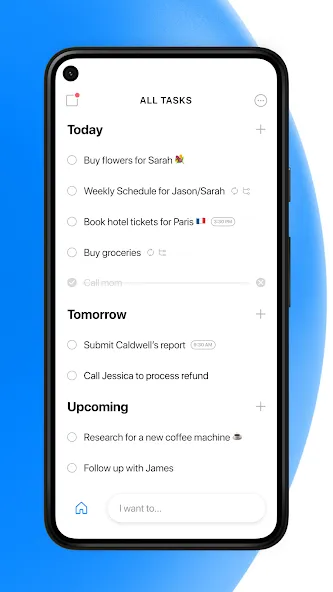
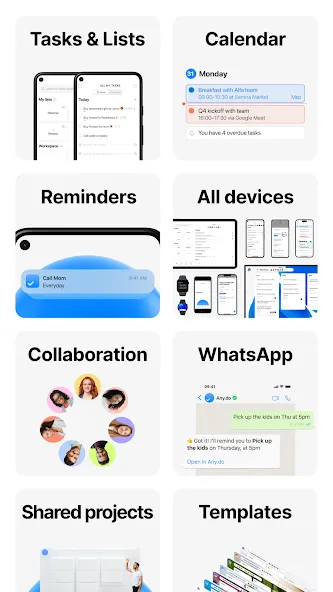
Any.do is an office application for Android devices. Using this application can comprehensively improve user work efficiency. It allows you to set reminders, schedule meetings, share lists, accurately assign tasks, and integrate with your phone's calendar. Detailed action plans are generated after task creation. The software supports drag-and-drop control, and you can freely paste notes. It features a modern interface for a better user experience. This version also supports external keyboards and provides timely updates on work status.
Features
Set reminders to better schedule your appointments.
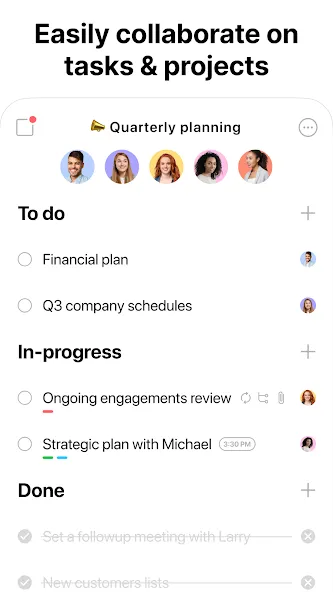
Collaborate using lists shared with other users and assign tasks.
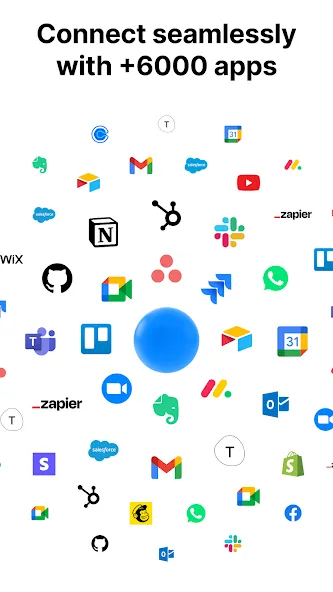
Sync with Google Calendar, Facebook Events, Outlook, and any other calendar.
Create post-meeting tasks and action plans.
Create reminders via SMS or voice messages.
Control the app with drag-and-drop functionality.
Add files and documents from your smartphone, Google Drive, or Dropbox.
Notepad.
Lists.
Blanks for pasting sticky notes or sticky notes.
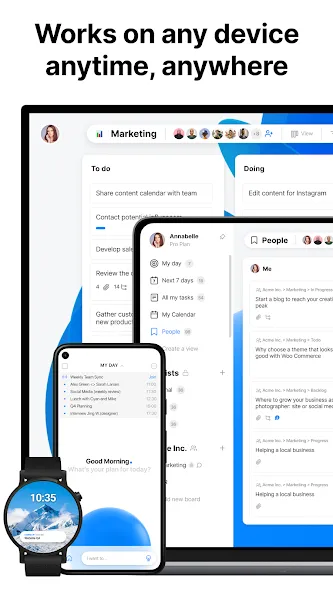
Real-time syncing between mobile, desktop, web, and tablet apps.

Advantages and disadvantages
Pros:
Simple and elegant user interface that enhances user experience.
Efficient task management through drag-and-drop functionality.
Versatile task addition methods (typing and voice dictation).
Customizable reminders to ensure you never miss a task.
Cons:
Limited advanced features compared to some competitor apps.
Voice recognition may not always be 100% accurate.
Version Log
What's New?
Workspace tasks in calendar – You can now view your assigned workspace tasks in your calendar
Update status – You can now mark a workspace task directly from my day
External keyboard support – Any.do now supports connecting your android tablet to an external keyboard
Redesigned Calendar – All new calendar design
Update status – Mark workspace tasks as completed directly from My day
User comments
I really like this app!! It does what it says it will do, important dates, appointments, ad-hoc shopping lists, last minute meetings, Any.do handles it!! If like me, your a tad disorganised, then this app will help develop good time management. It does take a little getting used to, but it's not long before you have it the way you want it!! Well, after a long absence Im back to Any.Do!! I dont have a PC, (desk or laptop) nor a Tablet. Just my phone. And Ive taken up the free 7 day trial offer.
Any.do is a very useful productivity app. The interface is clean and easy to use. I can organize tasks, set reminders, and manage my daily schedule efficiently. The synchronization across devices works well and helps me stay productive. Overall, a reliable app for task management and planning.
haven't used it too much, but I can dig it. the lat your is straightforward and the font selection is pop leasing to my eye. in the end, I can't say that it is any better at tasking than other options, but if you need a switch up from your norma, this is good enough to be seriously considered. great job, devs!
Summarize
Any.do is a versatile productivity app that helps over 40 million users manage their tasks and schedules effectively. Featuring an all-in-one platform, it integrates to-do lists, reminders, and calendar functionalities, allowing seamless organization. Users can set various types of reminders, collaborate on tasks, and sync with multiple calendar services. The app’s intuitive design facilitates easy task management through drag-and-drop features and real-time updates. Additionally, Any.do supports various integrations and offers specialized tools for grocery shopping, making it an essential tool for personal and team productivity.
More Information
- Size:56.49MB
- Version:5.21.0.0
- Requirements:Android 2.3+
- Votes:350
- Package Name:com.anydo
- Signature:e8af7b38a8831c97626c339228f83e3a
Related Versions


Related topics
-
Utility apps are indispensable in our lives, making our daily routines more convenient. To help you find these apps more easily, this site has created a collection. This collection brings together a series of practical tools covering various aspects of life, work, and education, meeting all your needs. What are you waiting for? Try these apps now and make your life easier!
-
![Color Effect]()
Color Effect
-
![Oxford Dict of English & Thes]()
Oxford Dict of English & Thes
-
![Any.do]()
Any.do
-
![Find My Lost Phone!]()
Find My Lost Phone!
-
![Framaroot]()
Framaroot
-
![Device Id Changer]()
Device Id Changer
-
![Eye Color Studio]()
Eye Color Studio
-
![CPU-Z]()
CPU-Z
-
-
Transform your mobile device into a powerhouse of efficiency with these handpicked essential tools. Whether you need professional-grade photo editing, seamless file organization, smart task management, or real-time weather updates, our curated selection of premium apps delivers unbeatable performance. Streamline your daily routine, automate repetitive tasks, and boost your productivity with intuitive interfaces and powerful features. Designed for both professionals and casual users, these editor-approved applications will revolutionize how you work and play. Don't settle for an ordinary phone - upgrade your digital experience today and unlock your device's full potential!
-
![Color Effect]()
Color Effect
-
![Oxford Dict of English & Thes]()
Oxford Dict of English & Thes
-
![Any.do]()
Any.do
-
![Find My Lost Phone!]()
Find My Lost Phone!
-
![Framaroot]()
Framaroot
-
![Device Id Changer]()
Device Id Changer
-
![Eye Color Studio]()
Eye Color Studio
-
![CPU-Z]()
CPU-Z
-
-
With the development of mobile hardware and software, many practical tool software have emerged, covering a wide range of aspects and becoming a good helper for everyone in work and life. Today, the editor provides you with a list of useful tool software downloads. These tools are not particularly complex types, and after reading them, everyone can quickly learn how to use them. Proper use can bring great convenience to life and work.
-
![Color Effect]()
Color Effect
-
![Oxford Dict of English & Thes]()
Oxford Dict of English & Thes
-
![Any.do]()
Any.do
-
![Find My Lost Phone!]()
Find My Lost Phone!
-
![Framaroot]()
Framaroot
-
![Device Id Changer]()
Device Id Changer
-
![Eye Color Studio]()
Eye Color Studio
-
![CPU-Z]()
CPU-Z
-






Latest Updated




Popular Apps








Popular News
More+-
![Tomie Wants to Get Married Full Walkthrough, All Choices and Ending Guide]()
Tomie Wants to Get Married Full Walkthrough, All Choices and Ending Guide
2026-05-22
-
![Karryn’s Prison Gameplay Walkthrough & Strategy Guide]()
Karryn’s Prison Gameplay Walkthrough & Strategy Guide
2025-10-28
-
![Life in Santa County Game Guide & Complete Walkthrough]()
Life in Santa County Game Guide & Complete Walkthrough
2025-10-28
-
![Dreams of Desire Complete Walkthrough and Game Guide]()
Dreams of Desire Complete Walkthrough and Game Guide
2025-10-28
-
![Era Hunter Gameplay Guide & Full Walkthrough]()
Era Hunter Gameplay Guide & Full Walkthrough
2025-10-28




