

Android Switch
Download for Android This app is available for Android only.- Category:Tools
- Rating:
- Language:English
- Updated:2026-11-05
Screenshots
Introduction
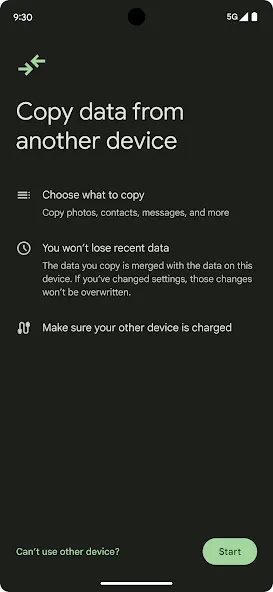
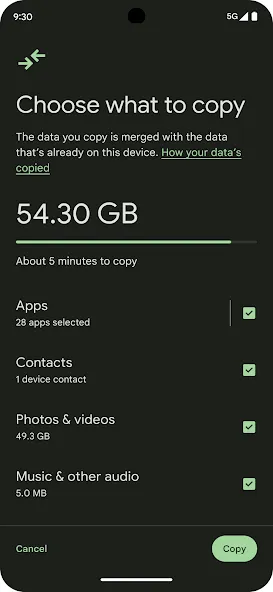
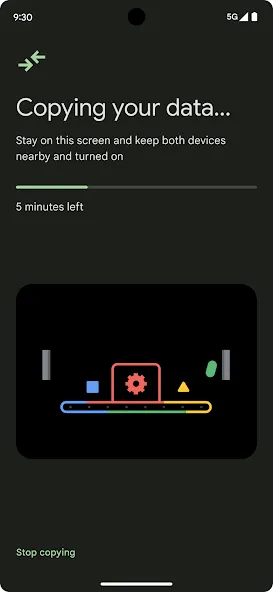
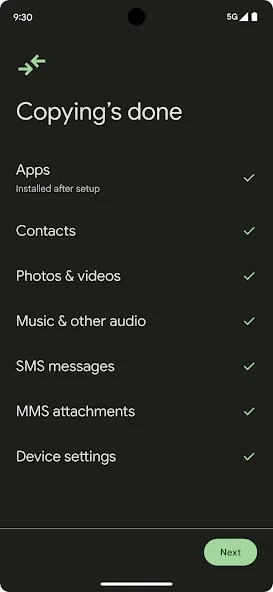
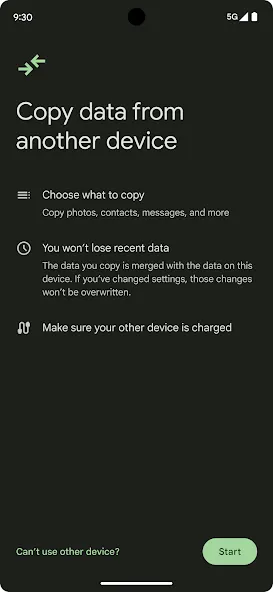
Android Switch is a data migration tool designed for mobile devices. It boasts excellent compatibility, allowing it to be installed and run across a wide range of mobile hardware. You can transfer files, images, and videos in various formats between two devices; the process is not only exceptionally fast but also ensures data privacy, as the information is never routed through the cloud. The software is also very simple to use—just pair and connect the devices to begin the transfer. Furthermore, it is highly power-efficient, so you can use it with complete peace of mind.
Features of Android Switch:
Effortless Data Migration: Moving your entire digital history to a new smartphone can often feel like a daunting task for many users. This solution eliminates the friction by identifying compatible files and moving them securely across different hardware configurations. Whether you are upgrading to the latest flagship or switching brands, the process remains consistent and reliable throughout the entire procedure.
Comprehensive File Support: The platform goes beyond simple contact lists by supporting a wide array of media formats and system settings. Users can easily move high-resolution videos, complex calendar schedules, and even call logs without worrying about format incompatibility. This ensures that your new device feels familiar from the moment you power it on for the first time.
Secure Wireless Connectivity: Security is a top priority when handling sensitive personal information during a transfer between two separate devices. Android Switch utilizes encrypted local connections to ensure that your data never touches the cloud or falls into the wrong hands during transit. This peer-to-peer approach guarantees both high-speed transfers and peace of mind for privacy-conscious individuals.
Optimized Battery Management: Large data transfers can often drain a device’s power quickly, but this tool is engineered to be as efficient as possible. By managing system resources intelligently, Android Switch ensures that the migration completes without causing the hardware to overheat or shut down unexpectedly. It maintains a stable connection while preserving enough battery life for you to explore your new phone immediately.
Strengths of Android Switch:
Deep Scanning Technology: Equipped with advanced deep scanning algorithms, the Android Switch app thoroughly searches for recoverable files on the affected storage device. This technology enables the software to locate and restore even partially overwritten or severely damaged files, maximizing the chances of successful data recovery. With this feature, you can trust that the tool will do its best to bring back your lost data.
User-Friendly Interface: The Android Switch app features an intuitive and easy-to-navigate interface, making it accessible for users of all skill levels. The step-by-step recovery process guides you through selecting the storage device, scanning for recoverable files, and ultimately restoring the desired data. You don’t need to be tech-savvy to use this powerful tool; it’s designed to be simple and efficient.
Preview and Selective Recovery: Before initiating the recovery process, the Android Switch app allows you to preview the recoverable files. This ensures that you can verify the content and quality of the data before restoration. Additionally, this feature enables selective recovery, allowing you to save time and storage space by avoiding the restoration of unnecessary data. You have full control over what gets restored.
Wide Compatibility: The Android Switch app is compatible with various storage devices, including internal and external hard drives, USB drives, memory cards, and more. It supports multiple file systems, such as FAT, NTFS, and exFAT, making it a versatile solution for data recovery across different platforms and devices. No matter the type of storage device or file system, the Android Switch app has got you covered.
Helpful Tips for Android Switch:
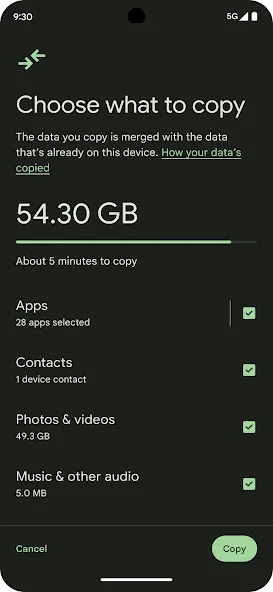
Using a cable from iPhone enables the broadest data transfer and is required for WhatsApp chat migration. When a cable is not available, you can start a wireless transfer with the iOS companion and copy core items like photos, contacts, and messages.
Before moving from iPhone, turn off iMessage and FaceTime, then deregister iMessage. This helps avoid missed texts on your new phone. Also, some messages may take up to 48 hours to appear as services update.
Keep both devices charged and unlocked, and leave them connected until the transfer completes. If you are switching to a Pixel 9 series device, you can also restore later from cloud backups without your old phone. In addition, staying on Wi-Fi helps with app downloads after the move.
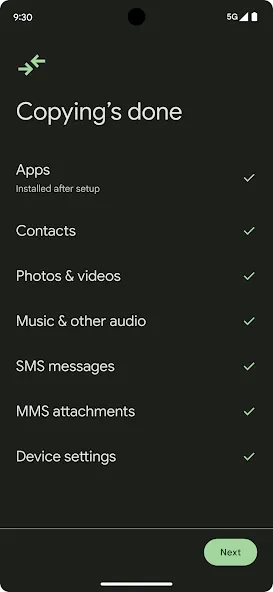
Android Switch appears during the initial setup flow on most devices. On Pixel 9 series, you can also find the transfer option later in Settings. Therefore you can finish moving data even if you skipped something during setup.
User Reviews of Android Switch:
This app is personally great I have no big deal with it but here is one problem when I downloaded the app it connected to my tablet which is great but also since after that I deleted it for months after this it was all normal but here is the plot twist My Internet wasn’t really working so I kept getting more annoyed and even more annoyed every time it wouldn’t work so I did some research and according to Google it said that the TV is draining my iPad so I blame the TV for it know what I didn’t realize that it was this app so it wasn’t working so immediately went to in the App Store, trying to get it but instead of loading normally it crashed so bad that my screen went black and it caused a respring loop in immediately it disconnected my Internet I was hoping to get it back and I realized after months this happened, it was actually connecting to the Internet, and I deleted it since while it was in the middle of it and also it even cost some issues with the device too so be careful don’t download this app or else you want to take the risk!!
I have had to transfer data between my own apple phones since forever and it was always the worst process. This was the easiest 5 clicks ever. It took maybe 20 minutes for a full transfer of my 81gb worth of data. I also didn’t have a cable since my iphone was the old port and not usb c. Overall I am very satisfied.
I only just realized that I had this app installed—no wonder so many photos and documents from my old phone from years ago reappeared after I logged into my account on this device! It looks like I need to explore how to use it more thoroughly.
My thanks go out to the developers of this application; thank you all for your hard work! Since I cannot thank each of you individually for your excellent contributions, I would like to take this opportunity to wish all the developers a Happy New Year! May you enjoy good health, success in all your endeavors, and even greater achievements in the Year of the Tiger! Thank you!
Final Verdict:
Android Switch features a clean and intuitive user interface designed with simplicity in mind. Navigating through different sections is straightforward due to well-organized menus and logical layout. The onboarding process is seamless, guiding new users effectively through setup procedures. Additionally, the app supports multiple languages, broadening its usability across diverse markets.
More Information
- Size:28.42MB
- Version:1.0.1002387102
- Requirements:Android
- Package Name:com.google.android.apps.restore
- Signature:2ab79d49a531db55e4e15c86ef466d6c
Related topics
-
Transform your mobile device into a powerhouse of efficiency with these handpicked essential tools. Whether you need professional-grade photo editing, seamless file organization, smart task management, or real-time weather updates, our curated selection of premium apps delivers unbeatable performance. Streamline your daily routine, automate repetitive tasks, and boost your productivity with intuitive interfaces and powerful features. Designed for both professionals and casual users, these editor-approved applications will revolutionize how you work and play. Don't settle for an ordinary phone - upgrade your digital experience today and unlock your device's full potential!
-
![Android Switch]()
Android Switch
-
![Samsung Internet Browser]()
Samsung Internet Browser
-
![µTorrent®]()
µTorrent®
-
![Adobe Photo Lightroom]()
Adobe Photo Lightroom
-
![Aiming Master]()
Aiming Master
-
![Google PDF Viewer]()
Google PDF Viewer
-
![Calorie Counter by FatSecret]()
Calorie Counter by FatSecret
-
![Samsung Clock]()
Samsung Clock
-
-
With the development of mobile hardware and software, many practical tool software have emerged, covering a wide range of aspects and becoming a good helper for everyone in work and life. Today, the editor provides you with a list of useful tool software downloads. These tools are not particularly complex types, and after reading them, everyone can quickly learn how to use them. Proper use can bring great convenience to life and work.
-
![Test DPC]()
Test DPC
-
![Android Switch]()
Android Switch
-
![Samsung Internet Browser]()
Samsung Internet Browser
-
![µTorrent®]()
µTorrent®
-
![Microsoft Edge]()
Microsoft Edge
-
![Adobe Photo Lightroom]()
Adobe Photo Lightroom
-
![Google PDF Viewer]()
Google PDF Viewer
-
![Calorie Counter by FatSecret]()
Calorie Counter by FatSecret
-




Latest Updated



Popular Apps








Popular News
More+-
![Tomie Wants to Get Married Full Walkthrough, All Choices and Ending Guide]()
Tomie Wants to Get Married Full Walkthrough, All Choices and Ending Guide
2026-05-22
-
![Karryn’s Prison Gameplay Walkthrough & Strategy Guide]()
Karryn’s Prison Gameplay Walkthrough & Strategy Guide
2025-10-28
-
![Life in Santa County Game Guide & Complete Walkthrough]()
Life in Santa County Game Guide & Complete Walkthrough
2025-10-28
-
![Dreams of Desire Complete Walkthrough and Game Guide]()
Dreams of Desire Complete Walkthrough and Game Guide
2025-10-28
-
![Era Hunter Gameplay Guide & Full Walkthrough]()
Era Hunter Gameplay Guide & Full Walkthrough
2025-10-28




