

Ventoy
Download for Android This app is available for Android only.- Category:Tools
- Rating:
- Language:English
- Updated:2026-11-28
Screenshots
Introduction
Ventoy is a simple and easy-to-use utility application that offers powerful features, allowing users to easily create bootable USB drives without repeatedly formatting disks, and making it convenient to select the files you want to use. With Ventoy, you can simply copy files—in various formats—directly onto your USB drive and then select and boot the specific file you wish to use. At the same time, it does not require file decompression and supports both MBR and GPT partition formats, giving you a smooth and efficient boot experience.
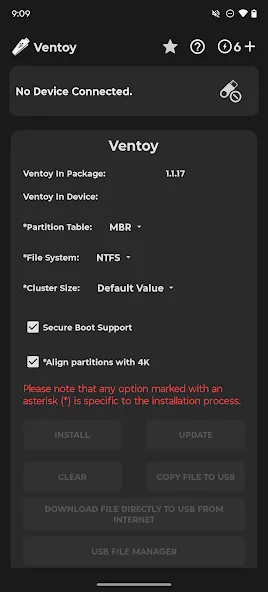
Highlights:
Allows you to create multi-boot USB drives with a dynamic menu to select ISO images.
Compatible with Windows 7 to 11 and the main Linux distributions.
Option to bypass Windows 11 minimum requirements during installation.
Manual selection of the partition scheme.
Support for NTFS, FAT32, and exFAT file systems.
Ability to add or remove ISO files at any time without needing to reformat the USB.
Direct download of ISO files to the USB from the application.
Pro version available that removes ads, unlocks unlimited features, and allows offline use without ad blockers.
Features:
Easy Bootable USB Creation: It allows you to create bootable USB drives for various file types like ISO, WIM, IMG, VHD(x), EFI files. This eliminates the need for repetitive disk formatting.
Multiple File Copying: You can copy multiple files at once onto the USB drive and Ventoy will provide a convenient boot menu for easy selection.
Wide Compatibility: It supports various systems including x86 Legacy BIOS, IA32 UEFI, x86_64 UEFI, ARM64 UEFI, and MIPS64EL UEFI. It also supports a wide range of operating systems such as Windows, WinPE, Linux, Unix, VMware, and Xen.
User-Friendly Interface: The app is designed to be extremely simple to use, making it easy for users to get started with creating bootable USB drives.
Efficient and Fast: It operates at high speeds limited only by the speed of copying the ISO file, ensuring a quick and efficient boot process.
Versatile Installation Options: You can install the app on USB drives, local disks, SSDs, NVMe, or SD cards. It also allows for direct booting from ISO, WIM, IMG, VHD(x), and EFI files without the need for extraction.
Tips for Users:
Creating a USB boot drive is simple
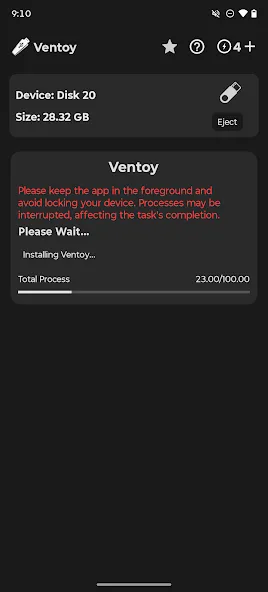
Using Ventoy is very easy. As soon as you connect a USB storage drive to your Android device, the app will automatically recognize it. Once it has been recognized, you will see several options for the boot drive, which you can check or uncheck as required. After selecting the desired actions, you can start the installation process at the touch of a button.
Compatible with several operating systems
As with the Windows version, Ventoy is compatible with the vast majority of popular operating systems, including Windows, WinPE, Linux, Unix, VMware and Xen. The app has been tested with more than 700 different ISOs, including files larger than 4GB, so it is very likely that, regardless of the operating system you want to use, it will function correctly.
Unlock the Pro version for an enhanced experience
It is important to note that you will need to use coins to create bootable USB drives. To obtain these coins, you will have to either buy them with real money or watch ads. Alternatively, you can unlock Ventoy Pro with a one-time payment. After purchasing a Pro license, you will never have to worry about buying coins again.
Pros & Cons:
Pros
Creates multi-boot USB drives that can hold several images at once
Supports ISO, WIM, IMG, VHD/VHDX, and EFI formats
Works with USB flash drives, SSDs, and SD cards
Compatible with many operating systems, including Windows, WinPE, Linux, Unix, VMware, and Xen
Tested with more than 700 ISO files, including images larger than 4 GB
Offers Secure Boot configuration, MBR/GPT partition choices, and quick-format options
Automatically detects connected USB drives and provides straightforward configuration options
Does not require root access on the Android device
Pro license removes the ongoing need for coins
Cons
Core functionality is locked behind an in-app coin system
Coins require either direct payment or watching full-screen ads
Bootable creation can fail without actually writing Ventoy to the USB drive, while still consuming coins
Conclusion:
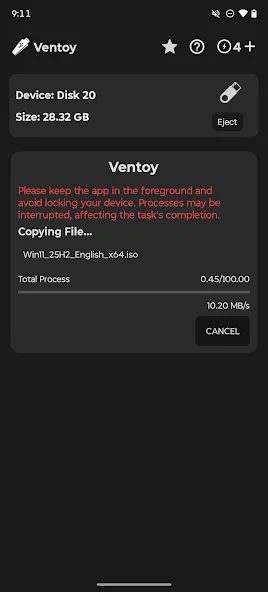
Users can copy ISO files directly to the USB or download them via the app. While the app is free, it operates on a token system for certain actions, such as installation and updates. Users can earn tokens through rewarded ads or upgrade to a Pro version for an ad-free experience and offline usage. The app is designed to keep the user informed and engaged while providing a straightforward solution to multi-booting from an Android device.
More Information
- Size:94.16MB
- Version:12.5.0(1.1.18)
- Requirements:Android 12.0+
- Package Name:com.mixapplications.ventoy_app
- Signature:f65125c7c913b7819ffa03d0e762fde9
Related topics
-
Transform your mobile device into a powerhouse of efficiency with these handpicked essential tools. Whether you need professional-grade photo editing, seamless file organization, smart task management, or real-time weather updates, our curated selection of premium apps delivers unbeatable performance. Streamline your daily routine, automate repetitive tasks, and boost your productivity with intuitive interfaces and powerful features. Designed for both professionals and casual users, these editor-approved applications will revolutionize how you work and play. Don't settle for an ordinary phone - upgrade your digital experience today and unlock your device's full potential!
-
![AyuGram]()
AyuGram
-
![GIPHY]()
GIPHY
-
![Kiren by F-Secure]()
Kiren by F-Secure
-
![Google Recorder]()
Google Recorder
-
![WiFi Master Key]()
WiFi Master Key
-
![Yoosee]()
Yoosee
-
![Droid Optimizer]()
Droid Optimizer
-
-
With the development of mobile hardware and software, many practical tool software have emerged, covering a wide range of aspects and becoming a good helper for everyone in work and life. Today, the editor provides you with a list of useful tool software downloads. These tools are not particularly complex types, and after reading them, everyone can quickly learn how to use them. Proper use can bring great convenience to life and work.
-
![GIPHY]()
GIPHY
-
![Kiren by F-Secure]()
Kiren by F-Secure
-
![Google Recorder]()
Google Recorder
-
![WiFi Master Key]()
WiFi Master Key
-
![MIUI Downloader]()
MIUI Downloader
-
![Vaulty]()
Vaulty
-
![Simple Scanner]()
Simple Scanner
-










Latest Updated







Popular Apps








Popular News
More+-
![Tomie Wants to Get Married Full Walkthrough, All Choices and Ending Guide]()
Tomie Wants to Get Married Full Walkthrough, All Choices and Ending Guide
2026-05-22
-
![Karryn’s Prison Gameplay Walkthrough & Strategy Guide]()
Karryn’s Prison Gameplay Walkthrough & Strategy Guide
2025-10-28
-
![Life in Santa County Game Guide & Complete Walkthrough]()
Life in Santa County Game Guide & Complete Walkthrough
2025-10-28
-
![Dreams of Desire Complete Walkthrough and Game Guide]()
Dreams of Desire Complete Walkthrough and Game Guide
2025-10-28
-
![Era Hunter Gameplay Guide & Full Walkthrough]()
Era Hunter Gameplay Guide & Full Walkthrough
2025-10-28




