

PhotoShot
Download for Android This app is available for Android only.- Category:Photography
- Rating: 4.9
- Language:English
- Updated:2026-06-10
Screenshots
Introduction
PhotoShot is a photo editing app. It incorporates powerful AI technology to easily remove blur from photos, compress noise, and convert your images into high-definition pictures! Besides blur image correction, it offers numerous image editing functions, such as erasing the sky, changing backgrounds, cropping subjects, and more. Or, if you want to revitalize your worn-out, dull clothes in photos, you can use it to change the texture and color of your fabric, creating a completely new look! Whatever your photo editing needs, it can help you.
Features
Blur Image Correction
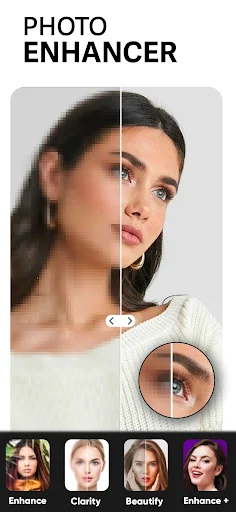
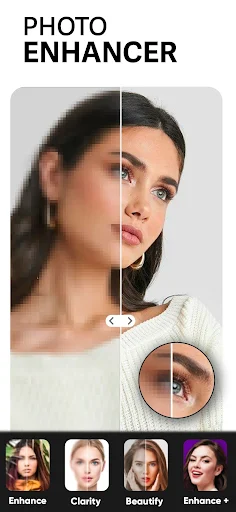
PhotoShot has a built-in photo enhancement function to help you correct blurry, noisy, or low-resolution photos. PhotoShot's built-in AI technology can eliminate blur, compress noise, and instantly convert your images into high-quality, high-definition pictures.
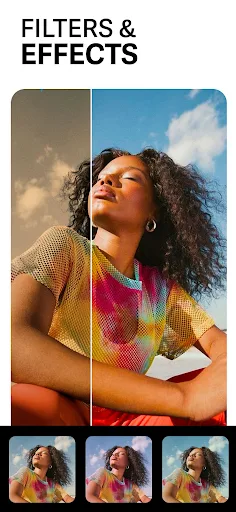
The photo enhancer can also be used in other situations. For example, when you want to bring photos to life with vibrant colors, or restore faded old photos to their original vibrant colors, you can use the photo enhancer.
Sky Transformer Function
PhotoShot can also help you change the sky around you. No more monotonous blue, no more weather-dependent sky. Now you can easily transform your sky into your favorite color using PhotoShot's Sky Transformer feature.
Erase the sky and choose any high-resolution sky tone offered within the app. Adjustments are incredibly simple. Tap the "Sky Transformer" feature to transform your sky into a completely new one. Then, you can freely adjust the tone; the horizon, clouds, and the overall atmosphere of the blue sky can all be customized to your liking. Meanwhile, surrounding details and the subject remain unaffected.
Background Changer, Image Background Replacement Function
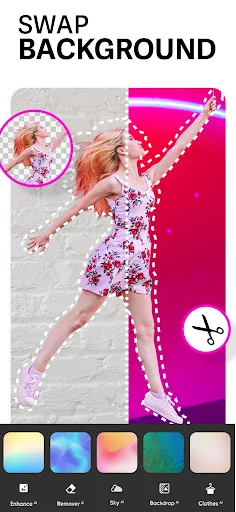
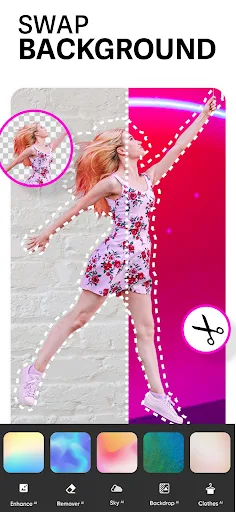
You'll often need a wallpaper changer. For example, when taking a photo against an unsuitable background, or when the background of your photo has obvious flaws. Now, use PhotoShot's background changer! You can delete old wallpapers, download new ones from the internet, or choose from over 100 built-in wallpapers as your background.
Subject cropping is also automatic and natural, preserving the subject's inherent natural contours and sheen when composited into a new background image. You can also increase or decrease the stroke, shadow, and image blur. The generated images are natural and soft, possessing a certain gentleness.
Change Texture, Create a New Look
Have you ever wanted to change the color of your shirt fabric? Or are you wearing an old garment and want to change the color to create a completely new feel? PhotoShot can help you achieve these desires.
Fabric texture is another powerful feature of PhotoShot. This feature helps you change the texture and color of fabrics, creating a completely new and stylish look for your clothing.
Insert Stickers into Photos to Make Them More Unique
In addition to the above features, PhotoShot has many other attractive additional features that are very effective when editing photos. For example, the LightFX feature can enhance photos with transparent overlays, and you can add text to images using over 100 unique fonts.
Highlights
High-Quality Sky Images: 50 options allow you to transform bright images into mysterious ones.
Color Compatibility: The essence of this application lies in allowing new elements to blend perfectly with existing elements.
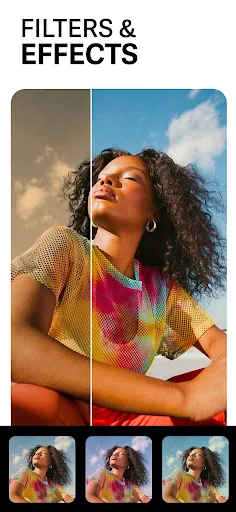
Use Different Overlay Effects: Color and light can change how viewers perceive an image.
Artwork: Based on your editing experience, creating artwork isn't difficult.
FAQs
Are you having problems installing PhotoShot?
PhotoShot installation may fail due to insufficient device storage, an unstable network connection, or incompatibility with your Android device. To avoid this, please ensure your phone meets the minimum configuration requirements before starting the installation.
What is the total file size of PhotoShot?
PhotoShot requires approximately 54.2MB of storage space, including the base file size, and may vary slightly depending on your device or other data downloaded during the process.
Conclusion
As you can see, PhotoShot is both a typical photo editing application and an ideal companion for photography enthusiasts. With its rich tools, this application is sure to deliver a professional, convenient, and fast photo editing experience.
More Information
- Size:54.2MB
- Version:2.22.1
- Requirements:Android
- Votes:449
Related Versions



Related topics
-
Welcome to our image editing apps! Perfect for beginners and pros alike, they make photo enhancement easy. Use PicsArt to crop, adjust colors, and apply filters. Remove backgrounds instantly with Remove.bg. Get creative with layers and advanced tools on Adobe Photoshop Express. Start transforming your images today!
-
![Motionleap]()
Motionleap
-
![Perfect Me]()
Perfect Me
-
![PicSay Pro]()
PicSay Pro
-
![ProCCD]()
ProCCD
-
![Lightroom]()
Lightroom
-
![SCRL]()
SCRL
-
![Adobe Lightroom]()
Adobe Lightroom
-
![AI Mirror AI Art Photo Editor]()
AI Mirror AI Art Photo Editor
-
-
Visuals serve as a primary gateway for players to engage with games, where distinctive art direction immediately captures attention and creates lasting impressions. An unconventional aesthetic not only stands out in crowded markets but also enhances immersion and emotional connection. When executed with creativity and polish, striking visuals elevate gameplay into a memorable artistic experience. That's why titles with truly exceptional art styles deserve recognition - they offer both visual delight and meaningful interactive expression that resonates with players long after the session ends.
-
![Perfect Me]()
Perfect Me
-
![ProCCD]()
ProCCD
-
![Lightroom]()
Lightroom
-
![SCRL]()
SCRL
-
![PicArt]()
PicArt
-
![Face Me]()
Face Me
-
![Foodie]()
Foodie
-
![Google Photos]()
Google Photos
-
-
AI Photo Editing Apps - encompassing both image generation and enhancement tools - utilize cutting-edge machine learning algorithms to produce, refine, or transform visuals using text prompts, uploaded images, or artistic preferences. These powerful applications are reshaping digital art, photography, and media production by streamlining sophisticated processes such as professional-grade retouching, artistic style replication, and completely AI-generated artwork. By combining automation with creative control, they empower users to achieve stunning results with unprecedented speed and precision.
-
![Perfect Me]()
Perfect Me
-
![SnapEdit]()
SnapEdit
-
![VIMAGE]()
VIMAGE
-
![Lightroom]()
Lightroom
-
![Adobe Lightroom]()
Adobe Lightroom
-
![FaceApp Pro]()
FaceApp Pro
-
![AI Mirror AI Art Photo Editor]()
AI Mirror AI Art Photo Editor
-
![Dual Camera : Front & Back Cam]()
Dual Camera : Front & Back Cam
-
















Latest Updated



Popular Apps








Popular News
More+-
![Tomie Wants to Get Married Full Walkthrough, All Choices and Ending Guide]()
Tomie Wants to Get Married Full Walkthrough, All Choices and Ending Guide
2026-05-22
-
![Karryn’s Prison Gameplay Walkthrough & Strategy Guide]()
Karryn’s Prison Gameplay Walkthrough & Strategy Guide
2025-10-28
-
![Life in Santa County Game Guide & Complete Walkthrough]()
Life in Santa County Game Guide & Complete Walkthrough
2025-10-28
-
![Dreams of Desire Complete Walkthrough and Game Guide]()
Dreams of Desire Complete Walkthrough and Game Guide
2025-10-28
-
![Era Hunter Gameplay Guide & Full Walkthrough]()
Era Hunter Gameplay Guide & Full Walkthrough
2025-10-28




