
Google Classroom
Download for Android This app is available for Android only.- Category:Education
- Rating: 4.6
- Language:English
- Updated:2026-08-13
Screenshots
Introduction
Google Classroom is an excellent educational platform for learning and communication. With its user-friendly interface and time-saving, efficient features, it revolutionizes the way assignments are created, graded, and scored, freeing users from cumbersome materials and tedious paperwork. With Google Classroom, teachers can easily set up virtual classrooms, add students directly, or share a unique code for students to join. Simultaneously, teachers can quickly create, grade, and score assignments, all on a single platform, saving valuable time for both teachers and students.
Highlights:
Class setup and communication
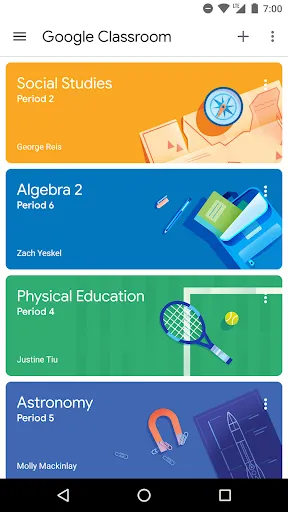
Google Classroom lets you add students directly or share a class code so setup is fast. You can post announcements and start class discussions, and students can share resources or reply on the stream when allowed.
Assignments in one place
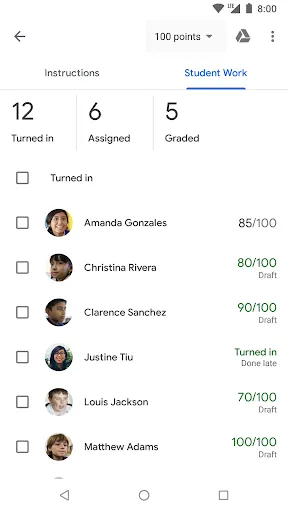
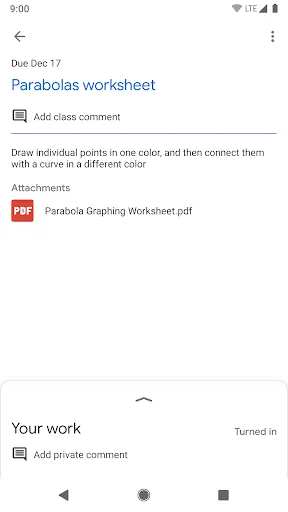
For daily coursework, you can create work, attach files, and review submissions without printing. Grading and returns happen in the same workflow so everything stays in one spot.
Organized materials and deadlines
To keep track of everything, students see upcoming and completed tasks on a dedicated assignments page. Class documents, photos, and videos are automatically sorted into Google Drive folders for easy access.
Features:
Streamlined assignment management
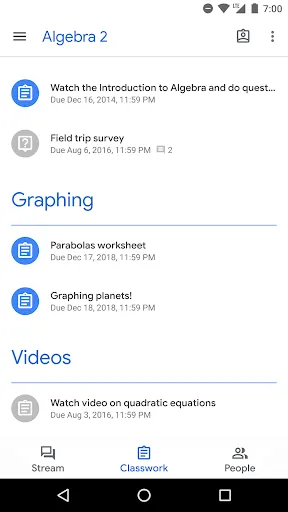
The Classwork tab provides an organized view of assignments and class materials. Within this section, teachers can create and distribute assignments, monitor due dates, and provide feedback on student submissions. Students can access their work and related resources in a structured layout, helping both teachers and learners manage class activities in one place.
Integration with Google services
Google Classroom integrates with Google Drive and other Google tools such as Docs, Sheets, and Slides. This allows teachers to create and share assignments directly from their Drive accounts. Students can attach files from Drive when turning in their work, which reduces the need for printed materials and supports a more organized digital classroom environment.
Progress tracking tools
Google Classroom provides tools that help teachers and students stay organized with classwork. Teachers can review assignments, check due dates, and see which students have turned in their work. Students have a To-do list that highlights upcoming deadlines, while overdue tasks are marked clearly to show what still needs attention. Together, these features make it easier for everyone to manage responsibilities and keep track of important deadlines.
AI-powered learning and teaching assistance
Google Classroom has recently expanded its educational toolkit with AI-assisted features designed to support both teachers and students. Through integration with Google Gemini for Education, educators can now generate lesson ideas, draft assignment instructions, and create quizzes more efficiently. These AI-powered tools help reduce repetitive administrative work, allowing teachers to focus more on classroom engagement and personalized instruction. Students also benefit from smarter study support and easier access to organized learning materials across Google Workspace applications.
Tips and Tricks:
Take Advantage of Google Drive Integration: Familiarize yourself with Google Drive to leverage its integration with Google Classroom. By storing your class materials in Google Drive, you can easily attach them to your assignments. This integration also helps in organizing your files and maintaining a structured virtual classroom environment.
Utilize Announcements and Stream: Make use of the announcement feature to effectively communicate important updates to your students. The stream is a great place for students to ask questions and share relevant resources. Encourage participation and active discussion in the stream to create an engaging learning environment.
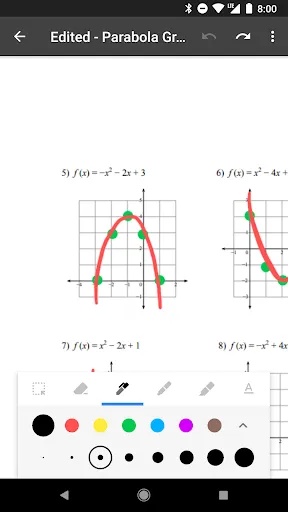
Provide Timely Feedback: Take advantage of the streamlined assignment workflow to provide timely feedback to your students. Giving prompt feedback helps students understand their progress and address any misconceptions. Use the marking tools available in it to annotate and grade assignments efficiently.
FAQs:
Is the app secure and privacy-friendly?
Yes, the app is a secure platform that contains no ads and never uses your content or student data for advertising purposes. It is designed to prioritize the privacy and security of its users, ensuring a safe online learning environment.
Can students collaborate with each other on the app?
Absolutely! The app encourages collaboration among students. They can share resources, provide answers to questions on the stream, and engage in discussions with their classmates, promoting teamwork and knowledge-sharing.
Can the app be used offline?
Yes, the app has offline support. It allows users to access their saved assignments, materials, and resources even without an internet connection. This feature ensures continuous learning opportunities, regardless of connectivity challenges.
Conclusion:
Students can respond, comment and ask questions directly, fostering interaction in virtual or hybrid courses. There are also private messaging functions via comments on tasks. In short, Google Classroom is a very useful tool that comprehensively connects students and teachers. Download the free Google Classroom APK and prepare your online or face-to-face classes with this tool and make your life a little easier.
More Information
- Size:31.3MB
- Version:3.64.958678737
- Requirements:Android
- Votes:227
- Package Name:com.google.android.apps.classroom
- Signature:46f6c8987311e131f4f558d8e0ae145bebab6da3
Related Versions
-
Download
Version:9.0.261.20.90.15Size:68MB
Related topics
-
Educational software are emerging in an endless stream on the market, so which one can stand out? It should not only be simple and convenient to use but also helpful for our study. Below, Xiaohei.com brings you a very comprehensive and practical summary of educational software downloads. Come and download it, there is always one that suits you.
-
![Rojgar With Ankit]()
Rojgar With Ankit
-
![QUANTUM PAPER]()
QUANTUM PAPER
-
![Exampur]()
Exampur
-
![SelfStudys,NCERT Book,Solution]()
SelfStudys,NCERT Book,Solution
-
![mShikshaMitra-m-Gov Platform]()
mShikshaMitra-m-Gov Platform
-
![AnkiDroid Flashcards]()
AnkiDroid Flashcards
-
![Google Classroom]()
Google Classroom
-
![Cymath]()
Cymath
-


Latest Updated



Popular Apps





Popular News
More+-
![Tomie Wants to Get Married Full Walkthrough, All Choices and Ending Guide]()
Tomie Wants to Get Married Full Walkthrough, All Choices and Ending Guide
2026-05-22
-
![Karryn’s Prison Gameplay Walkthrough & Strategy Guide]()
Karryn’s Prison Gameplay Walkthrough & Strategy Guide
2025-10-28
-
![Life in Santa County Game Guide & Complete Walkthrough]()
Life in Santa County Game Guide & Complete Walkthrough
2025-10-28
-
![Dreams of Desire Complete Walkthrough and Game Guide]()
Dreams of Desire Complete Walkthrough and Game Guide
2025-10-28
-
![Era Hunter Gameplay Guide & Full Walkthrough]()
Era Hunter Gameplay Guide & Full Walkthrough
2025-10-28




