

Sticker Maker - WASticker
Download for Android This app is available for Android only.- Category:Tools
- Rating:
- Language:English
- Updated:2026-11-15
Screenshots
Introduction
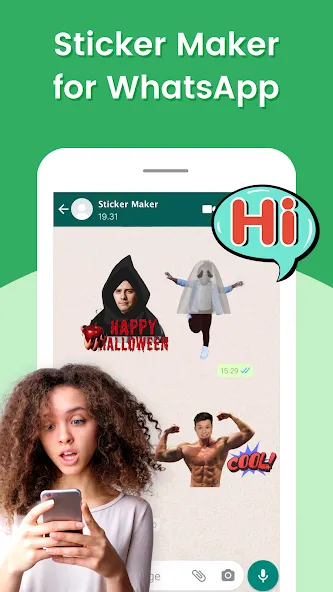
Sticker Maker - WASticker is an excellent and convenient photo-editing tool. Designed for users who want to create personalized, expressive stickers without the need for complex design software, the app offers an intuitive editor, cropping tools, and background removal features—allowing you to transform your photos into custom sticker packs for WhatsApp. With Sticker Maker - WASticker, you can organize multiple stickers into a single pack, customize the pack's name, and manage its cover thumbnail. Once created, your sticker packs can be exported directly to WhatsApp in just a few minutes, making them ready for you to send and share in your chats.
Highlights:
Supports all picture formats, jpg, webp, png, etc
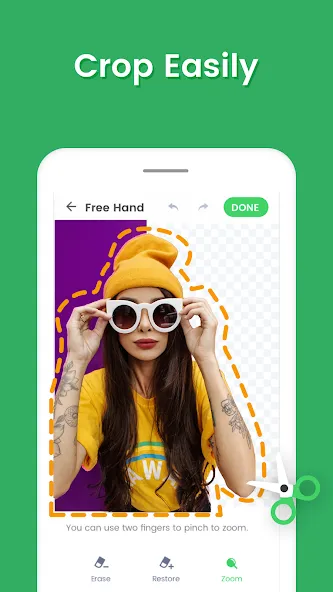
Easily crop your stickers
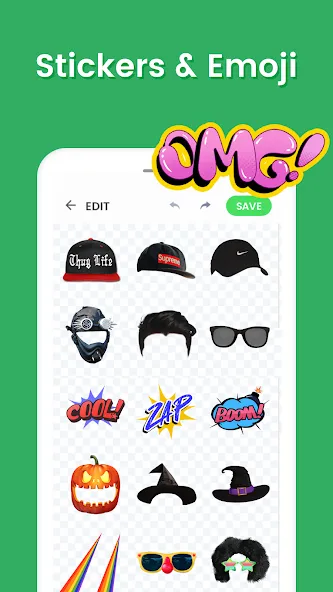
Add text, emoji & funny decorations to your stickers
Click to preview sticker in the sticker pack
Share your customized sticker packs with friends
Back up stickers & restore stickers to a new device
Automatically convert image formats
Customize HD quality stickers
Features:
Free Sticker Maker and Free Sticker DIY App for WhatsApp
"Sticker Maker - Make Sticker for WhatsApp stickers" is a free sticker creator app with a lively interface. It is easy to make stickers with three simple steps that can be used in both WhatsApp and WhatsApp Business.
Easy Image Crop and Free Hand Sticker Photo Cropping
This sticker maker app offers multiple ways to cut your pictures during sticker creation, including squares, select all, and free-hand image cropping for precise customization.
Powerful Rich Text Sticker Editor
The app features a robust text sticker editor with various special functions to enhance your WhatsApp stickers, such as text sticker colors, effects, curves, shadows, templates, and popular font selections.
Emoji and Decorations for Funny and Vivid Stickers
"Sticker Maker - Make Sticker for WhatsApp stickers" provides a wide range of sticker emojis and decorations to add humor and charm to your WhatsApp stickers or WhatsApp Business stickers. Choose from a plethora of decorations to make your stickers stand out.

Tips and Tricks:
Start with high-contrast images to help the automatic background tool detect edges more accurately.
Use the zoom and fine eraser when outlining hair or intricate shapes to avoid jagged borders.
Create themed packs—reactions, pets, or quotes—to make sharing easier and more fun.
Design a clear, eye-catching cover thumbnail so friends recognize your pack quickly.
Keep each sticker visually simple; bold shapes read better at small chat sizes.
Changelog:
3 steps to make stickers for WhatsApps with your own photo.
Crop the picture. Simple and easy to use photo cutting tool.
Support multi-shape picture cropping and freehand cropping. Prepare for making cool WhatsApp stickers.
Add text or decorations on the cropped picture. Make your WhatsApp stickers more cute and vivid.
Support exporting created stickers to WhatsAPP, WhatsAPP Business, etc.
Constantly update. It's a user friendly WhatsApp Stickers making app.
Final Words:
These stickers are fully compatible with WhatsApp, allowing users to enhance messaging with just a few taps. Download the app today and take the first step towards revolutionizing your conversations with tailor-made stickers that reflect your individuality and spice up your daily interactions.
More Information
- Size:20.04MB
- Version:1.01.72.11.06
- Requirements:Android 6.0+
- Package Name:stickermaker.stickercreater.whatsappstickers.stickermakerforwhatsapp
- Signature:127da2e283e9cccfcddcb351f25e3256
Related topics
-
Welcome to our image editing apps! Perfect for beginners and pros alike, they make photo enhancement easy. Use PicsArt to crop, adjust colors, and apply filters. Remove backgrounds instantly with Remove.bg. Get creative with layers and advanced tools on Adobe Photoshop Express. Start transforming your images today!
-
![3DLUT mobile 2]()
3DLUT mobile 2
-
![Sticker Maker - WASticker]()
Sticker Maker - WASticker
-
![GCamera]()
GCamera
-
![Snap Pro]()
Snap Pro
-
![Photo Lab PRO Picture Editor]()
Photo Lab PRO Picture Editor
-
![We Heart It]()
We Heart It
-
![Aarya Editz]()
Aarya Editz
-
![Memes]()
Memes
-
-
The demand for taking and editing images is increasing among modern people, and free image editing software has become an ideal choice to meet this demand. Through these apps, users can easily edit images, including cropping, rotating, adjusting brightness and contrast, and more. At the same time, they also provide rich filters and special effects to make your photos more vivid and artistic. In addition, these software also support adding elements such as stickers, text, and graffiti to make your pictures more personalized. Most importantly, these apps are very easy to use and do not require professional skills. Just a few steps can make your photos stand out. Whether you want to post a stunning photo on social media or add some creativity to your album, these free photo editing apps can meet your needs. Try one out!
-
![Sticker Maker - WASticker]()
Sticker Maker - WASticker
-
![Magicface-AI Face Swap]()
Magicface-AI Face Swap
-
![GCamera]()
GCamera
-
![FaceFlip]()
FaceFlip
-
![Photo Lab PRO Picture Editor]()
Photo Lab PRO Picture Editor
-
![We Heart It]()
We Heart It
-
![Aarya Editz]()
Aarya Editz
-
![Kwiky]()
Kwiky
-









Latest Updated







Popular Apps








Popular News
More+-
![Tomie Wants to Get Married Full Walkthrough, All Choices and Ending Guide]()
Tomie Wants to Get Married Full Walkthrough, All Choices and Ending Guide
2026-05-22
-
![Karryn’s Prison Gameplay Walkthrough & Strategy Guide]()
Karryn’s Prison Gameplay Walkthrough & Strategy Guide
2025-10-28
-
![Life in Santa County Game Guide & Complete Walkthrough]()
Life in Santa County Game Guide & Complete Walkthrough
2025-10-28
-
![Dreams of Desire Complete Walkthrough and Game Guide]()
Dreams of Desire Complete Walkthrough and Game Guide
2025-10-28
-
![Era Hunter Gameplay Guide & Full Walkthrough]()
Era Hunter Gameplay Guide & Full Walkthrough
2025-10-28




