Smart Tutor for SAMSUNG Mobile
Download for Android This app is available for Android only.- Category:Tools
- Rating:
- Language:English
- Updated:2026-11-19
Screenshots
Introduction
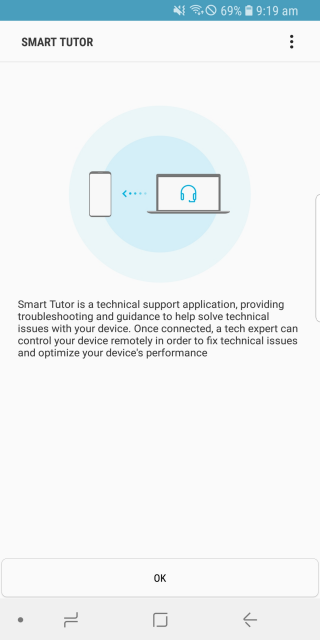
Smart Tutor for SAMSUNG Mobile is a powerful smart assistant tool. This application provides a convenient way to remotely diagnose your device, offer suggestions, and assist with display settings adjustments and software updates. With Smart Tutor for SAMSUNG Mobile, users can get timely assistance from technical experts through screen sharing, instant messaging, and app locking to ensure the security of their devices. Meanwhile, you can easily get the help you need by simply accessing remote support via 3G/4G networks or Wi-Fi, without having to leave your home or office.
Highlights:
To use Smart Tutor, users first download and install the app on their Android device.
The next step involves making a phone call to the SAMSUNG Contact Center.
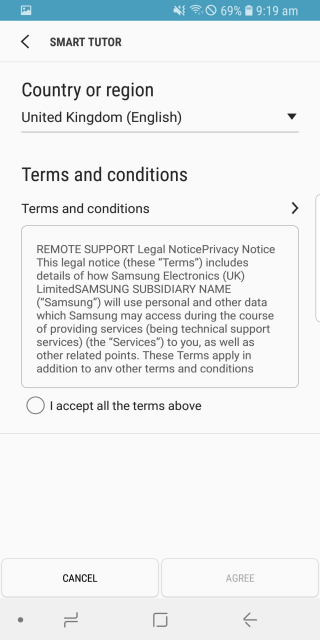
After agreeing to the displayed Terms and Conditions, the relevant contact center phone number for the user’s country will be shown.
Once connected with a tech expert, the user will be provided with a unique 6-digit connection code to enter into the app, establishing the remote support session.
Users can terminate the connection at any time by tapping the Disconnect option within the app.
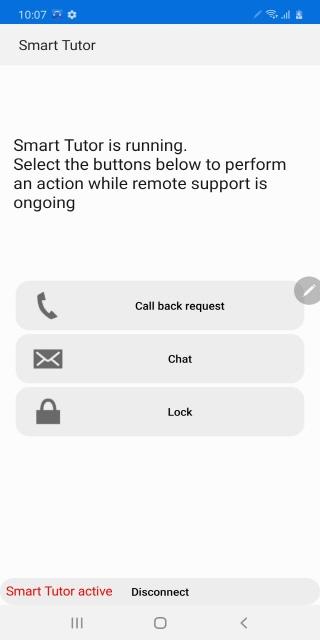
During a remote support session, the app provides several functionalities to assist the tech expert.
These include Screen Share, which allows the expert to view the device screen, and Chat for direct communication.
Additionally, Screen Lock and Application Lock features are available, which can be used to manage access during the support session.
Features:
Remote Device Check-Up
Connect with a real support pro who can diagnose your device in real-time, right from wherever you are. No need to figure it all out yourself—sometimes it’s just easier to let a tech expert take a peek.
Guided Feature Explanations
Got questions about a new feature or how to change a setting? Your specialist can walk you through your menu, help you understand updates, and explain what’s new.
On-the-Spot Troubleshooting
Whether it’s a weird display issue or a problem after updating an app, you’ll get instant support. The expert can help iron out those headaches and keep things running as they should.
Full Privacy Controls
Your private info stays yours—Smart Tutor for SAMSUNG Mobile is set up so support staff can’t go snooping through your photos, texts, or emails. Only what’s necessary gets shared, always under your control.
Easy Connection
It just takes a couple taps and entering a code from the support expert to get things started. The app works over Wi-Fi or mobile data—handy for when you’re not at home. And if you want to end the session? Just hit disconnect.
Convenient Tools
With options like screen sharing, live chat, and the ability to lock access to certain apps, getting help is straightforward and secure.
Tips and Tricks:
Keep your connection code handy
Make sure to have the 6-digit connection code given by the tech expert ready when you initiate a remote diagnosis session with Smart Tutor.
Utilize the features
Take advantage of the features offered by Smart Tutor, such as screen sharing, chatting, screen lock, and application lock, to enhance your remote support experience.
Communicate with the tech expert
Don't hesitate to ask questions and provide information to the tech expert during the diagnosis process. Clear communication will help resolve issues more efficiently.
Benefits:
Safety & Reliable
Don't worry about exposing our private information."Smart Tutor" restricts a tech expert from accessing applications with customer's private information such as Gallery, Message, e-mail and other throughout special features.
Convenient & Easy
Provide remote support from our Android device quickly and easily if we can use 3G/4G or Wi-Fi.
Features
Screen Share / Chat / Screen Lock / Application Lock
Final Words:
Although the support agent can control your smartphone in order to troubleshoot, they will not be able to access your personal data or any private files stored on your smartphone. When you want to exit, all you have to do is tap on 'hang up' to end the call and regain control of your smartphone. It's that easy!
More Information
- Size:15.73MB
- Version:1.5 build458
- Requirements:Android 4.3+
- Package Name:com.rsupport.rs.activity.rsupport.aas2
- Signature:3f37536a3f213156c7b37fbc51d40cf8
Related Versions
-
Download
Smart Tutor for SAMSUNG Mobile
Version:1.5(build405)Size:17MB
Related topics
-
Transform your mobile device into a powerhouse of efficiency with these handpicked essential tools. Whether you need professional-grade photo editing, seamless file organization, smart task management, or real-time weather updates, our curated selection of premium apps delivers unbeatable performance. Streamline your daily routine, automate repetitive tasks, and boost your productivity with intuitive interfaces and powerful features. Designed for both professionals and casual users, these editor-approved applications will revolutionize how you work and play. Don't settle for an ordinary phone - upgrade your digital experience today and unlock your device's full potential!
-
![Trace Sketch & Draw On Paper]()
Trace Sketch & Draw On Paper
-
![Apreço]()
Apreço
-
![Phone Doctor Plus]()
Phone Doctor Plus
-
![Seal Downloader]()
Seal Downloader
-
![IMEI Changer Pro]()
IMEI Changer Pro
-
![CP PLUS gCMOB]()
CP PLUS gCMOB
-
![Smart Tutor for SAMSUNG Mobile]()
Smart Tutor for SAMSUNG Mobile
-
![Skin Editor 3D for Minecraft]()
Skin Editor 3D for Minecraft
-
-
With the development of mobile hardware and software, many practical tool software have emerged, covering a wide range of aspects and becoming a good helper for everyone in work and life. Today, the editor provides you with a list of useful tool software downloads. These tools are not particularly complex types, and after reading them, everyone can quickly learn how to use them. Proper use can bring great convenience to life and work.
-
![EX File Manager]()
EX File Manager
-
![Phone Doctor Plus]()
Phone Doctor Plus
-
![Seal Downloader]()
Seal Downloader
-
![IMEI Changer Pro]()
IMEI Changer Pro
-
![CP PLUS gCMOB]()
CP PLUS gCMOB
-
![Yt5s All Media Video]()
Yt5s All Media Video
-
![Smart Tutor for SAMSUNG Mobile]()
Smart Tutor for SAMSUNG Mobile
-
![Dual Space Lite]()
Dual Space Lite
-







Latest Updated

Popular Apps








Popular News
More+-
![Tomie Wants to Get Married Full Walkthrough, All Choices and Ending Guide]()
Tomie Wants to Get Married Full Walkthrough, All Choices and Ending Guide
2026-05-22
-
![Karryn’s Prison Gameplay Walkthrough & Strategy Guide]()
Karryn’s Prison Gameplay Walkthrough & Strategy Guide
2025-10-28
-
![Life in Santa County Game Guide & Complete Walkthrough]()
Life in Santa County Game Guide & Complete Walkthrough
2025-10-28
-
![Dreams of Desire Complete Walkthrough and Game Guide]()
Dreams of Desire Complete Walkthrough and Game Guide
2025-10-28
-
![Era Hunter Gameplay Guide & Full Walkthrough]()
Era Hunter Gameplay Guide & Full Walkthrough
2025-10-28