

QRQR
Download for Android This app is available for Android only.- Category:Productivity
- Rating:
- Language:English
- Updated:2026-11-23
Screenshots
Introduction
QRQR is a simple and efficient QR code scanning tool. Designed for everyday use, this app can quickly locate and recognize various QR codes, even tiny or densely packed ones, providing users with a smooth user experience. With QRQR, users can instantly recognize all kinds of QR codes, including tiny or extremely complex QR codes that are difficult for other applications to capture. The app also offers a barcode recognition function; you can simply scan the code to be redirected directly to the product's detailed page.
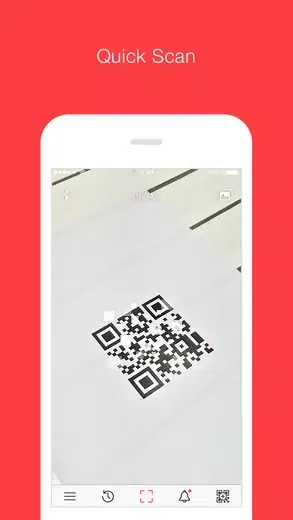
Highlights:
QR Code® Reader (Reads QR Code®)
Barcode Reader (Reads barcodes)
Automatically generate links to product pages of services after reading barcodes.
Read FrameQR®
Read rMQR
Read QRQR Wi-Fi
Preview Web sites
Login and transfer functions
Display confirmation messages
Read / delete read history
Copy read-out contents
Create QR Code® (generated from the text, URL, contact, and/or a map)
Compatible with URL Scheme (Direct launching from other apps)
Features:
Automatic Code Recognition: The app doesn't require any intricate configuration; it automatically reads any code, ensuring a hassle-free experience for users.
Versatility in Code Types: QR & Barcode Scanner can decode and read various QR code and barcode types, including text, URL, ISBN, product information, contact details, calendar events, email addresses, locations, Wi-Fi credentials, and more.
Instant Action Options: Following a successful scan, users are presented with relevant options based on the scanned QR code or barcode type. This ensures that users can take appropriate actions swiftly.
Coupon Scanning: The app extends its functionality to scanning coupons or coupon codes, allowing users to avail discounts and save money effortlessly.
QR Code Generation: In addition to scanning, the app serves as a QR code generator. Users can input data and generate QR codes with ease, adding to the app's versatility.
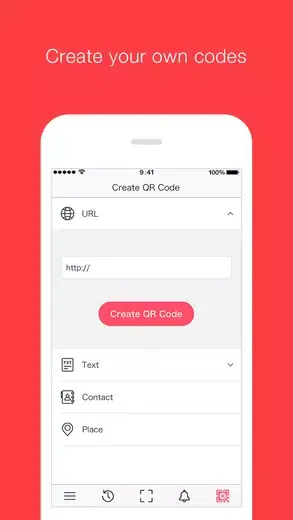
Comprehensive functionality:
QR Code Generation: Users can easily generate QR codes by entering the desired data, making it a versatile tool for various applications.
WiFi QR Code Scanning: The app specializes in scanning WiFi QR codes, simplifying the process of connecting to wireless networks without manual password entry.
Barcode Comparison for Shopping: Use the barcode reader in shops to compare prices with online prices, providing a money-saving advantage for users.
Customization Options: The app allows users to personalize their experience by changing the color, theme, and even utilizing dark mode for enhanced visibility.
Batch Scan Mode: Users can scan multiple QR codes at once in batch scan mode, streamlining processes and improving efficiency.
Export and Import Options: The app facilitates easy export of scanned data as .csv or .txt files and enables the import of data through .csv files.
Pros & Cons:
Pros
Scans QR codes, barcodes, and flashcodes
Reads codes from saved gallery images
Creates both QR codes and barcodes
Includes zoom and flashlight controls
Cons
Reported advertising notifications may appear outside the app and lack a suppression option
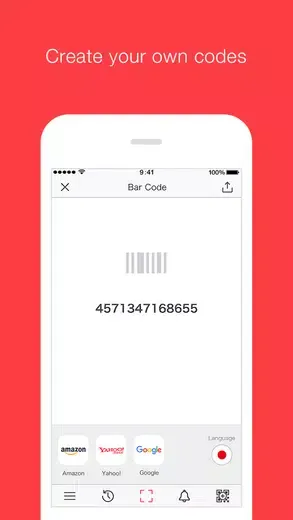
Final Words:
You can use them to link to websites, to download apps, to register for websites, to buy products and to find out more information. You can also use them to send messages and to share pictures and videos. QRQR is an excellent app for two very simple reasons: it takes hardly any space, and it gets the job done effectively. Plus, it lets you scan bar codes and even connect to WiFi networks via QR.
More Information
- Size:44.72MB
- Version:3.0.42
- Requirements:Android 9.0+
- Package Name:com.arara.q
- Signature:c577650be0436766f46f75d5f4a60a3e
Related topics
-
Feeling that there aren’t enough hours in the day? That you’re fighting a losing battle with your agenda? That each time you look up from your desk another year has rolled by? Well don’t worry, you’re not alone, and in today’s hyperconnected world, people are busier than ever before. On Android, there are countless productivity apps to help take control of your time and make your work more efficient. From a simple plugin for Chrome to a full-fledged app, picking the right productivity apps on Android can mean the difference between having a clear to-do list at the end of the day or having it overflowing with missed deadlines and projects that are off schedule. Productivity apps aren’t just about work, though. Using a productivity app in your personal life can keep you on top of deadlines for vacations, home repairs, and other family responsibilities.
-
![Basecamp]()
Basecamp
-
![mParivahan]()
mParivahan
-
![Plantix]()
Plantix
-
![QRQR]()
QRQR
-
![magicplan]()
magicplan
-
![Google Assistant]()
Google Assistant
-
![CamScanner]()
CamScanner
-
![Intel® Unison™]()
Intel® Unison™
-
-
Office Apps is a comprehensive and user - friendly platform that aggregates a wide array of office - related applications, catering to the diverse needs of modern professionals, students, and anyone who engages in office - based tasks. Whether you're working on a crucial business project, preparing academic papers, or handling daily administrative work, this aggregation page serves as your one - stop - shop.
-
![Basecamp]()
Basecamp
-
![mParivahan]()
mParivahan
-
![Plantix]()
Plantix
-
![QRQR]()
QRQR
-
![magicplan]()
magicplan
-
![Google Assistant]()
Google Assistant
-
![Nebo]()
Nebo
-
![CamScanner]()
CamScanner
-








Latest Updated
Popular Apps







Popular News
More+-
![Tomie Wants to Get Married Full Walkthrough, All Choices and Ending Guide]()
Tomie Wants to Get Married Full Walkthrough, All Choices and Ending Guide
2026-05-22
-
![Karryn’s Prison Gameplay Walkthrough & Strategy Guide]()
Karryn’s Prison Gameplay Walkthrough & Strategy Guide
2025-10-28
-
![Life in Santa County Game Guide & Complete Walkthrough]()
Life in Santa County Game Guide & Complete Walkthrough
2025-10-28
-
![Dreams of Desire Complete Walkthrough and Game Guide]()
Dreams of Desire Complete Walkthrough and Game Guide
2025-10-28
-
![Era Hunter Gameplay Guide & Full Walkthrough]()
Era Hunter Gameplay Guide & Full Walkthrough
2025-10-28




