

Ibo Pro Player
Download for Android This app is available for Android only.- Category:Media & Video
- Rating:
- Language:English
- Updated:2026-11-24
Screenshots
Introduction
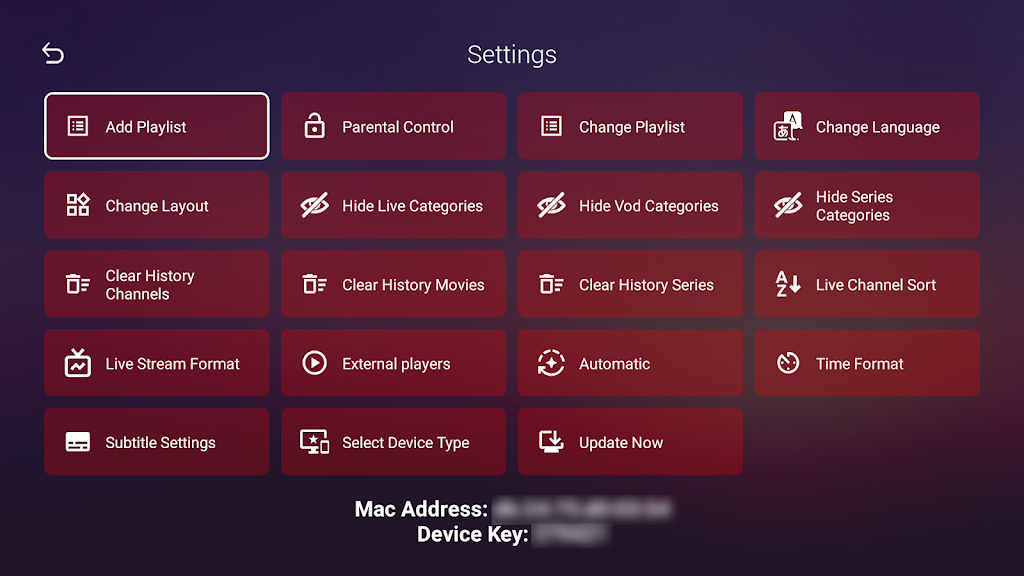
Ibo Pro Player is a professional S3U player. Compatible with Android smart TVs, TV sticks, smartphones, and tablets, the app features a clean user interface and enhanced playback controls, ensuring a smoother viewing experience. With Ibo Pro Player, users can simply upload their playlists via the website and activate their accounts to start enjoying their favorite content. Additionally, it offers a range of practical features, such as adding playlists, viewing details for movies and series, selecting languages and subtitles, and even including parental controls.
Features:
ADD PLAYLISTS WITH EASE
Optimized for swift m3u streaming. Load playlists quickly and enjoy high-quality content without annoying lags.
INTUITIVE INTERFACE
Navigate effortlessly through a user-friendly design, making streaming your media a breeze.
UNIVERSAL SCREEN SUPPORT
Compatible with all screen resolutions on Android TVs, smartphones, and more, bringing clarity to every viewing experience.
DETAILED CONTENT INFORMATION
Access release dates, cast info, trailers, and ratings for movies and series.
CUSTOMIZATION AND CONTROL
Add favorites, choose language options and subtitles, and enjoy parental control features.
How to Use:
Get an m3u url or playlist from your provider (we are just an Media player).
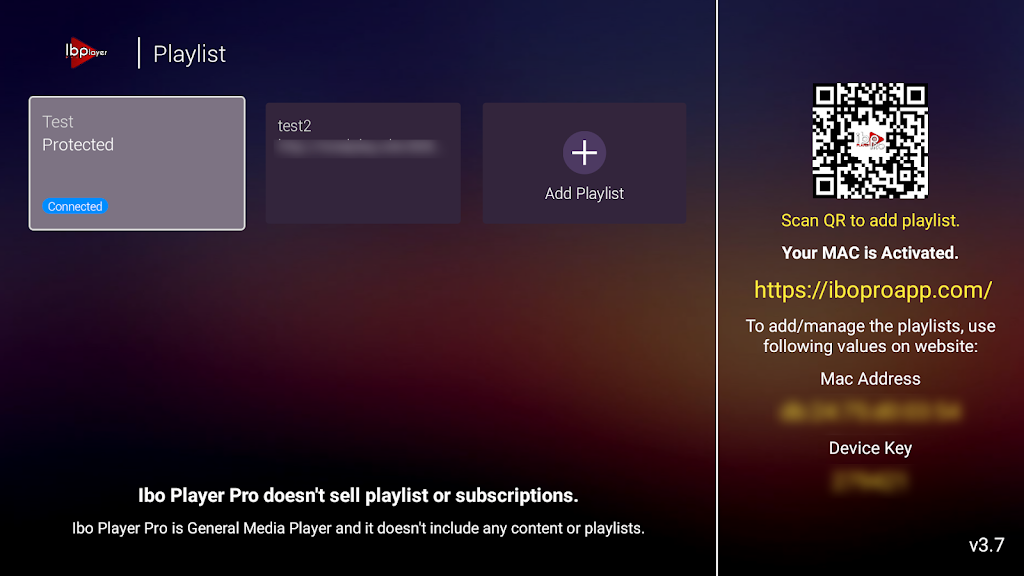
Upload your playlist in our website.
Activate your account via webstite.

Pros & Cons:
Pros
Accepts M3U playlist links and files
Includes subtitles, channel grouping, and playlist management
Layout supports phones and TV screens
Cons
No DVR recording
No integrated electronic program guide
FAQs:
How do I add playlists to this app?
To add playlists to this app, simply upload your m3u playlist on their website. You can then activate your account via the website and start streaming your favorite channels.
Can I use this app with other media players?
Yes, this app supports MX, VLC player, and Fast Streaming. You can choose to use any of these media players to enhance your viewing experience.
Is parental control available on this app?
Yes, this app offers parental control features. You can set restrictions on certain content to ensure a safe viewing environment for your family.
Conclusion:
If you're looking for a professional m3u player that provides fast and reliable streaming, Ibo Pro Player is an excellent choice. With its user-friendly interface and support for multiple devices, including Android smart TVs, smartphones, and tablets, it offers a convenient and seamless entertainment experience. Additionally, the this app goes beyond just streaming m3u playlists by providing features such as movie and series details, favorites list, language and subtitle options, and even parental control.
More Information
- Size:27.55MB
- Version:1.0.2
- Requirements:Android 5.0+
- Package Name:com.ibo.playeriptvpro
- Signature:e6431dbbd92c85a0aad5a606ed5894fa
Related Versions
-
Download
Version:3.7Size:24.2MB
Related topics
-
Video Player is a software application or hardware device designed to decode and display digital video content. Modern video players are highly versatile, capable of handling both locally stored files and real-time streaming media from online platforms. Over time, technological advancements have transformed video players from basic format-specific tools into sophisticated systems supporting a wide range of codecs, resolutions, and playback features. Today’s players offer enhanced functionality such as subtitle synchronization, playback customization, and adaptive streaming, ensuring a seamless and user-friendly viewing experience across various devices.
-
![Ibo Pro Player]()
Ibo Pro Player
-
![Go VideoTube]()
Go VideoTube
-
![YouTube Create]()
YouTube Create
-
![AI Kissing Video Generator]()
AI Kissing Video Generator
-
![Magma]()
Magma
-
![Playvid]()
Playvid
-
![FDown net]()
FDown net
-
![MultiMovies]()
MultiMovies
-
-
What are the best video player software? The editor recommends some treasure level video player apps to provide users with a massive collection of TV dramas and movie resources, allowing you to enjoy the joy of binge watching at any time. The interface is beautiful and the design is simple, and many functions are displayed very clearly without the need to search everywhere. It also has various functions such as screen casting and video screenshot, and all formats can be easily played without conversion, ensuring that users can enjoy the smoothest and highest definition picture quality. Interested friends, come and download it now.
-
![Ibo Pro Player]()
Ibo Pro Player
-
![Runtime for Android TV]()
Runtime for Android TV
-
![MLWBD]()
MLWBD
-
![Live Net TV]()
Live Net TV
-
![AniVera]()
AniVera
-
![Shahid4U]()
Shahid4U
-
![myFlixTor]()
myFlixTor
-
![Tea TV]()
Tea TV
-
-
Nowadays, the software we can see has varying sizes and decimals, with different types available. Today, we will mainly talk about video watching software and recommend several playback apps for everyone. The best video player software ranking is here. Do you want to know what are the useful video playback apps? If you want to know, let's follow the editor to learn about them one by one.
-
![Ibo Pro Player]()
Ibo Pro Player
-
![Runtime for Android TV]()
Runtime for Android TV
-
![HUBFLIX]()
HUBFLIX
-
![HdToday]()
HdToday
-
![WatchSeries]()
WatchSeries
-
![Katmoviehd]()
Katmoviehd
-
![Xtream IPTV]()
Xtream IPTV
-
![StreamFire]()
StreamFire
-




















Latest Updated







Popular Apps








Popular News
More+-
![Tomie Wants to Get Married Full Walkthrough, All Choices and Ending Guide]()
Tomie Wants to Get Married Full Walkthrough, All Choices and Ending Guide
2026-05-22
-
![Karryn’s Prison Gameplay Walkthrough & Strategy Guide]()
Karryn’s Prison Gameplay Walkthrough & Strategy Guide
2025-10-28
-
![Life in Santa County Game Guide & Complete Walkthrough]()
Life in Santa County Game Guide & Complete Walkthrough
2025-10-28
-
![Dreams of Desire Complete Walkthrough and Game Guide]()
Dreams of Desire Complete Walkthrough and Game Guide
2025-10-28
-
![Era Hunter Gameplay Guide & Full Walkthrough]()
Era Hunter Gameplay Guide & Full Walkthrough
2025-10-28




