

G-NetTrack
Download for Android This app is available for Android only.- Category:Tools
- Rating:
- Language:English
- Updated:2026-11-26
Screenshots
Introduction
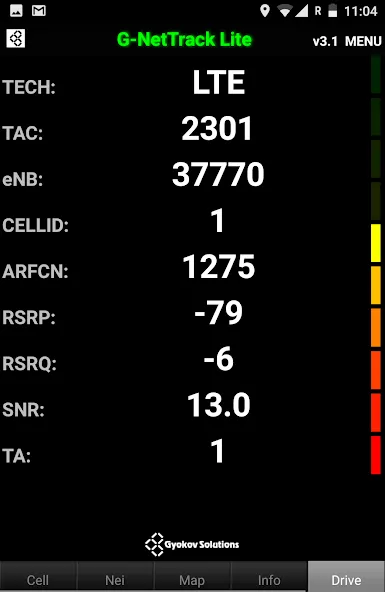
G-NetTrack is a network testing tool designed for Android devices. It allows users to measure network signals—covering both serving and neighboring cells—within their vicinity. Measurement data can be saved to log files (in text or KML format), which can then be visualized on a map to clearly display site locations. The software is versatile, supporting measurements across various environments. It also facilitates voice testing (including via Bluetooth) and enables the use of Bluetooth to control multiple phones simultaneously for network measurements. Additionally, it can utilize the device's built-in barometer to determine altitude. G-NetTrack offers a wide range of advanced, professional-grade drive-test features, making it an ideal choice for industry professionals.
Features
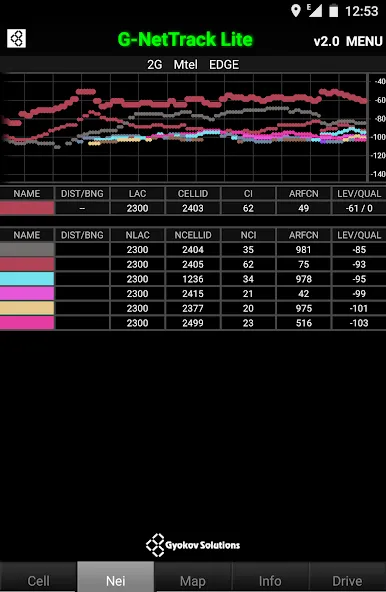
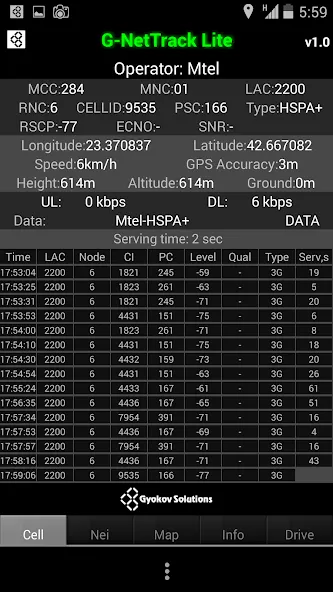
Measurement of 2G/3G/4G/5G serving and neighboring cells
Logging of measurement results (text and KML formats)
Import/export of cell site files and visualization of sites on a map
Indoor and outdoor measurement capabilities
Automatic indoor mode for tunnels and areas with weak GPS signals
Support for dual-SIM (dual-standby) devices
Export of cell scan data to KML files
Ability to load floor plans
Ability to load predefined routes
Data test sequences (upload, download, and ping)
Voice test sequences
Combined data/voice test sequences
Control of multiple phones via Bluetooth
G-NetWiFi control
Cell scanning
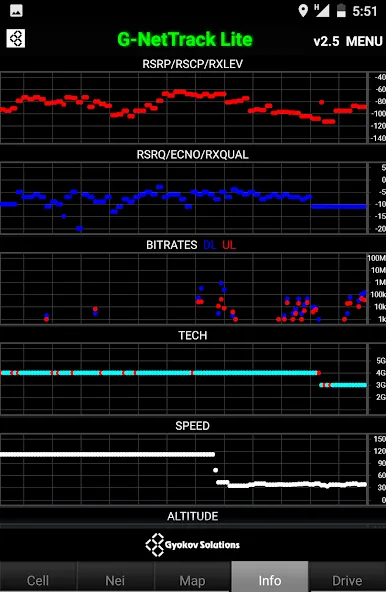
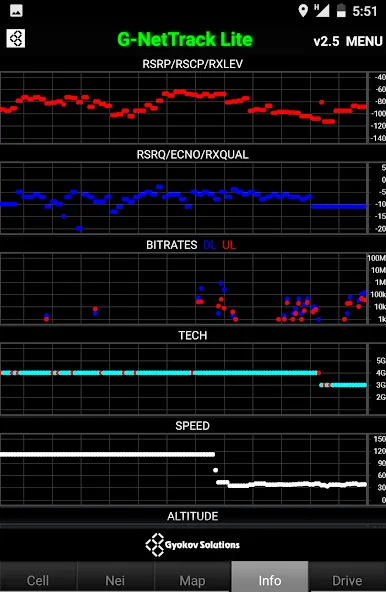
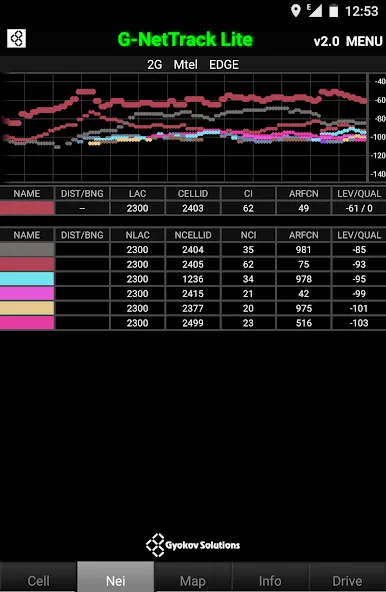
Charts for serving and neighboring cell levels
Altitude determination using the device barometer
Voice announcements for various events
Screen orientation switching
Usage Tips
If you have information regarding the cell sites in your network, you can create a corresponding cell file to gain a better understanding of how your network operates.
Under "Menu" -> "Settings," you can toggle the display of cell lines and cell names. Please note that if a cell file contains an excessive number of entries, it may impact performance while the "Map" tab is active.
Under "Menu" -> "Settings," you can enable or disable the following feature:
- CELLFIND: Used for estimating cell coverage areas. It records locations—determined by Google’s geolocation servers based on Cell ID measurements—and plots these locations, along with their estimated accuracy (represented as circles), in a "cellfind" KML file. Do not enable Wi-Fi during measurements; otherwise, Google may determine your location based on Wi-Fi reports. A mobile network connection is required to connect to Google’s location servers. - CELLHUNTER Mode - When enabled, only cells missing from the cell file are recorded in the exported file. - G-NetWorld Reporting - G-NetWorld is an experimental web service that allows G-NetTrack users to share, upload, and view their measurement data online. Methods for uploading measurement data: - Online Upload - Enable this feature in G-NetTrack via "Menu" - "Settings" - "G-NetReport" - "Send measurement data online" (requires a network connection). - Offline Upload - Manually upload files via G-NetLook ("Menu" - "Upload log file to database").
For log files, a new data point is created whenever the distance exceeds 15 meters or the Cell ID changes. Icon sizes vary by technology: size2G < size3G < size4G.
Thresholds and colors for "LEVEL" (signal level) can be customized. Go to "Menu" - "Settings" to modify the threshold (LT, in dBm) and the color (L, in RRGGBB format—representing Red, Green, and Blue, with values ranging from 00 to FF). To see these changes reflected in the map legend, toggle the "LEVEL" setting to a different value and then back again.
KML log files can be used with Google Earth or G-NetLook to easily visualize measurement results. Text log files can be used with the online tool G-NetDiag, utilized for statistical analysis, or imported into MapInfo to create coverage maps.
The "Map" tab allows for real-time viewing of measurement data (signal level, quality, Cell ID, download/upload bitrates, and speed), with options to export KML files and take screenshots. An internet connection and an active GPS signal are required to display the map.
When an automated voice call sequence is initiated, events such as CALL START, CALL BLOCK, CALL DROP, and CALL END are recorded in both an `events.kml` file (viewable in Google Earth) and an `events.txt` file.
The application must be running in the foreground for these sequences to execute. If the app is running in the background, the sequence will be paused.
Note: On 3G networks, cell parameters are not updated during voice calls. Therefore, when using 3G, keep call durations very short (5 seconds) to ensure accurate capture of Cell IDs and cell parameters.
Pros and Cons
Pros:
A free, feature-rich "lite" version focused on genuine mobile network monitoring.
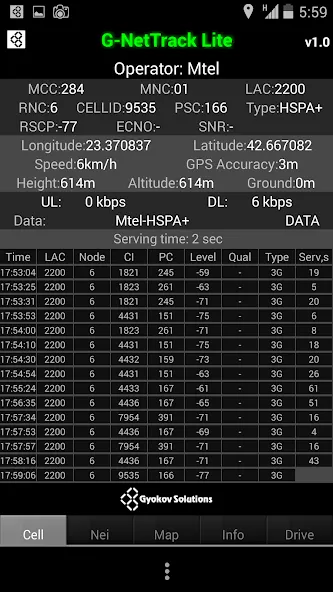
Provides detailed information on serving and neighboring cells.
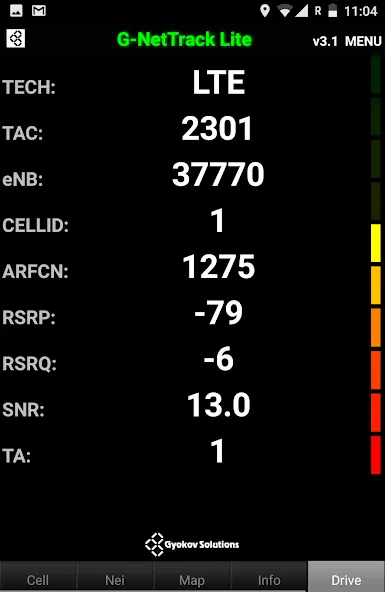
Displays technology-specific metrics such as RXLEVEL, RSCP, RSRP, RSRQ, PCI, SNR, CQI, and Timing Advance.
Logging mode enables continuous data collection in the background—useful for basic drive tests and walk tests.
Helps in evaluating network coverage and site placement (e.g., positioning a 4G router equipped with an external antenna).
Part of a broader ecosystem of "Pro" tools designed for logging, post-processing, and fleet-based measurements.
Cons:
The technical interface and radio metrics may be difficult for non-professionals to interpret.
On some newer Android and Samsung devices, log files may be stored in locations that are difficult for users to access.
Conclusion
G-NetTrack allows for the monitoring of mobile network service and neighboring cell information without the need for specialized hardware. It serves as both a professional tool and an engaging utility—professionals can use it to gain deeper insights into the network, while radio enthusiasts can use it to learn more about wireless networks.
More Information
- Size:6.27MB
- Version:20.5
- Requirements:Android
- Package Name:com.gyokovsolutions.gnettracklite
- Signature:7e1abc948bbc04ae127897e6a8d4d9b5
Related topics
-
Utility apps are indispensable in our lives, making our daily routines more convenient. To help you find these apps more easily, this site has created a collection. This collection brings together a series of practical tools covering various aspects of life, work, and education, meeting all your needs. What are you waiting for? Try these apps now and make your life easier!
-
![Yoosee]()
Yoosee
-
![G-NetTrack]()
G-NetTrack
-
![Screen Off]()
Screen Off
-
![File Manager by Xiaomi]()
File Manager by Xiaomi
-
![CyberGhost VPN]()
CyberGhost VPN
-
![JioSwitch]()
JioSwitch
-
![Among Pink MOD]()
Among Pink MOD
-
![Samsung Members]()
Samsung Members
-
-
Transform your mobile device into a powerhouse of efficiency with these handpicked essential tools. Whether you need professional-grade photo editing, seamless file organization, smart task management, or real-time weather updates, our curated selection of premium apps delivers unbeatable performance. Streamline your daily routine, automate repetitive tasks, and boost your productivity with intuitive interfaces and powerful features. Designed for both professionals and casual users, these editor-approved applications will revolutionize how you work and play. Don't settle for an ordinary phone - upgrade your digital experience today and unlock your device's full potential!
-
![Yoosee]()
Yoosee
-
![G-NetTrack]()
G-NetTrack
-
![Screen Off]()
Screen Off
-
![LetsVPN]()
LetsVPN
-
![File Manager by Xiaomi]()
File Manager by Xiaomi
-
![WT Hub]()
WT Hub
-
![Samsung Members]()
Samsung Members
-
-
With the development of mobile hardware and software, many practical tool software have emerged, covering a wide range of aspects and becoming a good helper for everyone in work and life. Today, the editor provides you with a list of useful tool software downloads. These tools are not particularly complex types, and after reading them, everyone can quickly learn how to use them. Proper use can bring great convenience to life and work.
-
![G-NetTrack]()
G-NetTrack
-
![Screen Off]()
Screen Off
-
![JioSwitch]()
JioSwitch
-
![WT Hub]()
WT Hub
-
![Samsung Members]()
Samsung Members
-
![Dolphin MMJR2]()
Dolphin MMJR2
-
![Foap]()
Foap
-







Latest Updated

Popular Apps








Popular News
More+-
![Tomie Wants to Get Married Full Walkthrough, All Choices and Ending Guide]()
Tomie Wants to Get Married Full Walkthrough, All Choices and Ending Guide
2026-05-22
-
![Karryn’s Prison Gameplay Walkthrough & Strategy Guide]()
Karryn’s Prison Gameplay Walkthrough & Strategy Guide
2025-10-28
-
![Life in Santa County Game Guide & Complete Walkthrough]()
Life in Santa County Game Guide & Complete Walkthrough
2025-10-28
-
![Dreams of Desire Complete Walkthrough and Game Guide]()
Dreams of Desire Complete Walkthrough and Game Guide
2025-10-28
-
![Era Hunter Gameplay Guide & Full Walkthrough]()
Era Hunter Gameplay Guide & Full Walkthrough
2025-10-28




