

Samsung Video Library
Download for Android This app is available for Android only.- Category:Media & Video
- Rating:
- Language:English
- Updated:2026-11-25
Screenshots
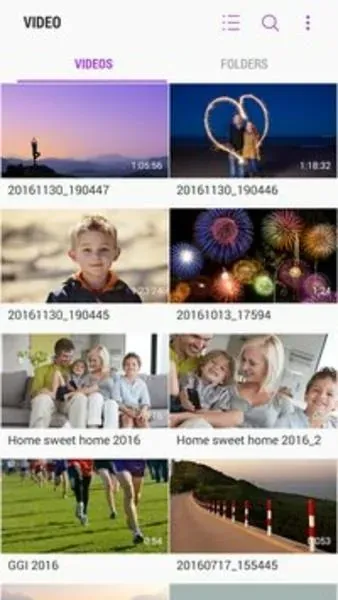
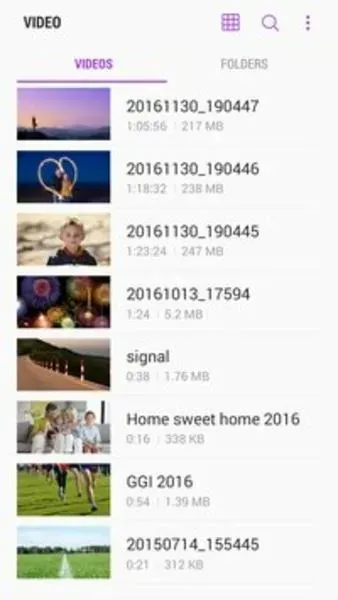
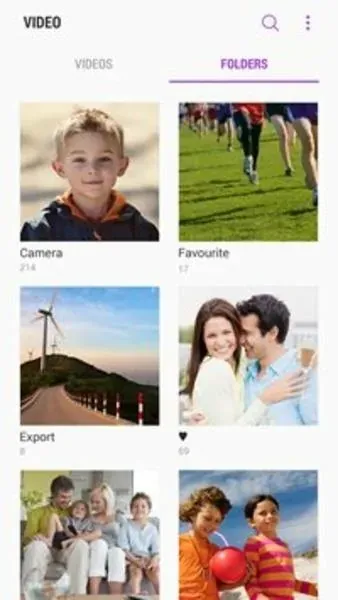

Introduction
Samsung Video Library combines video management and playback, making it easy for users to access and organize videos in various formats stored on their phones. The app automatically categorizes videos into different folders, and a built-in search function allows users to quickly locate the files they need. It supports batch operations, enabling you to move, delete, rename, or mark multiple videos as private—or even share them directly with friends. The app also supports the playback of various video formats; simply tap a file to start watching. You can also adjust settings such as brightness and playback speed to ensure a more comfortable viewing experience.
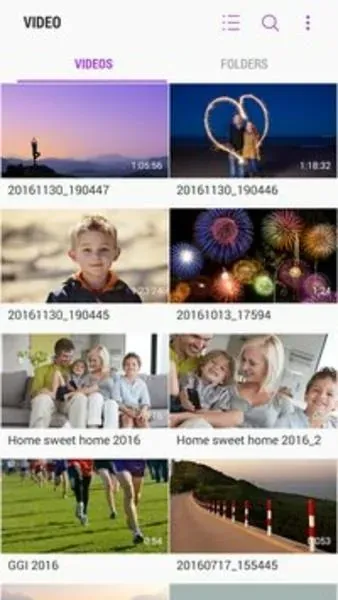
Features of Samsung Video Library:
Neatly organizes all your videos: Samsung Video Library automatically sorts your videos into different folders, making it much easier to access and manage them.
Quick search feature: With just a few taps, you can run a quick search within the app and effortlessly find the video you're looking for.
Interesting features for customization: You can rename your videos, move them between folders, and even convert them into private videos using Secure Folder.
Exclusively designed for videos: Unlike other gallery apps, Samsung Video Library is solely focused on videos, ensuring an optimized experience for organizing your video content.
Perfect for Samsung phones: This app is specifically designed for Samsung phones running the latest version of Android, providing a seamless and tailored experience.
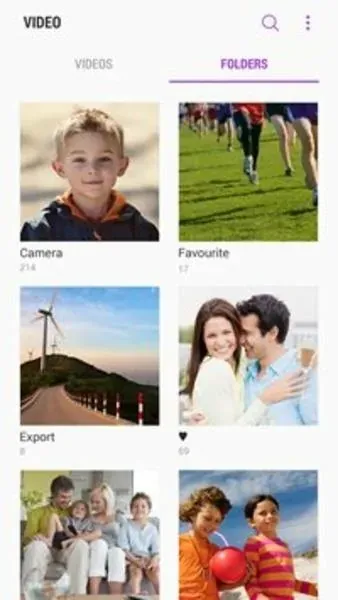
Highlights of Samsung Video Library:
Samsung Video Library incorporates a resume position card that shows the last video a user played. This feature allows for convenient playback, as users can easily pick up where they left off without having to search through their collection. The app also provides management capabilities for video content, enabling users to edit or delete videos directly within the application. For those looking to enhance their editing options, Samsung Video Library can be paired with a downloadable Video Editor.
Sharing video content is another important function of the app. Users can share their videos with friends through various sharing methods supported by their devices, such as email, Bluetooth, Wi-Fi Direct, and YouTube. This sharing capability extends the app's utility, allowing users to distribute their favorite videos with others effortlessly.
For users with multiple folders, Samsung Video Library allows for the selection and movement of content between folders. This feature supports better organization of video files, making it simpler for users to manage their collections. Additionally, the app provides the option to rename video files, offering another layer of customization for users who want to keep their collections orderly.
Samsung Video Library also includes a privacy feature that enables users to make selected video content private. This functionality is contingent on the device's support for Secure Folder, Private Mode, or KNOX service. Such options are beneficial for users who wish to keep certain videos confidential and separate from their main video library.
To provide quality service, Samsung Video Library requires mandatory access privileges, specifically to storage. This access is necessary for the app to manage and access local video files, ensuring that users can fully utilize its features without interruptions. Although there are optional app access privileges, the core functionalities of the application remain accessible without additional consent.
Final Thoughts:
Thanks to its optimization features, you can easily organize all the video content on your Android smartphone in one single swoop. Bear in mind that it's particularly designed for Samsung phones running a current version of Android.
More Information
- Size:7.49MB
- Version:1.4.22.81
- Requirements:Android
- Package Name:com.samsung.android.videolist
- Signature:d460af7e59cb2b33313f5c9c6731e600
Related topics
-
A truly outstanding movie is not just about an engaging plot-it also requires seamless transitions between scenes. When these transitions are natural and fluid, they help the audience stay immersed in the story without feeling disconnected. The same principle applies to video games. Games that ensure smooth, uninterrupted gameplay, whether through well-designed animations, intuitive controls, or seamless scene changes, create a more immersive and enjoyable experience for players. A game that flows effortlessly from one moment to the next demonstrates a level of craftsmanship that deserves recognition and admiration.
-
![Samsung Video Library]()
Samsung Video Library
-
![Filter Cam for WA Video Call]()
Filter Cam for WA Video Call
-
![Go VideoTube]()
Go VideoTube
-
![Ace Stream]()
Ace Stream
-
![AI Kissing Video Generator]()
AI Kissing Video Generator
-
![Magma]()
Magma
-
![f2movies]()
f2movies
-
![Playvid]()
Playvid
-
-
In our fast-paced world, internet access isn’t always available-whether you're on a flight, a high-speed train, in a low-connectivity zone, or simply off the grid. That’s where offline games shine! These hassle-free entertainment options let you dive into immersive gameplay without relying on a connection. No lag, no interruptions-just pure, uninterrupted fun wherever you are. Perfect for travelers, commuters, or anyone seeking a reliable escape, offline games ensure the excitement never stops!
-
![Samsung Video Library]()
Samsung Video Library
-
![Ace Stream]()
Ace Stream
-
![VLC Media Player]()
VLC Media Player
-
![Samsung Video Player]()
Samsung Video Player
-
![Video Player All Format]()
Video Player All Format
-
![HDx Video Player]()
HDx Video Player
-
![MEDIAFLIX Plus]()
MEDIAFLIX Plus
-
![SAX Video Player]()
SAX Video Player
-
-
Video Player is a software application or hardware device designed to decode and display digital video content. Modern video players are highly versatile, capable of handling both locally stored files and real-time streaming media from online platforms. Over time, technological advancements have transformed video players from basic format-specific tools into sophisticated systems supporting a wide range of codecs, resolutions, and playback features. Today’s players offer enhanced functionality such as subtitle synchronization, playback customization, and adaptive streaming, ensuring a seamless and user-friendly viewing experience across various devices.
-
![Samsung Video Library]()
Samsung Video Library
-
![Ibo Pro Player]()
Ibo Pro Player
-
![Go VideoTube]()
Go VideoTube
-
![YouTube Create]()
YouTube Create
-
![Snaptube]()
Snaptube
-
![AI Kissing Video Generator]()
AI Kissing Video Generator
-
![Magma]()
Magma
-
![Playvid]()
Playvid
-
















Latest Updated








Popular Apps








Popular News
More+-
![Tomie Wants to Get Married Full Walkthrough, All Choices and Ending Guide]()
Tomie Wants to Get Married Full Walkthrough, All Choices and Ending Guide
2026-05-22
-
![Karryn’s Prison Gameplay Walkthrough & Strategy Guide]()
Karryn’s Prison Gameplay Walkthrough & Strategy Guide
2025-10-28
-
![Life in Santa County Game Guide & Complete Walkthrough]()
Life in Santa County Game Guide & Complete Walkthrough
2025-10-28
-
![Dreams of Desire Complete Walkthrough and Game Guide]()
Dreams of Desire Complete Walkthrough and Game Guide
2025-10-28
-
![Era Hunter Gameplay Guide & Full Walkthrough]()
Era Hunter Gameplay Guide & Full Walkthrough
2025-10-28




