

Fossify Gallery
Download for Android This app is available for Android only.- Category:Photography
- Rating: 4.7
- Language:English
- Updated:2026-10-21
Screenshots
Introduction
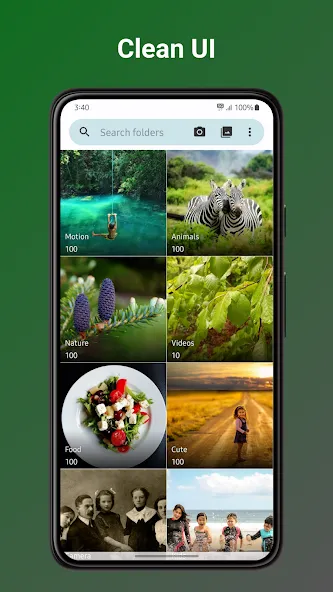
Fossify Gallery is an excellent photography tool. This app boasts a beautiful, simple, and modern design, supports quick image search, photo editing, and gallery management, allowing users to solve all their photography problems in one place. With Fossify Gallery, users can view the boundaries of photos through the built-in menu, sort and browse files, and quickly perform operations such as deleting, copying, moving, or sharing. Additionally, the app includes a range of photo-editing features, giving you plenty of options to create stunning images.
Highlights:
Local photo and video albums
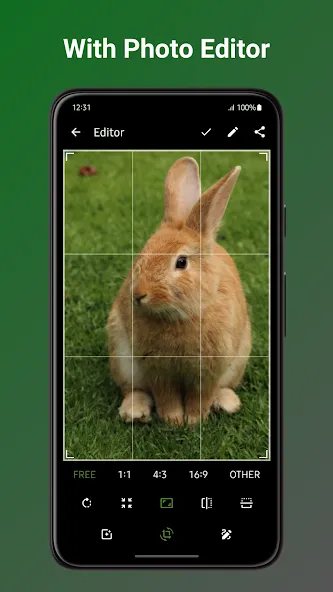
Editor tools for crop, rotate, resize, draw, and filters
Hidden folders, app locking, recycle bin, and file recovery controls
EXIF and metadata controls for sharing
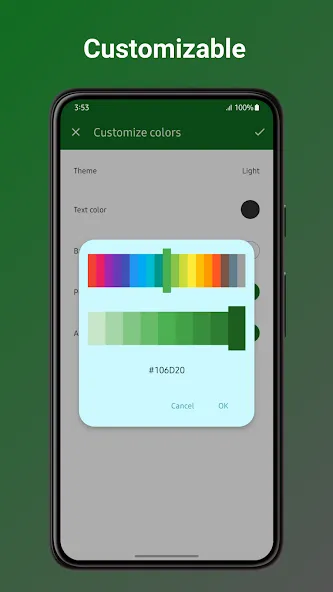
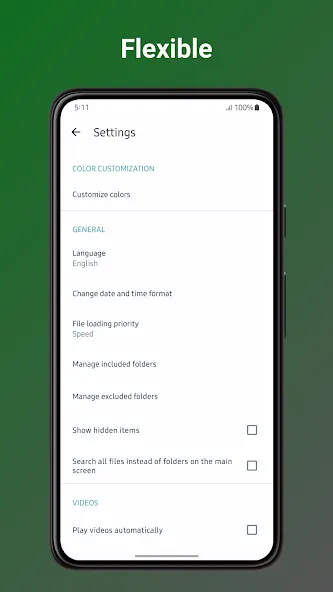
Theme and layout controls
Features:
PHOTO EDITING AT YOUR FINGERTIPS
Enhance your photos with our basic yet powerful photo editor. Crop, resize, rotate, flip, draw, and apply stunning filters, all without compromising your privacy. Take control of your memories like never before.
PRIVACY FIRST, ALWAYS
Your privacy matters. Ditch the data-hungry giants. Fossify Gallery puts you in control. Strip away EXIF metadata like GPS coordinates and camera details, keeping your memories yours, and yours alone.
SUPERIOR SECURITY
Lock down your memories with pin, pattern, or fingerprint protection. Secure specific photos, videos, or the entire app – you decide who gets access. Peace of mind, guaranteed.
RECOVER WITH EASE
Breathe easy, accidents happen! Fossify Gallery's built-in recycle bin lets you recover deleted photos and videos in seconds. No more lost treasures, just pure relief.
YOUR GALLERY, YOUR STYLE
Customize the look, feel, and functionality to match your style. From UI themes to function buttons, Fossify Gallery gives you the creative freedom you crave.
UNIVERSAL FORMAT FREEDOM
JPEG, JPEG XL, PNG, MP4, MKV, RAW, SVG, GIF, videos, and more – we've got your memories covered, in any format you choose. No restrictions, just limitless possibilities.
MATERIAL DESIGN WITH DYNAMIC THEMES
Experience the beauty of intuitive material design with dynamic themes. Want more? Dive into custom themes and make your gallery truly unique.
Pros & Cons:
Pros
No ads or unnecessary permissions
PIN, pattern, and fingerprint protection
Can strip location and camera data from EXIF metadata
Broad image and video format support
Recycle bin and extensive interface customization
Cons
Editor lacks exposure, contrast, saturation, and similar adjustments
Changelog:
Changed:
Compatibility with newer Android devices using 16KB pages
Updated translations
Conclusion:
This app supports various media formats, including JPEG, PNG, MP4, RAW, and more, making it versatile for handling a wide range of files. Fossify Gallery also features a recycle bin for recovering deleted items and offers customization options like themes and UI adjustments to match your preferences. Fossify Gallery combines security, functionality, and personalization, making it an exceptional choice for managing and protecting your media.
More Information
- Size:16.46MB
- Version:1.14.0
- Requirements:Android 8.0+
- Votes:194
- Package Name:org.fossify.gallery
- Signature:3a52d0ad2fc7f4919e5ba25e8bd2167b
Related topics
-
Welcome to our image editing apps! Perfect for beginners and pros alike, they make photo enhancement easy. Use PicsArt to crop, adjust colors, and apply filters. Remove backgrounds instantly with Remove.bg. Get creative with layers and advanced tools on Adobe Photoshop Express. Start transforming your images today!
-
![Da Vinci Eye]()
Da Vinci Eye
-
![Photopea]()
Photopea
-
![3DLUT mobile]()
3DLUT mobile
-
![Logo Maker]()
Logo Maker
-
![Snap Camera HDR]()
Snap Camera HDR
-
![Kafios]()
Kafios
-
![Nomao Camera]()
Nomao Camera
-
![Movie Special Effects Editor]()
Movie Special Effects Editor
-
-
Photography is an art form that has been around for over a century and has evolved greatly over the years. With the advent of technology, photography has become more accessible and convenient, especially with the rise of mobile photography. Mobile photography has revolutionized the field of photography, making it possible to capture and edit high-quality photos right from your smartphone. As mobile photography continues to grow in popularity, there is an abundance of mobile apps available for photography enthusiasts. However, with so many options available, it can be difficult to determine which apps are worth your time and investment. In this article, we’ll take a look at the top mobile apps for photography and provide you with a comprehensive guide to help you choose the best app for your needs.
-
![Phocus Mobile]()
Phocus Mobile
-
![Camera for Facebook]()
Camera for Facebook
-
![Candy Camera AI]()
Candy Camera AI
-
![Amazon Photos]()
Amazon Photos
-
![Glitch!]()
Glitch!
-
![Photo & Picture Resizer]()
Photo & Picture Resizer
-
![Timelapse Calculator]()
Timelapse Calculator
-
![Selfie Camera Expert]()
Selfie Camera Expert
-
-
The demand for taking and editing images is increasing among modern people, and free image editing software has become an ideal choice to meet this demand. Through these apps, users can easily edit images, including cropping, rotating, adjusting brightness and contrast, and more. At the same time, they also provide rich filters and special effects to make your photos more vivid and artistic. In addition, these software also support adding elements such as stickers, text, and graffiti to make your pictures more personalized. Most importantly, these apps are very easy to use and do not require professional skills. Just a few steps can make your photos stand out. Whether you want to post a stunning photo on social media or add some creativity to your album, these free photo editing apps can meet your needs. Try one out!
-
![3DLUT mobile]()
3DLUT mobile
-
![Logo Maker]()
Logo Maker
-
![Snap Camera HDR]()
Snap Camera HDR
-
![HD Camera]()
HD Camera
-
![Camera Pixel]()
Camera Pixel
-
![Kapi Cam]()
Kapi Cam
-
![Native Camera Mod]()
Native Camera Mod
-
![FACEinHOLE®]()
FACEinHOLE®
-



















Latest Updated

Popular Apps








Popular News
More+-
![Tomie Wants to Get Married Full Walkthrough, All Choices and Ending Guide]()
Tomie Wants to Get Married Full Walkthrough, All Choices and Ending Guide
2026-05-22
-
![Karryn’s Prison Gameplay Walkthrough & Strategy Guide]()
Karryn’s Prison Gameplay Walkthrough & Strategy Guide
2025-10-28
-
![Life in Santa County Game Guide & Complete Walkthrough]()
Life in Santa County Game Guide & Complete Walkthrough
2025-10-28
-
![Dreams of Desire Complete Walkthrough and Game Guide]()
Dreams of Desire Complete Walkthrough and Game Guide
2025-10-28
-
![Era Hunter Gameplay Guide & Full Walkthrough]()
Era Hunter Gameplay Guide & Full Walkthrough
2025-10-28




