
Ana Muhtarif Al Khat
Download for Android This app is available for Android only.- Category:Productivity
- Rating:
- Language:English
- Updated:2026-11-16
Screenshots
Introduction
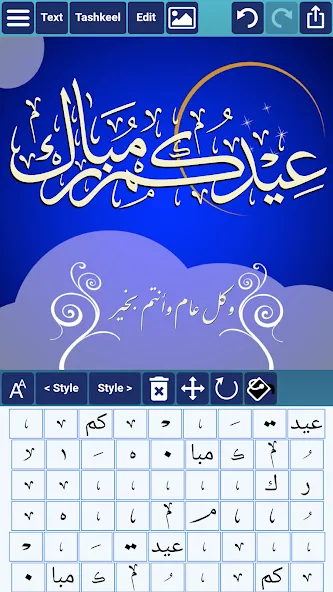
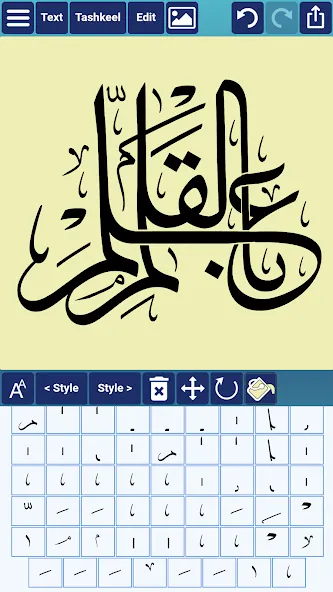
Ana Muhtarif Al Khat is an engaging and fun-to-use input tool for Android. The application offers a rich font library, with two different built-in fonts, and features flexible language settings, including Arabic, English, Indonesian, menus, and interface, making it feel very familiar to users. With Ana Muhtarif Al Khat, you can utilize custom styling tools to modify glyphs, select different letter variants, or even remove dots from characters to create truly unique visual effects. Thanks to its integrated save and share functions, you can quickly store your creations and share them with others at any time.
Highlights:
Choose from a variety of vector shapes.
Choose a specific color using the Eyedropper tool.
Align text or shapes using the Alignment tools.
Bring design elements Forward or send them Backward.
Change the color and the width of the text outline.
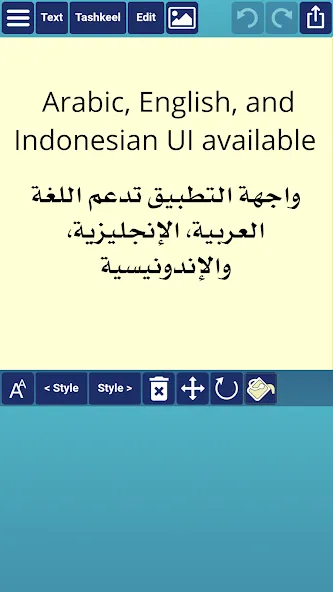
Choose either Arabic, English or Indonesian UI [user interface] and menus.
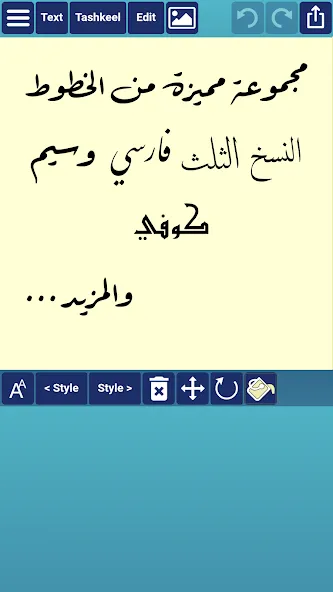
Choose from a collection of 21 fonts including Diwan's most advanced Arabic fonts like Diwan Naskh Mishafi, Diwan Thuluth, Diwan Farsi, Waseem (Ruqa’a like font), Kufi, and more.
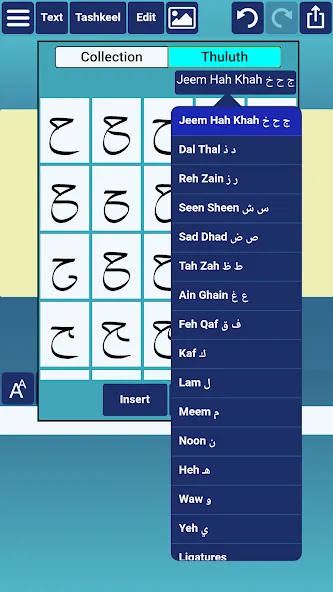
Select from a number of styling options for each word segment including alternative shapes, wide forms, and removed dots.
Freely position word segments to create complex compositions.
Features:
Easy Editing
Enjoy multi-level undo and redo options. Lock or unlock elements, group items, and work with multi-line text complete with line spacing and alignment choices.
Creative Backgrounds
Set any color or photo as your background—or keep it transparent if that’s more your style.
Full Resolution Exports
Save your artwork as images to use elsewhere, or crank out high-res PDFs for top-quality prints.
Grid, Zoom, and Sizing
Use a handy grid for lining up text, zoom in or out for precision work, and adjust design size to fit your needs.
Import, Export, and Merge
Bring in or send out designs, reopen saved projects, and even merge two pieces into one new composition.
Rotation and Flipping
Spin or flip text in any direction for the perfect arrangement.
Pros & Cons:
Pros
Rich Arabic calligraphy focus with detailed control over text curves, colors, and outlines
Collection of 21 specialized fonts, including Diwan Naskh Mishafi, Diwan Thuluth, Diwan Farsi, Waseem, and Kufi
Advanced glyph handling, with per-segment styling options and freely placed decorative glyphs
Helpful layout tools such as grid, alignment, layering, rotation and flipping of text, and element grouping
Robust project handling with save, reopen, import, export, and design merging features
High resolution PDF and image export, plus support for transparent backgrounds
Multilingual interface with Arabic, English, and Indonesian menus
Cons
Vector shape selection feels limited for those who want basic frames like circles or triangles
Font set may feel incomplete for artists who rely on additional styles such as Diwani
Conclusion:
Save and reopen projects, create designs at different sizes, and export as high resolution PDFs or images with transparent backgrounds. These capabilities make the software suitable for standalone artwork or templates you can refine further elsewhere. If you want an approachable yet capable calligraphy application, Ana Muhtarif Al Khat delivers the control you need. Get Ana Muhtarif Al Khat on Mac and start crafting refined Arabic calligraphy today.
More Information
- Size:31.90MB
- Version:2.2.1
- Requirements:Android 10.0+
- Package Name:com.diwan.muhtarifalkhat
- Signature:3d75e7f26e55e556141d6c92029f7093
Related topics
-
Office Apps is a comprehensive and user - friendly platform that aggregates a wide array of office - related applications, catering to the diverse needs of modern professionals, students, and anyone who engages in office - based tasks. Whether you're working on a crucial business project, preparing academic papers, or handling daily administrative work, this aggregation page serves as your one - stop - shop.
-
![Ana Muhtarif Al Khat]()
Ana Muhtarif Al Khat
-
![Microsoft 365 Copilot]()
Microsoft 365 Copilot
-
![HP Smart]()
HP Smart
-
![WPS Office]()
WPS Office
-
![Milkshake]()
Milkshake
-
![Resilio Sync]()
Resilio Sync
-
![Orgzly]()
Orgzly
-
![Code Studio]()
Code Studio
-
-
The complete collection of office software is compiled based on user needs and referencing the popularity of major computer application stores. This collection selects various useful computer office software for users from multiple aspects such as office suite, communication and collaboration, email management, note management, cloud storage, download and decompression, etc. These software can meet your various document processing needs, making your team collaboration smoother, and conveniently managing your emails and keeping various meeting records. Download various materials and documents needed for office work. This collection of office software commonly used by professionals can meet all needs. Welcome to download and experience it!
-
![Ana Muhtarif Al Khat]()
Ana Muhtarif Al Khat
-
![HP Smart]()
HP Smart
-
![WPS Office]()
WPS Office
-
![Milkshake]()
Milkshake
-
![Resilio Sync]()
Resilio Sync
-
![CutList Optimizer]()
CutList Optimizer
-
![Code Studio]()
Code Studio
-
![First 5]()
First 5
-






Latest Updated


Popular Apps





Popular News
More+-
![Tomie Wants to Get Married Full Walkthrough, All Choices and Ending Guide]()
Tomie Wants to Get Married Full Walkthrough, All Choices and Ending Guide
2026-05-22
-
![Karryn’s Prison Gameplay Walkthrough & Strategy Guide]()
Karryn’s Prison Gameplay Walkthrough & Strategy Guide
2025-10-28
-
![Life in Santa County Game Guide & Complete Walkthrough]()
Life in Santa County Game Guide & Complete Walkthrough
2025-10-28
-
![Dreams of Desire Complete Walkthrough and Game Guide]()
Dreams of Desire Complete Walkthrough and Game Guide
2025-10-28
-
![Era Hunter Gameplay Guide & Full Walkthrough]()
Era Hunter Gameplay Guide & Full Walkthrough
2025-10-28




