

PayByPhone
Download for Android This app is available for Android only.- Category:Productivity
- Rating:
- Language:English
- Updated:2026-11-24
Screenshots


Introduction
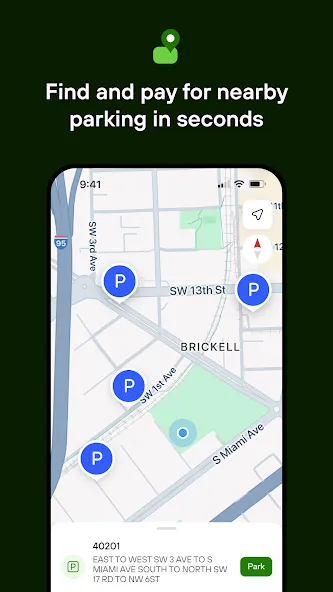
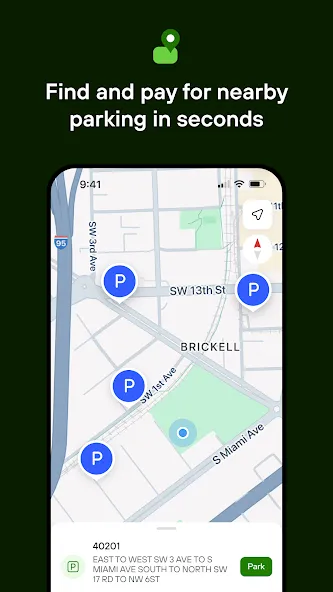
PayByPhone is a payment application designed for Android, offering an efficient way to handle parking fees. Users no longer need to carry loose change or rely on physical credit cards; instead, they can complete payments entirely online within the app. The app also helps users locate parking spaces quickly, with a seamless payment process just a tap away. Furthermore, it provides timely notifications regarding your parking duration, helping you avoid potential fines for overstaying. PayByPhone prioritizes payment security and privacy, ensuring a safe experience for all users.
Functions
Convenient Parking Payments: Eliminate the need for loose change or physical credit cards. The app offers a simple, efficient way to pay for parking directly from your Android device.
Quick and Easy Parking: With PayByPhone, you can find, select, and pay for a parking space in seconds. Simply enter the parking location code, choose your desired duration, and confirm the payment.
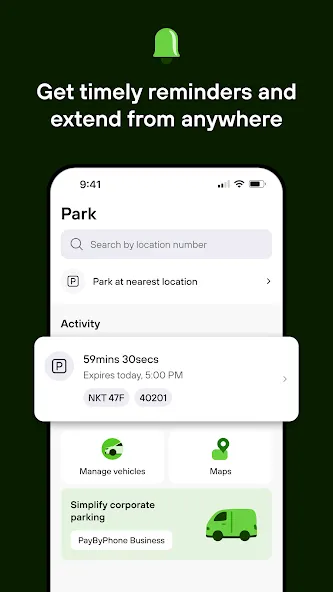
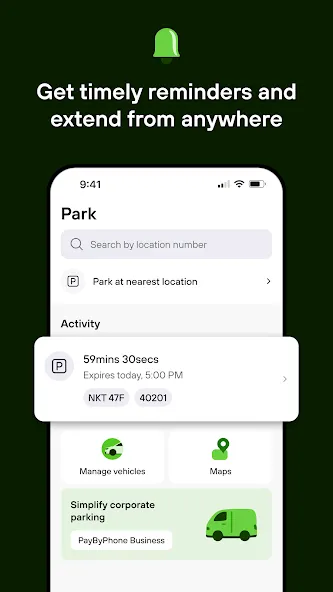
Parking Duration Reminders: The app sends timely alerts before your parking time expires, allowing you to extend your session directly through the interface. This is especially useful when you are away from your vehicle, helping you avoid parking fines or penalties.
Stored Vehicle and Payment Information: PayByPhone allows you to save your vehicle details and payment methods within the app for quick, convenient access in the future—saving you time on every visit.
Parking History and Receipts: For those who need to track their parking expenses, the app provides a clear view of your parking history and receipts, helping you stay organized and manage your costs effectively.
Advanced Security and Data Protection: The app offers top-tier security for all transactions. Your personal and financial information is protected by advanced data encryption, and the platform fully complies with all relevant privacy and data protection regulations.
Highlights
Hybrid Work Model
We are committed to helping you achieve a healthy work-life balance. Team members have the flexibility to choose between working from home or from the office—optimizing collaboration while allowing everyone to perform at their best in the environment where they feel most comfortable. This flexibility not only helps us collaborate efficiently and stand out, but also empowers us to pursue excellence in our respective roles. It allows you to comfortably balance all aspects of your life, ultimately contributing to our collective success and outstanding performance.
Gatherings and Events
We value the time we spend together in person. Whether it’s team members coming into the office for celebrations, all-hands meetings, or collaborative workshops, the atmosphere is always warm and engaging. Throughout the year, we host a variety of exciting team activities, games, parties, and cultural celebrations—all designed to strengthen our connections and mark our shared achievements.
Pet-Friendly Office
Did we mention how much we love dogs? You’ll often see our team members’ “fur babies” around the office, keeping things lively—there’s never a dull moment!
FAQs
Is PayByPhone available in my area?
PayByPhone operates in many cities worldwide. You can check their website or app to see if the service is available in your location.
What payment methods does PayByPhone accept?
PayByPhone generally accepts a variety of credit and debit cards, as well as mobile wallets like Apple Pay and Google Pay.
Can PayByPhone be used for parking enforcement?
Yes, PayByPhone is widely used for parking payments and can be integrated with local parking enforcement systems.
What should I do if I encounter an issue while using the app?
If you run into any problems, you can contact PayByPhone’s customer support through the app or visit their website for assistance.
Is my payment information secure when using PayByPhone?
Yes, PayByPhone employs encryption and secure processes to protect your payment information.

User Reviews
This app is very useful for those who use different parking payment apps across various cities. I downloaded it while traveling, and it worked smoothly across several different parking zones. That said, I personally prefer the parking app used in my own city, as it saves parking zones—allowing me to quickly select a saved location as soon as I open the app, which makes the process much faster.
A very convenient way to pay for parking. Drive in, enter the parking zone, select your vehicle (if you have more than one), choose the duration, and tap "Pay." Done. Setting up an account on the mobile app was a bit slow—for some reason, my password manager didn't recognize the login fields—but that didn't affect my rating.
Every time I’m asked to pay $4.35 an hour to park in some sketchy, unreliable spot, the app pops up to ask if I like it and encourages me to leave a review. Well, let me tell you just how "great" this app is. It stores my credit card and personal information—and I’m sure they’ll keep it perfectly safe from any potential data breaches! I’m just thrilled to shell out nearly $20 a day—from my hard-earned money—to park my boat trailer in an empty, unattended lot! I love this app so much that I even open it up when I’m parked at home, just to voluntarily buy a few hours of parking—it’s just that good! Highly recommended! My only regret is that there’s no option to leave a tip. I’d be more than happy to add a 25% gratuity just for the privilege of using such an outstanding piece of software!
Conclusion
With the PayByPhone app, parking is quick, convenient, and secure. Simply enter or scan the parking zone code, select your duration, and pay using your preferred method—all right from your phone. We’re dedicated to streamlining your journey so you can focus on what matters most.
More Information
- Size:75.05MB
- Version:26.11.0
- Requirements:Android
- Package Name:com.paybyphone
- Signature:fb8b5fdf0d3581b481efe2364074c4bf
Related topics
-
Feeling that there aren’t enough hours in the day? That you’re fighting a losing battle with your agenda? That each time you look up from your desk another year has rolled by? Well don’t worry, you’re not alone, and in today’s hyperconnected world, people are busier than ever before. On Android, there are countless productivity apps to help take control of your time and make your work more efficient. From a simple plugin for Chrome to a full-fledged app, picking the right productivity apps on Android can mean the difference between having a clear to-do list at the end of the day or having it overflowing with missed deadlines and projects that are off schedule. Productivity apps aren’t just about work, though. Using a productivity app in your personal life can keep you on top of deadlines for vacations, home repairs, and other family responsibilities.
-
![Samsung Notes]()
Samsung Notes
-
![PayByPhone]()
PayByPhone
-
![Basecamp]()
Basecamp
-
![mParivahan]()
mParivahan
-
![Plantix]()
Plantix
-
![QRQR]()
QRQR
-
![magicplan]()
magicplan
-
![Google Assistant]()
Google Assistant
-
-
Office Apps is a comprehensive and user - friendly platform that aggregates a wide array of office - related applications, catering to the diverse needs of modern professionals, students, and anyone who engages in office - based tasks. Whether you're working on a crucial business project, preparing academic papers, or handling daily administrative work, this aggregation page serves as your one - stop - shop.
-
![Samsung Notes]()
Samsung Notes
-
![PayByPhone]()
PayByPhone
-
![Basecamp]()
Basecamp
-
![mParivahan]()
mParivahan
-
![Plantix]()
Plantix
-
![QRQR]()
QRQR
-
![magicplan]()
magicplan
-
![Google Assistant]()
Google Assistant
-
-
The complete collection of office software is compiled based on user needs and referencing the popularity of major computer application stores. This collection selects various useful computer office software for users from multiple aspects such as office suite, communication and collaboration, email management, note management, cloud storage, download and decompression, etc. These software can meet your various document processing needs, making your team collaboration smoother, and conveniently managing your emails and keeping various meeting records. Download various materials and documents needed for office work. This collection of office software commonly used by professionals can meet all needs. Welcome to download and experience it!
-
![Samsung Notes]()
Samsung Notes
-
![PayByPhone]()
PayByPhone
-
![Basecamp]()
Basecamp
-
![mParivahan]()
mParivahan
-
![Plantix]()
Plantix
-
![magicplan]()
magicplan
-
![Google Assistant]()
Google Assistant
-
![CamScanner]()
CamScanner
-







Latest Updated


Popular Apps







Popular News
More+-
![Tomie Wants to Get Married Full Walkthrough, All Choices and Ending Guide]()
Tomie Wants to Get Married Full Walkthrough, All Choices and Ending Guide
2026-05-22
-
![Karryn’s Prison Gameplay Walkthrough & Strategy Guide]()
Karryn’s Prison Gameplay Walkthrough & Strategy Guide
2025-10-28
-
![Life in Santa County Game Guide & Complete Walkthrough]()
Life in Santa County Game Guide & Complete Walkthrough
2025-10-28
-
![Dreams of Desire Complete Walkthrough and Game Guide]()
Dreams of Desire Complete Walkthrough and Game Guide
2025-10-28
-
![Era Hunter Gameplay Guide & Full Walkthrough]()
Era Hunter Gameplay Guide & Full Walkthrough
2025-10-28




