

Lawnchair Launcher
Download for Android This app is available for Android only.- Category:Tools
- Rating:
- Language:English
- Updated:2026-11-26
Screenshots
Introduction
Lawnchair Launcher is a free, open-source launcher. This application is built on Launcher3 from the Android open-source project and integrates the features of various mainstream launchers on the Android platform, aiming to provide users with a smooth user experience. Lawnchair Launcher serves as a replacement for your device's default home screen, allowing you to create a layout tailored to your personal preferences and workflow. Additionally, you can configure custom gestures and the dock (bottom bar), assigning specific actions to various gesture inputs.
Highlights:
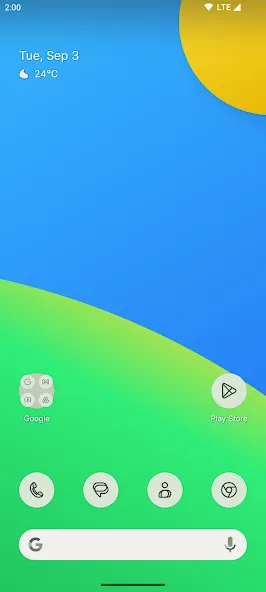
The default arrangement closely follows Google’s approach. Pixel Pill provides search access, a persistent date and time widget occupies the home screen, and an upward swipe opens the app drawer. Swiping left can open Google Now, while Google app icons receive the characteristic white circular background.
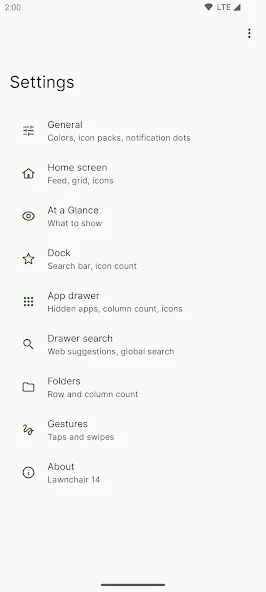
This makes Lawnchair particularly suitable for people who like the uncluttered Pixel interface but want more control over it. A long press on the home screen opens settings for changing the search bar, disabling default elements, and adjusting icon size, shape, and spacing. Adaptive Icons help maintain a consistent appearance across apps.
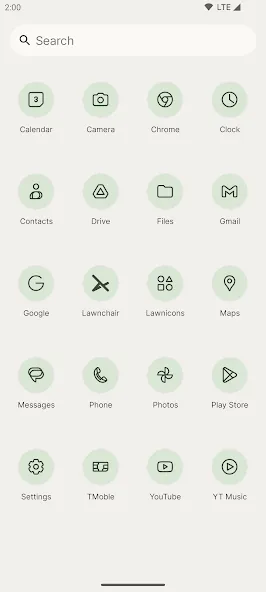
Customization extends beyond cosmetics. The desktop, dock, and app drawer are flexible, and Drawer Categories can organize apps with tabs and folders. Automatic Dark Mode, notification dots, contextual At a Glance information, and gesture support fill out a thoughtful set of everyday tools without burying the Pixel design under excessive decoration.
Features:
Customizable Pixel Launcher
Lawnchair has a design similar to the Pixel Launcher, with added customizability.
Latest Android features
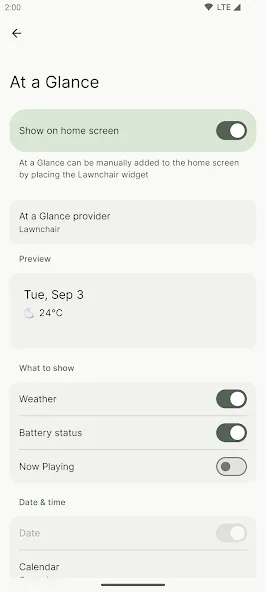
Lawnchair has the latest Android features, like Material You and the new At a Glance widget.
QuickSwitch support
Lawnchair has support for QuickSwitch, a Magisk module that adds Recents customization.
Tips for Users:
Material You Theming: Adapts to your wallpaper and system theme.
At a Glance Widget: Displays information at a glance with support for Smartspacer.
QuickSwitch Support: Integrates with Android Recents on Android 10 and newer. (requires root)
Global Search: Allows quick access to apps, contacts, and web results from the home screen.
Customization Options: Provides options to tweak icons, fonts, and colors to your liking.
Pros & Cons:
Pros
Faithfully recreates the Pixel home-screen layout
Detailed control over icons, search, gestures, dock, and app drawer
Drawer tabs and folders improve app organization
Optional permissions are tied to specific gesture features
Cons
Some integrations require separate components
Limited page rearrangement and notification-dot color controls
Conclusion:
All in all, if you want to see what Android 8.0 would look like on your phone, start downloading this app right away bearing in mind what we mentioned earlier: it's an application that's still under development and it might not work as well as we would like it to.
More Information
- Size:13.55MB
- Version:15.Beta3
- Requirements:Android 8.0+
- Package Name:app.lawnchair.play
- Signature:c66d652e060aebf2dad837fdc5560acb
Related topics
-
Transform your mobile device into a powerhouse of efficiency with these handpicked essential tools. Whether you need professional-grade photo editing, seamless file organization, smart task management, or real-time weather updates, our curated selection of premium apps delivers unbeatable performance. Streamline your daily routine, automate repetitive tasks, and boost your productivity with intuitive interfaces and powerful features. Designed for both professionals and casual users, these editor-approved applications will revolutionize how you work and play. Don't settle for an ordinary phone - upgrade your digital experience today and unlock your device's full potential!
-
![Yoosee]()
Yoosee
-
![WiFi Direct +]()
WiFi Direct +
-
![Whiteboard]()
Whiteboard
-
![Lawnchair Launcher]()
Lawnchair Launcher
-
![Flashify APK]()
Flashify APK
-
![Google Allo]()
Google Allo
-
-
With the development of mobile hardware and software, many practical tool software have emerged, covering a wide range of aspects and becoming a good helper for everyone in work and life. Today, the editor provides you with a list of useful tool software downloads. These tools are not particularly complex types, and after reading them, everyone can quickly learn how to use them. Proper use can bring great convenience to life and work.
-
![Vaulty]()
Vaulty
-
![Whiteboard]()
Whiteboard
-
![Lawnchair Launcher]()
Lawnchair Launcher
-
![Flashify APK]()
Flashify APK
-
![Google Allo]()
Google Allo
-
![Edge Screen]()
Edge Screen
-







Latest Updated




Popular Apps








Popular News
More+-
![Tomie Wants to Get Married Full Walkthrough, All Choices and Ending Guide]()
Tomie Wants to Get Married Full Walkthrough, All Choices and Ending Guide
2026-05-22
-
![Karryn’s Prison Gameplay Walkthrough & Strategy Guide]()
Karryn’s Prison Gameplay Walkthrough & Strategy Guide
2025-10-28
-
![Life in Santa County Game Guide & Complete Walkthrough]()
Life in Santa County Game Guide & Complete Walkthrough
2025-10-28
-
![Dreams of Desire Complete Walkthrough and Game Guide]()
Dreams of Desire Complete Walkthrough and Game Guide
2025-10-28
-
![Era Hunter Gameplay Guide & Full Walkthrough]()
Era Hunter Gameplay Guide & Full Walkthrough
2025-10-28




