

LightBlue
Download for Android This app is available for Android only.- Category:Tools
- Rating:
- Language:English
- Updated:2026-11-26
Screenshots
Introduction
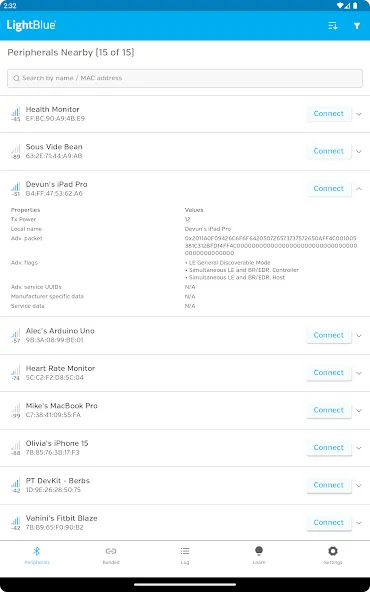
LightBlue is a scanning and maintenance tool designed for Bluetooth devices. It can precisely detect nearby Bluetooth devices and sort them by signal strength; users can simply tap to connect, then view detailed information and characteristics of each device. The app automatically keeps a record of previously connected devices and offers customizable settings, allowing users to tailor its functionality to their specific needs. Beyond being available on Apple tablets and smartphones, LightBlue features an active community where users can download, test, and modify the app’s code—empowering them to unleash their creativity and develop entirely new features.
Features of LightBlue:
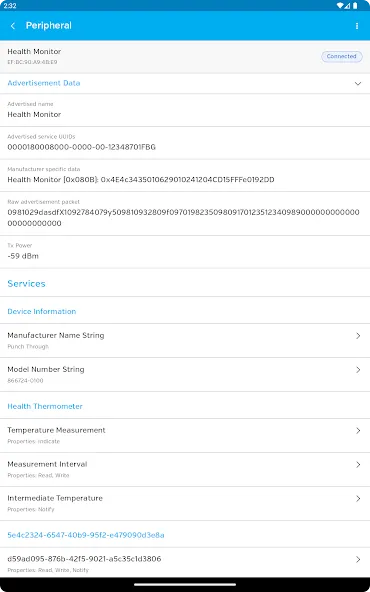
Quick Scanning & Device Discovery: See all nearby BLE devices with a couple of taps. Scanning’s fast, and you get an instant list with names, MAC addresses, and real-time signal strength (RSSI)—which is super useful if you’re, say, hunting for your lost fitness band in the couch cushions.
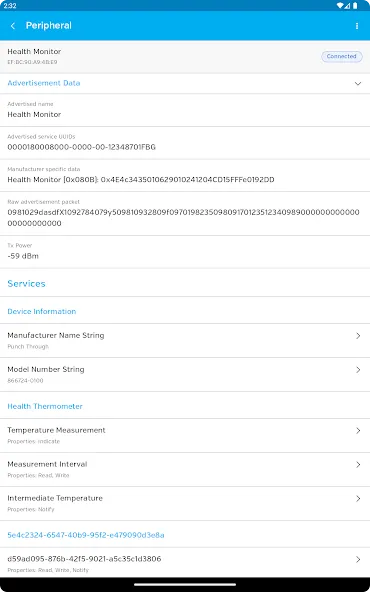
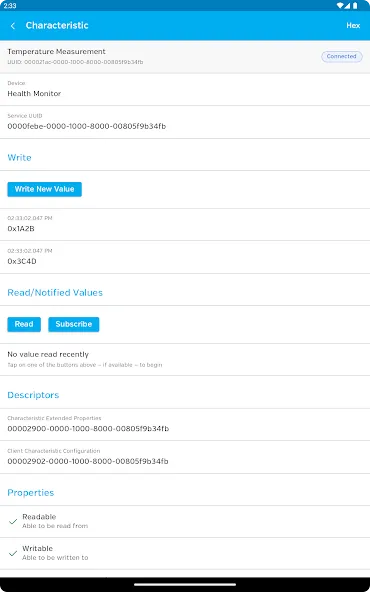
Deep Dive into Device Info: Curious about what your BLE gadget can actually do? Browse all its services and characteristics without needing to be a programming whiz. You can read data from characteristics, write to them in either hex or UTF-8 string format, and enable notifications so you don’t miss any updates from your connected device.
Testing & Prototyping Made Simple: If you’re a developer working on new BLE gadgets, LightBlue is a solid way to test heart rate monitors, keyfobs, sensors, or custom peripherals. Read, write, and notify support are all built-in for seamless firmware development or troubleshooting.
Respect for Your Privacy: The app only asks for location access when it’s absolutely needed by Android to run BLE scans, and that’s it. No tracking your whereabouts, just getting the technical job done.
Functions of LightBlue:
LightBlue also enables users to browse the characteristics and services of connected BLE devices. This feature allows users to dive deeper into the device functionalities and understand the types of data that can be accessed or manipulated. The capability to view characteristics is essential for developers who are testing and debugging their firmware, as it provides visibility into the communication between the app and the device.
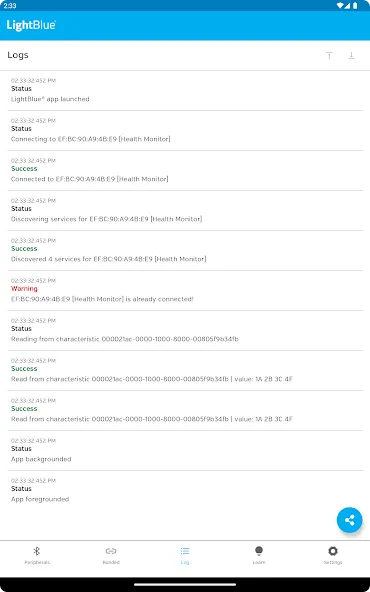
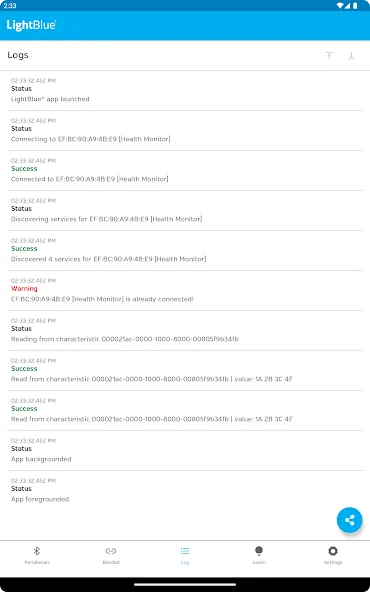
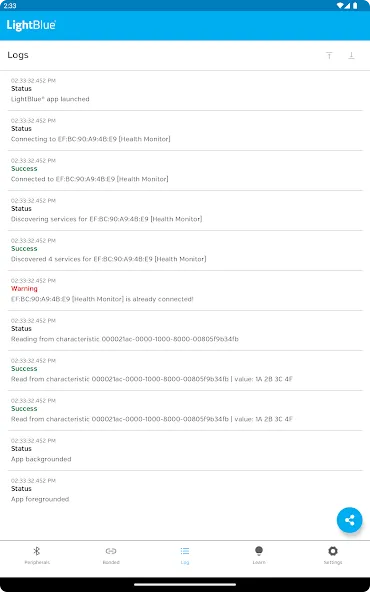
LightBlue features a logging function that tracks significant BLE events. Users can keep a record of events such as device discovery, connections, reading, and writing, which can be beneficial for troubleshooting or development purposes. The log feature allows users to share this information in a plain text format, facilitating collaboration and communication among developers and users engaged in firmware testing.
The app also requires location access on Android devices running version 6.0 (Marshmallow) and above. This requirement is part of the Android SDK and is necessary for the operating system to present BLE scan results to the app. It is important to note that LightBlue does not utilize any location data for purposes outside of BLE scanning.
For users interested in developing or testing BLE devices, LightBlue serves as a valuable tool. The app's comprehensive set of features supports various testing scenarios, making it easier to assess device performance and functionality. With its straightforward interface and essential capabilities, users can enhance their understanding of BLE technology and improve their overall experience with their devices.
User Reviews of LightBlue:
This was the only app that could detect my wife's QALO smart ring. We used the built-in decibel meter to walk around the house until the signal got stronger. It led us to the bathroom, and within a minute we found the ring on the ground between the counter and toilet. Hands down, this was the best free app we tried. I almost never write reviews, but this app absolutely earned one. Highly recommended.
A very nice tool to use when you're having problems with Bluetooth. The makers of an OBD2 bluetooth device suggested that I use it to debug my issue. It's spot on and fantastic!
Found my fitbit! Didn't work on my phone but worked on my partners. Clicked on my fitbit on the app, then on the dial which opens some more options then found it through the Distance feature. Ended up being outside in a bin bag!!!! Tried many apps and this was the only one that worked and didnt cost money.
I had lost a small Bluetooth step counter in my home. I searched the play store and found several apps claiming to be able to locate Bluetooth devices but they were worthless. Finally I found this app. It took about 10 minutes walking in the house to find the step counter. Kudos to the developer of this gem. Thanks!
Found my ear buds! I tried using the Galaxy Wear App to locate one of my two ear buds but the App would not make the bud chirp to sound off. A Reddit user recommended using the LightBlue app to triangulate the Bluetooth power of the bud by walking around my home and looking at the LightBlue app for signal loss or gain. I highly recommend this app.
FAQs of LightBlue:
What are virtual devices in LightBlue?
Virtual devices in LightBlue are simulated BLE devices that allow developers to test and debug their applications without needing physical hardware. These virtual devices can mimic the behavior of actual BLE devices, providing a flexible testing environment.
How can I export log data in LightBlue?
In LightBlue, you can export log data by navigating to the “Log” tab and selecting the save button in the lower right hand corner on Android and the upper right hand corner on iOS.
What platforms is LightBlue available on?
LightBlue is available on iOS, macOS, and Android platforms. You can download it from the App Store for iOS and macOS devices and the Google Play Store for Android devices.
How often is LightBlue updated?
LightBlue is regularly updated to ensure compatibility with the latest BLE standards and to introduce new features. Updates typically include performance enhancements and bug fixes.
How do I filter devices when scanning in LightBlue?
While scanning, tap the filter icon (a funnel) in the top right corner of the app. You can filter by RSSI (Received Signal Strength Indicator) and set a minimum RSSI. This helps you focus on the devices that are closest to you, especially in crowded BLE environments.
Can LightBlue interact with non-BLE Bluetooth devices?
No, LightBlue is specifically designed for Bluetooth Low Energy (BLE) devices. It does not support non-BLE Bluetooth devices, and you would need a different application for non-BLE Bluetooth interactions.
Conclusion:
LightBlue is equipped with essential functionalities such as read, write, and notify support. Additionally, it provides real-time signal strength (RSSI) information, aiding in determining the proximity of the peripheral.The app includes a log tab that records all significant BLE events encountered during usage. This comprehensive log can be easily shared for further analysis.
More Information
- Size:14.12MB
- Version:2.14.0
- Requirements:Android
- Package Name:com.punchthrough.lightblueexplorer
- Signature:feaa4a8cbfa50c2ce4b8a779b71924eb
Related topics
-
Welcome to our collection of game customization tools! These apps help you personalize your gameplay. You can access premium content, enjoy more in-game resources, or opt for an ad-free experience. Apps like Game Guardian and Lucky Patcher allow you to adjust game parameters. Just a heads-up, it's good to be mindful of the game's original terms of service. Feel free to explore and elevate your play, but always use them responsibly.
-
![Among Pink MOD]()
Among Pink MOD
-
![Dododex]()
Dododex
-
![Brasil Roleplay]()
Brasil Roleplay
-
![Lemuroid]()
Lemuroid
-
![EmuReady Beta]()
EmuReady Beta
-
![JJSploit]()
JJSploit
-
![LightBlue]()
LightBlue
-
![Brawlify for Brawl Stars]()
Brawlify for Brawl Stars
-
-
Discover our File Management Apps hub! Here, you can explore essential tools like Google Drive for cloud storage, Dropbox for simple file sharing, and File Commander for managing files directly on your device. Easily organize and access your files across your phone, or tablet. Our platform is designed to help you quickly find reliable apps to streamline your digital file management.
-
![File Manager by Xiaomi]()
File Manager by Xiaomi
-
![JioSwitch]()
JioSwitch
-
![WT Hub]()
WT Hub
-
![Installation Tools]()
Installation Tools
-
![Virtual Android]()
Virtual Android
-
![Quick Share]()
Quick Share
-
![Yt5s All Media Video]()
Yt5s All Media Video
-
![LightBlue]()
LightBlue
-











Latest Updated




Popular Apps








Popular News
More+-
![Tomie Wants to Get Married Full Walkthrough, All Choices and Ending Guide]()
Tomie Wants to Get Married Full Walkthrough, All Choices and Ending Guide
2026-05-22
-
![Karryn’s Prison Gameplay Walkthrough & Strategy Guide]()
Karryn’s Prison Gameplay Walkthrough & Strategy Guide
2025-10-28
-
![Life in Santa County Game Guide & Complete Walkthrough]()
Life in Santa County Game Guide & Complete Walkthrough
2025-10-28
-
![Dreams of Desire Complete Walkthrough and Game Guide]()
Dreams of Desire Complete Walkthrough and Game Guide
2025-10-28
-
![Era Hunter Gameplay Guide & Full Walkthrough]()
Era Hunter Gameplay Guide & Full Walkthrough
2025-10-28




