

Quick Share
Download for Android This app is available for Android only.- Category:Tools
- Rating:
- Language:English
- Updated:2026-11-19
Screenshots
Introduction
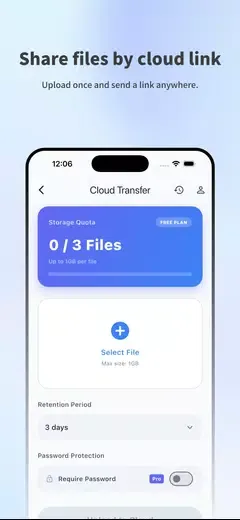
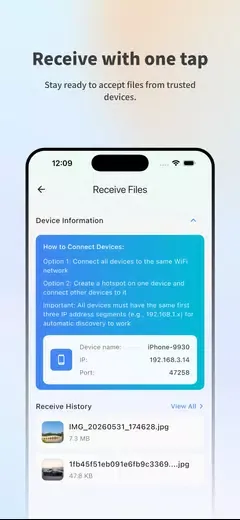
Quick Share is a convenient file-transfer tool. This application offers powerful features and is designed based on a local network, allowing users to transfer photos, videos, documents, and applications between different devices without consuming mobile data or using cloud storage. With Quick Share, users can establish a secure and efficient connection between devices via Wi-Fi Direct or a local hotspot. You can also monitor the progress of transfers in real time, and once a transfer is complete, you can access the received files through your device's file manager.
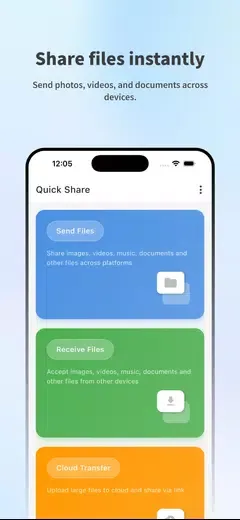
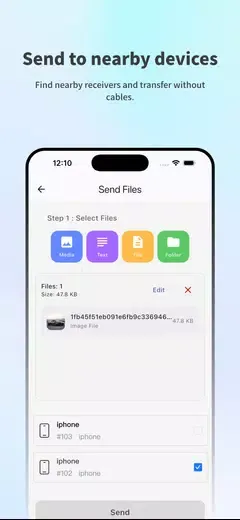
Simple Steps to Send:
1. Connect both devices to the same network.
2. Select your share videos, share apps, or transfer photos.
3. Choose the receiver and send it.
4. Success! Your quick share is complete.
Features:
Smart Transfer Technology: Enjoy lightning-fast speeds and seamless connectivity thanks to advanced tech.
Secure File Transfer: Keep your sensitive documents and personal media safe with our secure system.
Versatile File Support: Transfer any file type you can think of—documents, videos, photos, the lot!
Easy-to-Use Interface: Navigate with ease; a few taps is all it takes to share your files.
All-in-One Solution: Share apps, transfer data, and manage everything in one convenient spot.
Intuitive File Management: Organize your files effortlessly, ensuring everything’s where it should be.
Pros & Cons:
Pros
Eliminates the need for USB cables and clumsy setup, speeding up the sharing process.
Fast, on-demand transfers that are ideal for students, professionals, and casual sharing situations.
File Transfer works across platforms by using a browser token, so you don't need to install software on every computer.
Handles both large and small files with a straightforward workflow and minimal steps.
Cons
Requires a companion web page or other device to display the token before transfers can begin.
Transfer speed and reliability depend on the current network or device connection, so very large files can take time.
Final Words:
The app offers advanced features such as media casting, offline Wi-Fi sharing, and on-the-go document editing, making it a versatile tool for organizing, accessing, and transferring files. Whether you're a beginner or an advanced user, Quick Share provides a user-friendly interface with support for multiple languages and root access. Download Quick Share now to experience hassle-free file management on your Android device.
More Information
- Size:45.45MB
- Version:1.0.0.28
- Requirements:Android 10.0+
- Package Name:com.dong.quickshare
- Signature:b500df7d0902bddb4ae2b6d40705e17c
Related Versions
-
 Download
Version:1.0.1Size:4.66MB
Related topics
-
Discover our File Management Apps hub! Here, you can explore essential tools like Google Drive for cloud storage, Dropbox for simple file sharing, and File Commander for managing files directly on your device. Easily organize and access your files across your phone, or tablet. Our platform is designed to help you quickly find reliable apps to streamline your digital file management.
-
![Quick Share]()
Quick Share
-
![Yt5s All Media Video]()
Yt5s All Media Video
-
![MagTapp]()
MagTapp
-
![FEB]()
FEB
-
![File Cleaner–Booster&Cleanup]()
File Cleaner–Booster&Cleanup
-
![KeepSafe]()
KeepSafe
-
![Video & Music Downloader]()
Video & Music Downloader
-
![Filelinked]()
Filelinked
-
-
File Manager offers both graphical and command-line interfaces, allowing users to efficiently organize and control files and directories on their phone. With a file manager, users can perform a wide range of tasks, including creating, renaming, moving, copying, and deleting files and folders. Additionally, it enables users to view file properties, access content, and modify file permissions as needed. Advanced features may also include cloud storage integration, file compression, and secure encryption, enhancing file accessibility and management on mobile devices.
-
![Quick Share]()
Quick Share
-
![XShare- Transfer & Share files]()
XShare- Transfer & Share files
-
![UserUpload]()
UserUpload
-
![ES File Explorer]()
ES File Explorer
-
![Files by Google]()
Files by Google
-
![ES File Explorer File Manager]()
ES File Explorer File Manager
-
![PaperKnife]()
PaperKnife
-
![Espacio]()
Espacio
-










Latest Updated








Popular Apps








Popular News
More+-
![Tomie Wants to Get Married Full Walkthrough, All Choices and Ending Guide]()
Tomie Wants to Get Married Full Walkthrough, All Choices and Ending Guide
2026-05-22
-
![Karryn’s Prison Gameplay Walkthrough & Strategy Guide]()
Karryn’s Prison Gameplay Walkthrough & Strategy Guide
2025-10-28
-
![Life in Santa County Game Guide & Complete Walkthrough]()
Life in Santa County Game Guide & Complete Walkthrough
2025-10-28
-
![Dreams of Desire Complete Walkthrough and Game Guide]()
Dreams of Desire Complete Walkthrough and Game Guide
2025-10-28
-
![Era Hunter Gameplay Guide & Full Walkthrough]()
Era Hunter Gameplay Guide & Full Walkthrough
2025-10-28




