
Screen Dimmer
Download for Android This app is available for Android only.- Category:Tools
- Rating:
- Language:English
- Updated:2026-11-20
Screenshots
Introduction
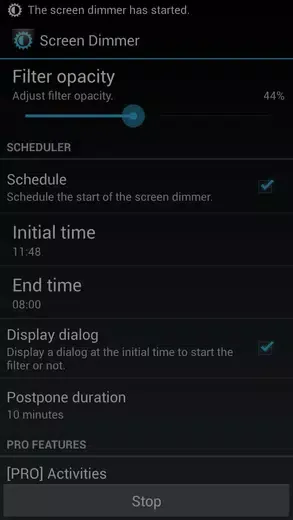
Screen Dimmer is a screen utility designed specifically for Android users. This app offers powerful features, allowing users to set color filters for the screen and freely adjust its opacity and brightness, aiming to solve the problem of eye fatigue when using mobile phones in dark environments. With Screen Dimmer, you can customize and dim your entire screen to suit your personal preferences. Whether you're browsing your phone late at night or using your device in a dimly lit room, it can protect your eyesight.
Highlights:
Those interested in sleep health will find the filter's color can be modified to red or brown to minimize blue light exposure, which is linked to sleep disturbances, though this feature is available exclusively in the pro version.
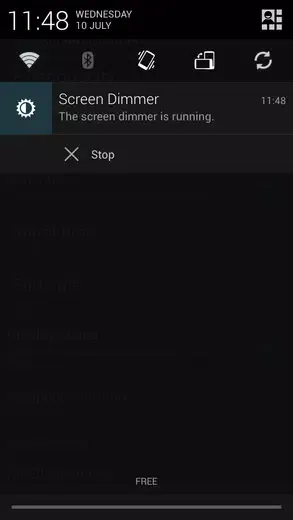
The design is user-friendly and offers an accessible notification system. Users can effortlessly stop the app or adjust filter opacity directly from the notification bar.
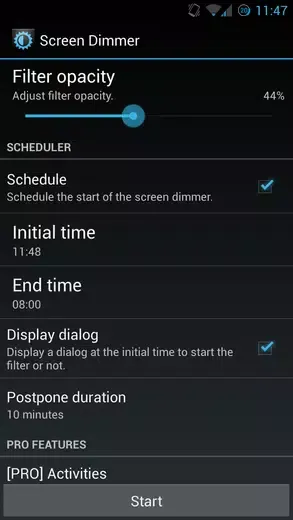
Key features include adjustable opacity levels, a simple toggle notification for the active status, customizable scheduling options, and the ability to reduce screen brightness to a minimum. The application also allows for disabling button backlights and includes convenient widgets for quick access and opacity control.
Pro users receive additional functions such as altering the filter and widget colors, automatic toggling according to sunrise and sunset timing, selecting specific apps to launch with the app, activating silent mode upon starting, and enabling smooth opacity transitions.
Users' experience is further enhanced by the option to support development and unlock pro features through an in-app purchase of the pro version.
Features:
Customizable Brightness
Tune your screen to the perfect brightness for your eyes. Whether it’s day or night, you can always set things just right.
RGB Overlay Control
Adjust colors with a custom RGB overlay—handy if you prefer a warmer or cooler hue, or want to cut down on blue light.
Quick Adjustments
No more digging through endless menus. Just open Dim Screen, tweak the slider, and you’re good to go.
Works Everywhere
Want the same screen dimming on your computer or laptop? You can use Dim Screen seamlessly with BlueStacks, too—so you’re not stuck with only your phone.
Lightweight and Easy
The app is small, so it doesn’t hog memory or slow things down. Change your screen’s brightness in a snap, whenever you need.
FAQs:
How does Screen Dimmer differ from other brightness adjustment apps?
Screen Dimmer stands out by offering both display and notification overlay dimming, giving users a more thorough solution.
Can Screen Dimmer affect the performance of my device?
While the app may cause slight lag when active, it is designed to prioritize your eye health and comfort while using your device.
Why is scheduling important in a screen dimming app?
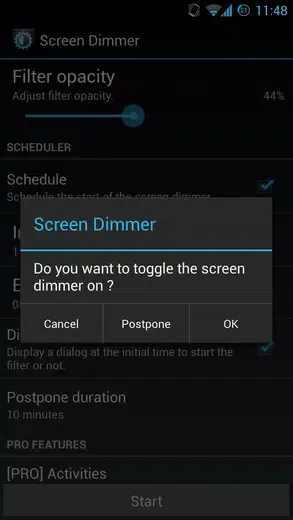
Scheduling allows users to automate the brightness adjustment process, ensuring a seamless transition between different lighting conditions.
Changelog:
v2.3.3a
Hotfix concernig pro users (thanks for reporting errors).
v2.3.3
Various fixes.
Added opacity transition [PRO].
Swipe has been updated too, check it out!
v2.3.2
Added Tasker support.
You can now toggle the Silent Mode in the donator version.
Conclusion:
It is important to note certain limitations, such as potential conflicts when manually installing apps or granting root access with SuperSu, and difficulties disabling key backlights on several Samsung devices. Tasker users will appreciate the included support for extended customization and automation possibilities. Importantly, Screen Dimmer is an application that continues to address user needs with ongoing updates and new features.
More Information
- Size:315.79KB
- Version:2.3.3a
- Requirements:Android 2.1+
- Package Name:com.sebmorand.brightcom
- Signature:d430c686856be32405d44384d378726e
Related topics
-
Utility apps are indispensable in our lives, making our daily routines more convenient. To help you find these apps more easily, this site has created a collection. This collection brings together a series of practical tools covering various aspects of life, work, and education, meeting all your needs. What are you waiting for? Try these apps now and make your life easier!
-
![RPCSX Emulator]()
RPCSX Emulator
-
![Trace Sketch & Draw On Paper]()
Trace Sketch & Draw On Paper
-
![EX File Manager]()
EX File Manager
-
![Opensignal]()
Opensignal
-
![Apreço]()
Apreço
-
![Phone Doctor Plus]()
Phone Doctor Plus
-
![Screen Dimmer]()
Screen Dimmer
-
![LokOS app]()
LokOS app
-
-
Transform your mobile device into a powerhouse of efficiency with these handpicked essential tools. Whether you need professional-grade photo editing, seamless file organization, smart task management, or real-time weather updates, our curated selection of premium apps delivers unbeatable performance. Streamline your daily routine, automate repetitive tasks, and boost your productivity with intuitive interfaces and powerful features. Designed for both professionals and casual users, these editor-approved applications will revolutionize how you work and play. Don't settle for an ordinary phone - upgrade your digital experience today and unlock your device's full potential!
-
![Trace Sketch & Draw On Paper]()
Trace Sketch & Draw On Paper
-
![Opensignal]()
Opensignal
-
![Epson iPrint]()
Epson iPrint
-
![Apreço]()
Apreço
-
![Phone Doctor Plus]()
Phone Doctor Plus
-
![Screen Dimmer]()
Screen Dimmer
-
![Seal Downloader]()
Seal Downloader
-
![Safe Gallery]()
Safe Gallery
-







Latest Updated





Popular Apps








Popular News
More+-
![Tomie Wants to Get Married Full Walkthrough, All Choices and Ending Guide]()
Tomie Wants to Get Married Full Walkthrough, All Choices and Ending Guide
2026-05-22
-
![Karryn’s Prison Gameplay Walkthrough & Strategy Guide]()
Karryn’s Prison Gameplay Walkthrough & Strategy Guide
2025-10-28
-
![Life in Santa County Game Guide & Complete Walkthrough]()
Life in Santa County Game Guide & Complete Walkthrough
2025-10-28
-
![Dreams of Desire Complete Walkthrough and Game Guide]()
Dreams of Desire Complete Walkthrough and Game Guide
2025-10-28
-
![Era Hunter Gameplay Guide & Full Walkthrough]()
Era Hunter Gameplay Guide & Full Walkthrough
2025-10-28




