

Wipro Next Smart Home
Download for Android This app is available for Android only.- Category:Tools
- Rating:
- Language:English
- Updated:2026-11-21
Screenshots
Introduction
Wipro Next Smart Home is a management tool designed for Android systems. It allows users to control household appliances directly from their smartphones with just a simple tap. The app also features integrated voice control, enabling users to manage devices remotely using voice commands. Users can control their home appliances at any time, and the app includes a sharing function that allows others to be granted access permissions. Additionally, the app provides status notifications and monitors your connected devices. It also supports network-based connectivity for quick device pairing. The user-friendly interface ensures that managing your devices is effortless.
Features
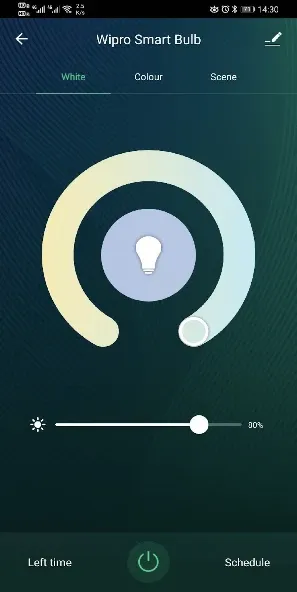
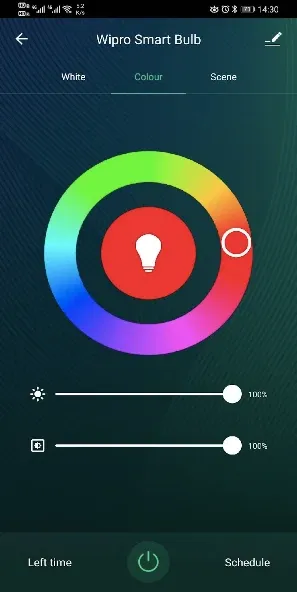
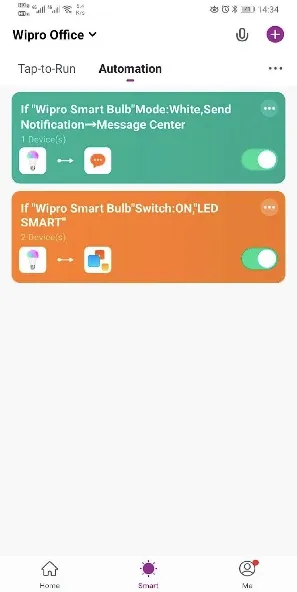
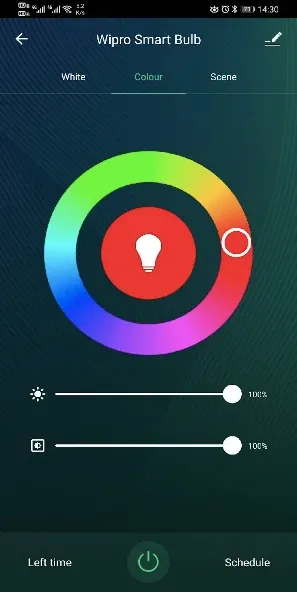
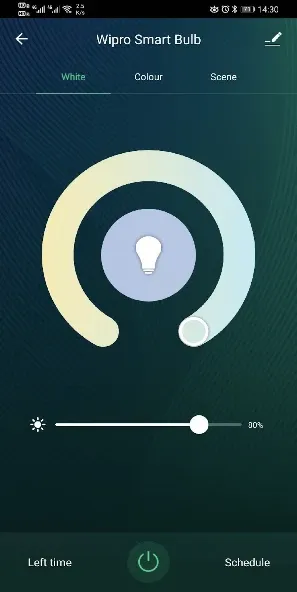
Mobile Control: Manage your home lighting system directly from your phone—control your devices with a single tap.
Voice Integration: Have an Amazon Echo or Google Home? Use voice commands for hands-free control.
Remote Access: Control your smart devices from anywhere, whether you’re at the office or on vacation.
Easy Sharing: Grant other app users permission to manage your devices through a simple sharing feature.
Real-time Updates: Stay informed with instant notifications and monitor your devices in real time.
Quick Connectivity: Enjoy seamless interaction thanks to robust network connectivity.
Pros and Cons
Pros:
Offers a wide range of smart home automation features, such as lighting control, thermostat management, security camera integration, and more.
Features an intuitive user interface that is easy to navigate and customize.
Supports integration with major smart home platforms and services, including Alexa, Google Assistant, and IFTTT.
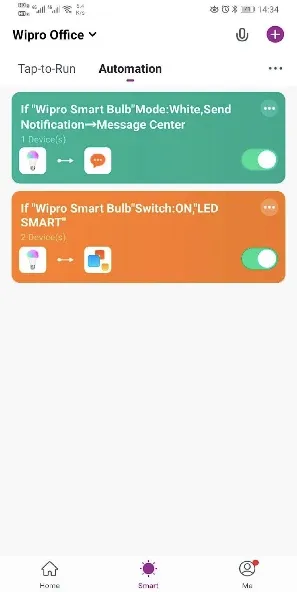
Provides advanced scheduling and automation options to optimize energy efficiency and convenience.
Allows users to control their smart home devices remotely via a mobile app or web portal.
Cons:
May experience compatibility issues with certain smart home devices or platforms.
The initial setup and configuration process might be complex for less tech-savvy users.
FAQs
How long does it take to download Wipro Next Smart Home?
Wipro Next Smart Home is 105.2 MB in size. Depending on your network speed, the download could take anywhere from a few seconds to a few minutes over a stable 4G, 5G, or Wi-Fi connection.
Why am I unable to download or install the app?
Common reasons include insufficient storage space, an incompatible Android version, an unstable network connection, a corrupted download file, or a lack of installation permissions.
What are the system requirements for Wipro Next Smart Home?
The latest version of Wipro Next Smart Home requires Android 6.0 or higher. If your device is running an older version of Android, please check whether a compatible, earlier version of the app is available.
Conclusion
With the Wipro Next Smart Home app, you can remotely control your smart devices anytime, anywhere. This means you can easily turn off lights, adjust settings, or manage other devices—even when you are not physically present.
More Information
- Size:105.19MB
- Version:3.42.5
- Requirements:Android
- Package Name:wipro.com
- Signature:714f8b95871853352b9977e5ccd2aca9
Related topics
-
Utility apps are indispensable in our lives, making our daily routines more convenient. To help you find these apps more easily, this site has created a collection. This collection brings together a series of practical tools covering various aspects of life, work, and education, meeting all your needs. What are you waiting for? Try these apps now and make your life easier!
-
![Easy Share]()
Easy Share
-
![Wipro Next Smart Home]()
Wipro Next Smart Home
-
![Da Fit]()
Da Fit
-
![PS2 Emulator DamonPS2 PPSSPP]()
PS2 Emulator DamonPS2 PPSSPP
-
![Rips by Triumph]()
Rips by Triumph
-
![RPCSX Emulator]()
RPCSX Emulator
-
![Trace Sketch & Draw On Paper]()
Trace Sketch & Draw On Paper
-
-
Transform your mobile device into a powerhouse of efficiency with these handpicked essential tools. Whether you need professional-grade photo editing, seamless file organization, smart task management, or real-time weather updates, our curated selection of premium apps delivers unbeatable performance. Streamline your daily routine, automate repetitive tasks, and boost your productivity with intuitive interfaces and powerful features. Designed for both professionals and casual users, these editor-approved applications will revolutionize how you work and play. Don't settle for an ordinary phone - upgrade your digital experience today and unlock your device's full potential!
-
![Wipro Next Smart Home]()
Wipro Next Smart Home
-
![Da Fit]()
Da Fit
-
![GameCC]()
GameCC
-
![Rips by Triumph]()
Rips by Triumph
-
![JJSploit]()
JJSploit
-
![Trace Sketch & Draw On Paper]()
Trace Sketch & Draw On Paper
-
-
With the development of mobile hardware and software, many practical tool software have emerged, covering a wide range of aspects and becoming a good helper for everyone in work and life. Today, the editor provides you with a list of useful tool software downloads. These tools are not particularly complex types, and after reading them, everyone can quickly learn how to use them. Proper use can bring great convenience to life and work.
-
![Easy Share]()
Easy Share
-
![Wipro Next Smart Home]()
Wipro Next Smart Home
-
![Da Fit]()
Da Fit
-
![GameCC]()
GameCC
-
![PS2 Emulator DamonPS2 PPSSPP]()
PS2 Emulator DamonPS2 PPSSPP
-
![Rips by Triumph]()
Rips by Triumph
-
![RPCSX Emulator]()
RPCSX Emulator
-







Latest Updated




Popular Apps








Popular News
More+-
![Tomie Wants to Get Married Full Walkthrough, All Choices and Ending Guide]()
Tomie Wants to Get Married Full Walkthrough, All Choices and Ending Guide
2026-05-22
-
![Karryn’s Prison Gameplay Walkthrough & Strategy Guide]()
Karryn’s Prison Gameplay Walkthrough & Strategy Guide
2025-10-28
-
![Life in Santa County Game Guide & Complete Walkthrough]()
Life in Santa County Game Guide & Complete Walkthrough
2025-10-28
-
![Dreams of Desire Complete Walkthrough and Game Guide]()
Dreams of Desire Complete Walkthrough and Game Guide
2025-10-28
-
![Era Hunter Gameplay Guide & Full Walkthrough]()
Era Hunter Gameplay Guide & Full Walkthrough
2025-10-28




